Study Guides
Edexcel IGCSE Accounting: Technology in accounting and professional ethics (4AC1)
Study guide to Edexcel IGCSE Accounting 4AC1 sections 1.3 and 1.4: software, spreadsheets, data security, professional ethics and public interest.
- Subject
- Accounting
- Level
- IGCSE
- Topic
- The accounting environment
- Author
- Marlbridge Academic Team
- Updated
- Reviewed by
- Javaid Iqbal Sabri (what this means)
Aligned to Pearson Edexcel IGCSE Accounting (4AC1), Issue 1, October 2016. Official specification .
Syllabus page (what it covers and how it is assessed): Pearson Edexcel IGCSE Accounting.
Syllabus points this page covers
4AC1
- 1 The accounting environment (whole topic)
- 1.3 Use of technology in accounting
- 1.4 Professional ethics
Found an error? Report a correction.
Want a teacher for this? Marlbridge teaches Accounting online. Request a free trial class.
This guide covers sections 1.3 Use of technology in accounting and 1.4 Professional ethics of Topic 1, The accounting environment, in the Pearson Edexcel International GCSE in Accounting (4AC1) specification, Issue 1, October 2016. Topic 1 is one of the three topics that Paper 1 draws on exclusively. Sections 1.1 and 1.2 (types of business organisation and accounting concepts) are not covered here. All money amounts on this page are in dollars.
Links: 4AC1 Accounting course hub, printable checklist, free 10-minute diagnostics. Other pages for this unit: revision notes and practice questions.
What the specification asks you to do
| Section | What you must be able to do |
|---|---|
| 1.3 (a) | Explain the benefits of using technology within accounting: accounting software and spreadsheets |
| 1.3 (b) | Explain the issues regarding the security of data: data loss, access, confidentiality |
| 1.3 (c) | Explain the methods of protecting data: hardware and software |
| 1.4 (a) | Describe the principles of professional ethics |
| 1.4 (b) | Apply the principles of professional ethics to accounting roles and functions |
| 1.4 (c) | Explain the concept of public interest and how it is applied to accounting roles and functions |
The command words matter. “Explain” needs a point plus the reason or effect. “Describe” needs a clear account of what something is. “Apply” needs you to use a principle on a situation you are given.
1.3 (a) Benefits of accounting software
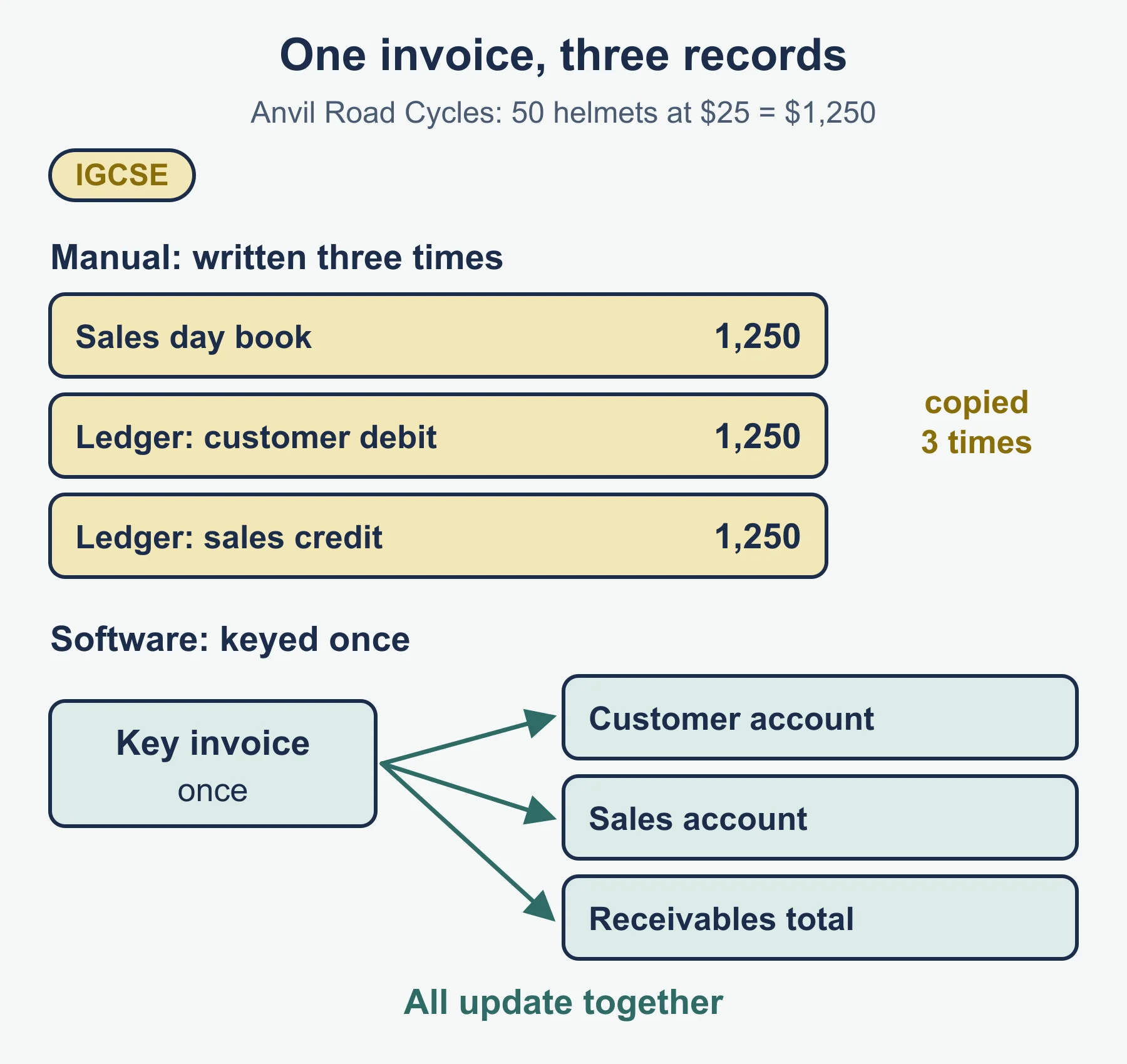
Accounting software is a program built for recording and reporting transactions. The user enters a transaction once. The program then posts it to every account and report that depends on it.
Take a sales invoice that Anvil Road Cycles raises for 50 helmets at 25 each, a total of 1,250. In a manual system the bookkeeper writes it in the sales day book, then posts the customer’s debit to the sales ledger, then posts the sales credit to the general ledger. That is three records for one event. In accounting software the invoice is keyed once, and the customer account, the sales account and the receivables total update together.
Benefits you can explain:
- Speed. Posting and totalling happen automatically, so the bookkeeper spends less time copying figures between records.
- Accuracy. The program does the arithmetic and does not copy a figure to the wrong side of an account by accident. Many programs also refuse an entry whose debits and credits differ.
- Reports on demand. A trial balance, an aged list of receivables or a statement of profit or loss can be produced at any date without re-adding the ledgers.
- Less storage space and easier searching. Records are held electronically, and a particular invoice can be found by typing a name or number.
- Up-to-date information. Managers see balances as soon as entries are made, which helps decisions about credit and cash.
A balanced answer also notes costs: the software must be bought and learned, and a wrong entry is still wrong, however fast it was posted.
1.3 (a) Benefits of spreadsheets
A spreadsheet is a grid of cells that hold numbers, text or formulas. A formula recalculates whenever the cells it refers to change. This makes spreadsheets suited to calculations and plans that the user designs, such as budgets, depreciation schedules and simple financial statements.
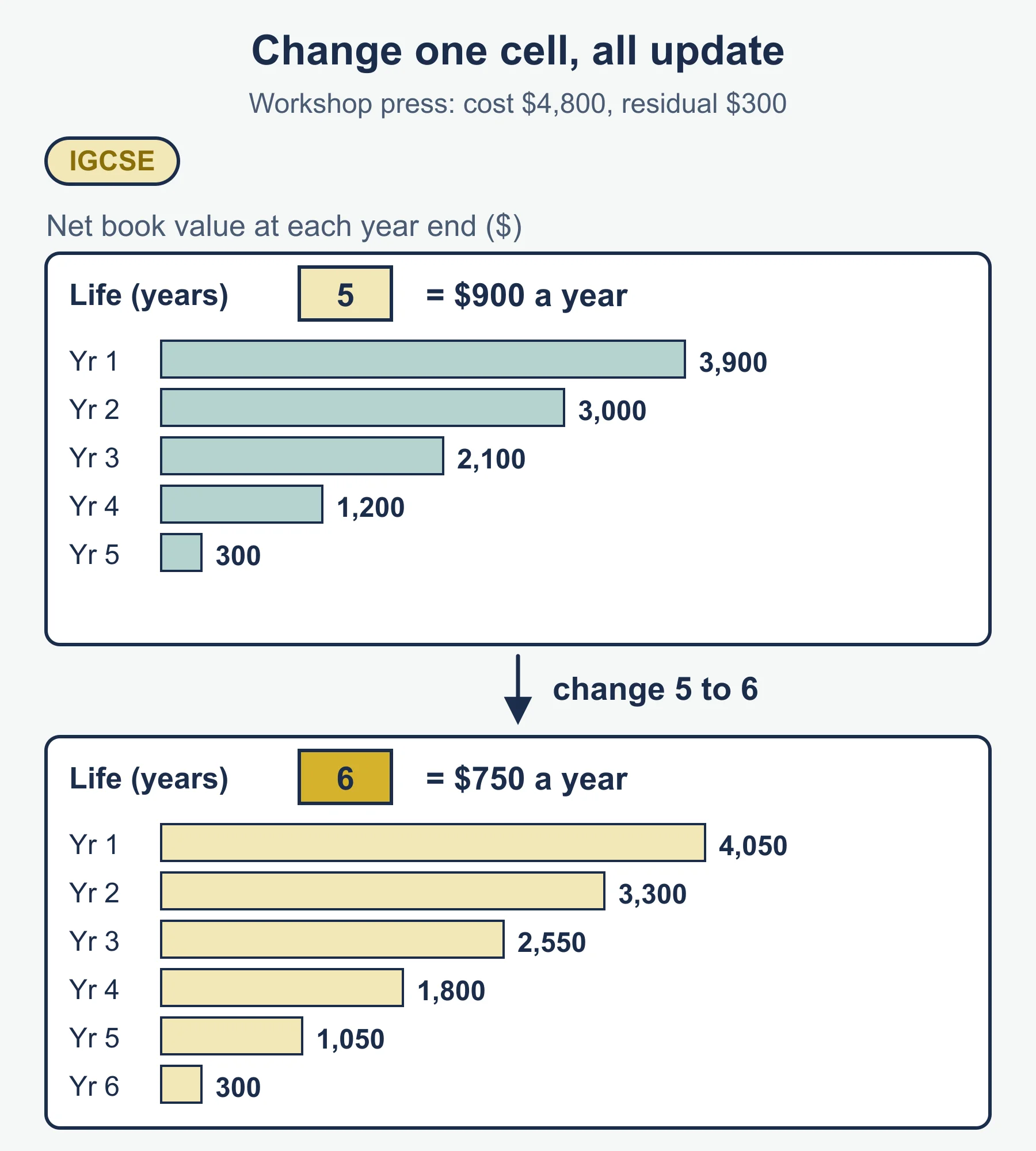
Worked example. Anvil Road Cycles buys a workshop press for 4,800. It expects the press to last 5 years and to be worth 300 at the end. Straight-line depreciation is (cost − residual value) ÷ life.
Cell layout:
| A | B | |
|---|---|---|
| 1 | Cost | 4800 |
| 2 | Residual value | 300 |
| 3 | Life (years) | 5 |
| 4 | Annual depreciation | =(B1-B2)/B3 |
The formula gives (4,800 − 300) ÷ 5 = 900. The schedule below can be filled down using formulas that subtract each year’s charge from the previous closing figure.
| Year | Depreciation (dollars) | Net book value at year end (dollars) |
|---|---|---|
| 1 | 900 | 3,900 |
| 2 | 900 | 3,000 |
| 3 | 900 | 2,100 |
| 4 | 900 | 1,200 |
| 5 | 900 | 300 |
Now suppose the owner decides the press will last 6 years. Changing B3 to 6 makes every cell update: the annual charge becomes (4,800 − 300) ÷ 6 = 750. Nothing has to be re-typed. This ability to test “what if” changes is the main benefit that sets spreadsheets apart.
Further benefits:
- Formulas such as SUM and AVERAGE total columns without manual addition.
- Templates can be saved and reused each month.
- Charts can be drawn from the data to show trends in sales or costs.
- Budgets and forecasts can be adjusted quickly when assumptions change.
Spreadsheets are flexible, but a mistyped formula or a cell overwritten by accident can give a wrong result that looks tidy. Accounting software has more built-in checks.
1.3 (b) Security of data: the issues
Accounting data is valuable. Customers owe money, bank details are held, and profit figures are private. The specification names three issues.
Data loss
Data loss means records are destroyed, damaged or become unreadable. Typical causes are hardware failure, a virus, a power cut during saving, fire or flood, theft of equipment, and a user deleting or overwriting a file by mistake. Without a copy, the business may not know who owes it money or what it owes.
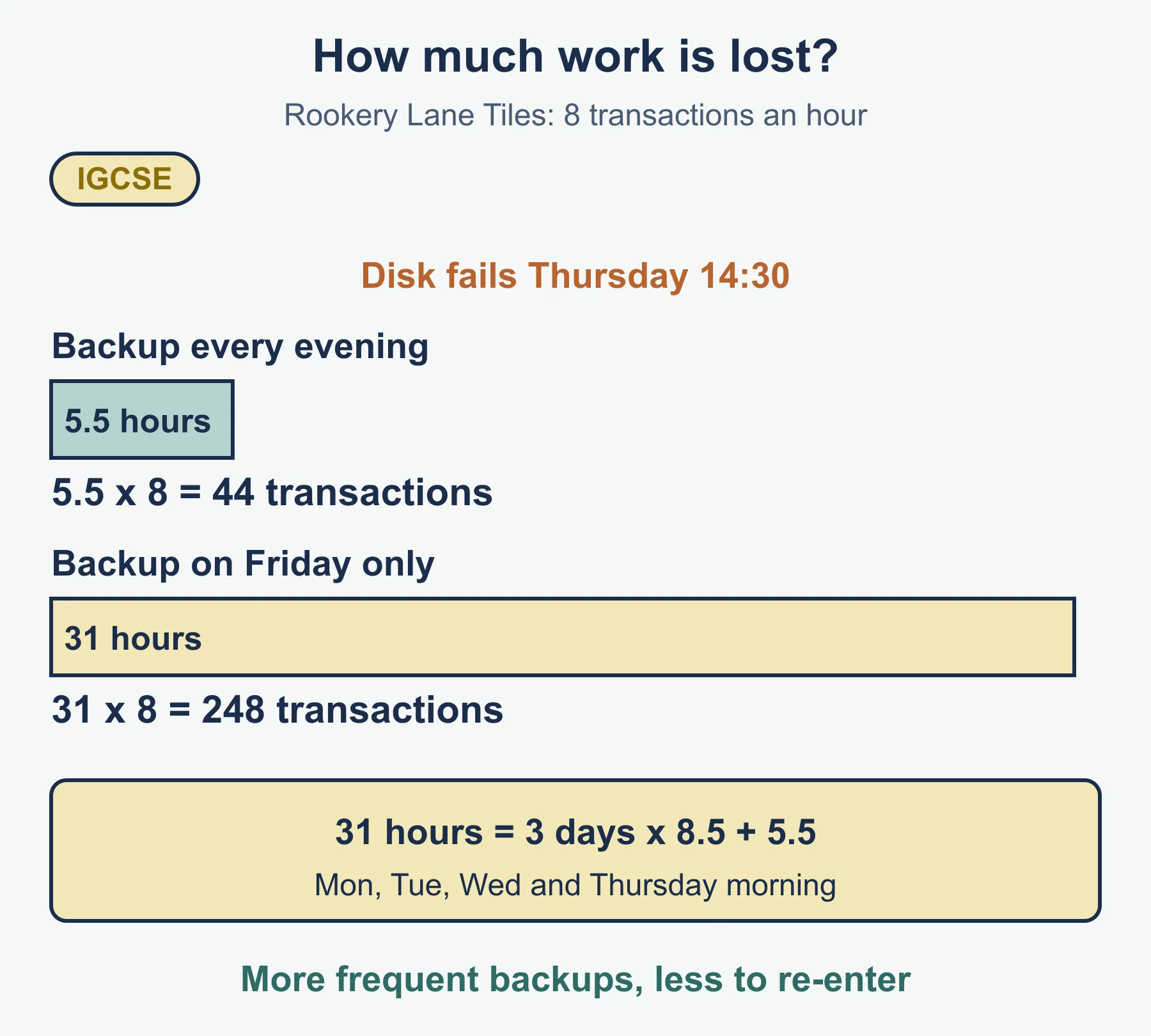
Worked example. Rookery Lane Tiles keys about 8 transactions an hour during the working day, 09:00 to 17:30 (8.5 hours). A disk fails at 14:30 on a Thursday.
- If a backup is made at the close of business every day, the last backup was Wednesday at 17:30. The business loses Thursday’s work from 09:00 to 14:30, which is 5.5 hours, so 5.5 × 8 = 44 transactions to re-enter.
- If a backup is made only on Friday evenings, the last backup was the previous Friday. Monday, Tuesday and Wednesday (3 × 8.5 = 25.5 hours) and the 5.5 hours of Thursday are lost, which is 31 hours, so 31 × 8 = 248 transactions.
More frequent backups mean less work to repeat. That is the reasoning to quote when you recommend a backup routine.
Access
The access issue is who can open, change or delete the records. If anyone can use the system, an unauthorised person may view private data, alter figures to hide fraud or delete records. Even a trusted employee should see only what the job needs. A cashier does not need to alter the payroll file.
Confidentiality
Confidentiality means information is kept private and is used only for the purpose it was given. If a customer’s credit limit, a supplier’s prices or the business’s profit leaked to a competitor, the business could lose trade. Confidentiality can fail through hacking, but also through a printout left on a desk, a screen visible to visitors or a member of staff passing on information.
1.3 (c) Methods of protecting data
The specification groups methods under hardware and software.
| Type | Method | Which issue it helps |
|---|---|---|
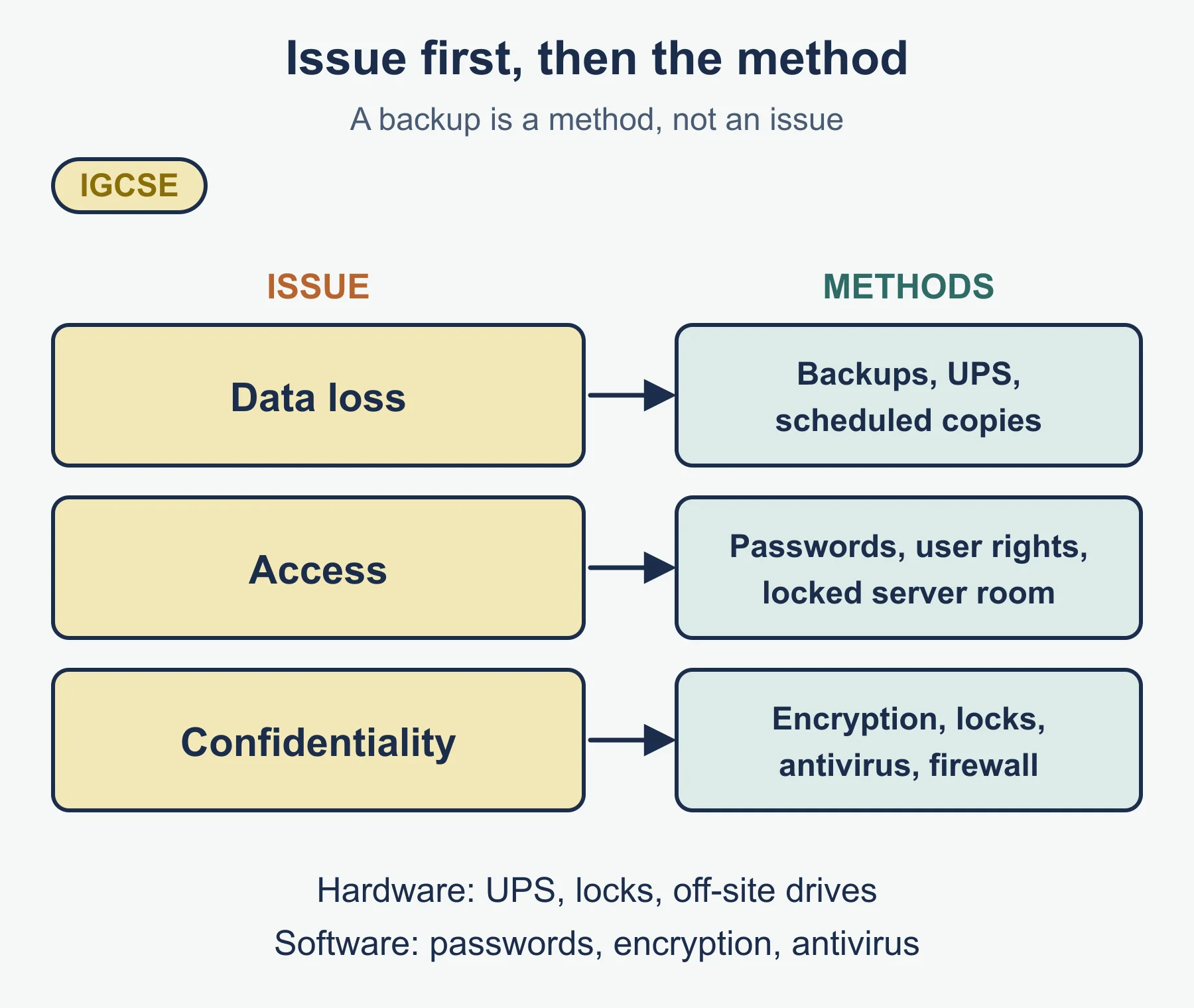
| Hardware | Backup copies on external drives, kept off-site or in a fireproof safe | Data loss |
| Hardware | Uninterruptible power supply (UPS) so work can be saved in a power cut | Data loss |
| Hardware | Locked server room, locked cabinets, keycards or fingerprint scanners | Access, confidentiality |
| Software | Passwords and different access rights for each user | Access, confidentiality |
| Software | Encryption of files and backups | Confidentiality |
| Software | Antivirus and firewall programs, with regular updates | Data loss, access |
| Software | Automatic scheduled backups, including copies stored online | Data loss |
Worked example of matching methods to roles. Anvil Road Cycles has three users.
| User | Needs to | Suitable access right |
|---|---|---|
| Bookkeeper | Enter invoices and receipts | Read and write in sales and purchases records |
| Shop assistant | Check whether a customer has paid | Read only on receivables |
| Owner | Review everything and approve changes | Full access, plus a backup password held securely |
Each person has their own password, so changes can be traced to a user. No method is perfect. A backup kept in the same room as the computer is lost in the same fire, which is why off-site copies matter.
1.4 (a) Principles of professional ethics
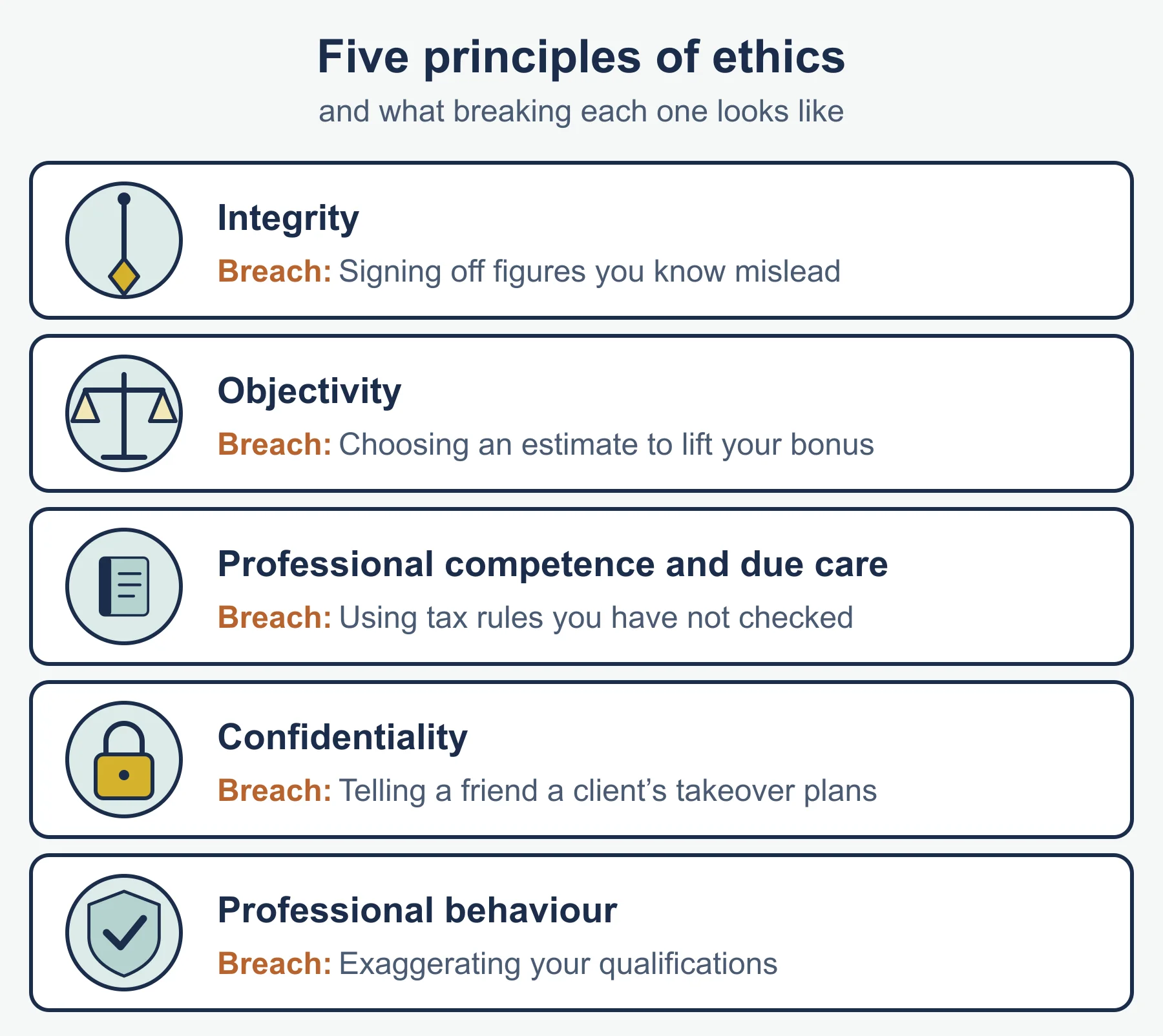
Accountants are trusted with other people’s money and information. Professional ethics are the standards of behaviour that accountants are expected to follow. The specification does not list the principles by name. The five fundamental principles in the international code for professional accountants are a widely used set, and they are suitable for describing the idea:
| Principle | What it means |
|---|---|
| Integrity | Being honest and straightforward; not being linked with false or misleading information |
| Objectivity | Not letting bias, a conflict of interest or pressure from others override professional judgement |
| Professional competence and due care | Keeping knowledge up to date and working carefully, in line with standards |
| Confidentiality | Not disclosing information gained through work without proper authority, and not using it for personal gain |
| Professional behaviour | Obeying laws and rules and avoiding conduct that harms the reputation of the profession |
1.4 (b) Applying the principles to accounting roles and functions
Roles include a bookkeeper recording transactions, an accounts clerk dealing with payments, an accountant preparing financial statements and an auditor checking them. Functions include recording, reporting, advising and checking. To apply a principle, name it, say what the situation tests and say what the accountant should do.
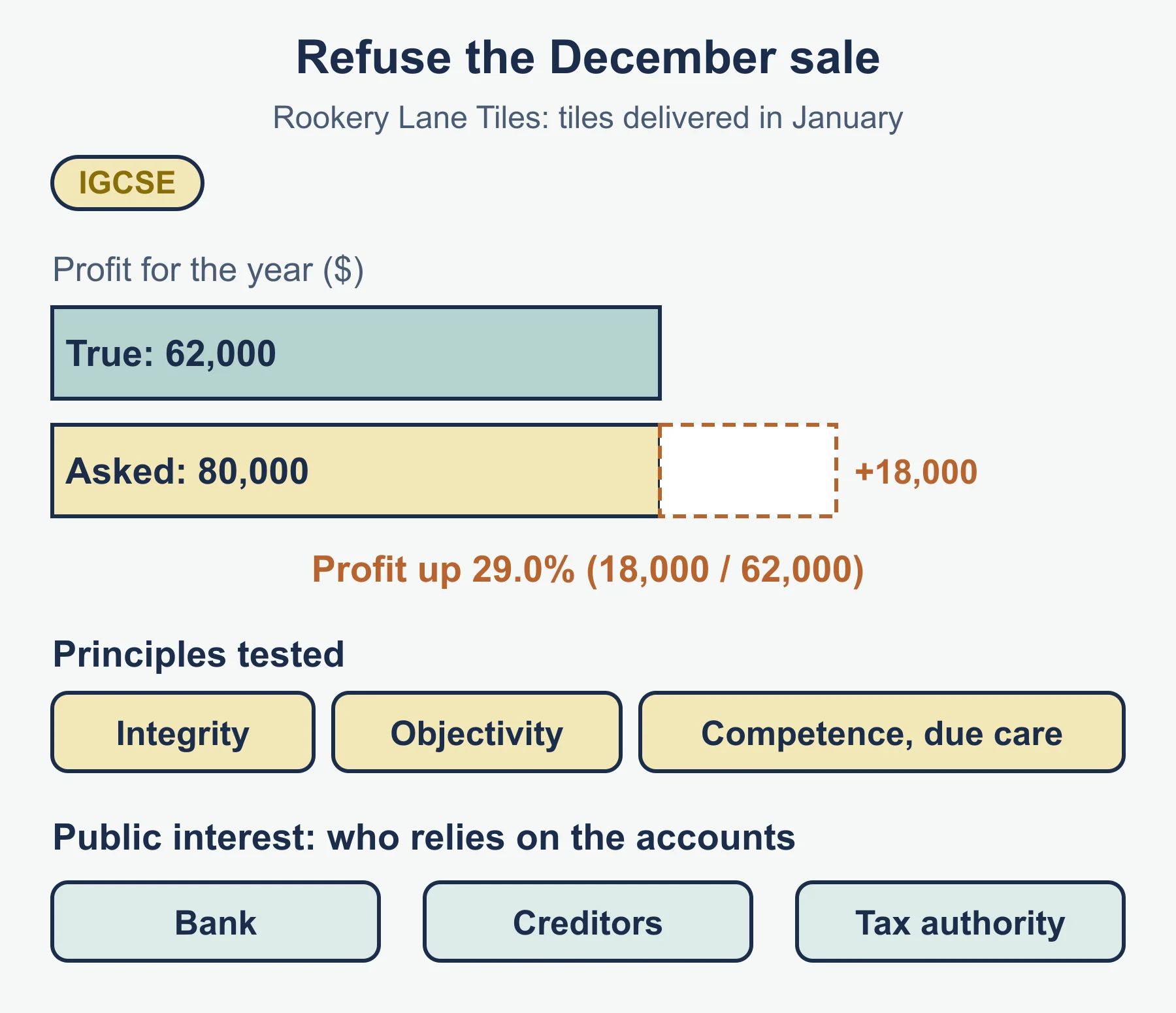
Worked example 1. Nadia Farrow is the accountant at Rookery Lane Tiles. The owner asks her to record 18,000 of tiles that will not be delivered until January as December sales. Profit for the year would rise from 62,000 to 80,000, an increase of 29.0% (18,000 ÷ 62,000 × 100). The owner wants a better result to show the bank.
- Integrity: recording sales that have not happened would be false.
- Objectivity: she must not let the owner’s wishes decide the figure.
- Professional competence and due care: the accruals concept says income belongs in the period it is earned, and she must apply it properly.
She should refuse and explain her reasons. If the owner insists, she should record the matter and, in line with her own professional body’s guidance, consider seeking advice.
Worked example 2. Greta Voss, a payroll clerk, is asked by a friend how much a colleague earns. The salary is confidential information gained through her job, so she must not disclose it. The principle also applies after she changes jobs.
1.4 (c) Public interest
The public interest means the wellbeing of the wider community, including people who rely on accounts but who are not the client or employer: lenders, investors, suppliers, employees and tax authorities. The idea is that an accountant’s duty is not only to whoever pays them.
It is applied in different roles:
- A bookkeeper or accountant prepares information that is truthful, because others make decisions with it.
- An auditor reports honestly on whether statements give a true picture, even if the client dislikes the finding.
- An accountant who sees a client hiding income from the tax authority cannot help conceal it.
In worked example 1, the bank would lend on the strength of the inflated profit. Refusing protects the bank and the business’s other creditors, not only Nadia’s reputation. This is the public interest in practice.
Common errors
- Describing a security issue and a protection method as if they were the same thing. Data loss is an issue; a backup is a method.
- Naming a method without saying what it protects against.
- Listing “benefits of technology” without a reason, for example “it is faster” with no mention of automatic posting.
- Claiming accounting software makes errors impossible. It can only process what it is given.
- Using the word “ethical” without naming the principle that is tested.
- Treating the public interest as the same as the employer’s interest.
Next step: test yourself with the practice questions and condense the unit with the revision notes.
Frequently asked questions
What are the benefits of accounting software in Edexcel IGCSE Accounting? A transaction is entered once and posted automatically to every account and report, which saves time and avoids copying errors. Software also produces reports such as a trial balance on demand, takes less storage space and gives up-to-date balances.
What is the main benefit of a spreadsheet in accounting? Formulas recalculate automatically when the cells they refer to change, so a spreadsheet can test “what if” changes such as a different useful life in a depreciation schedule without re-typing. Spreadsheets also total columns, reuse templates and draw charts.
What are the three data security issues in the 4AC1 specification? The specification names data loss, access and confidentiality. Data loss is records being destroyed or unreadable, access is about who can open or change records, and confidentiality is keeping information private and using it only for its intended purpose.
What is the public interest in accounting? The public interest is the wellbeing of the wider community, including lenders, investors, suppliers, employees and tax authorities who rely on accounts. An accountant’s duty is not only to the client or employer.
What should an accountant do if asked to record sales that have not happened? Recording them would break integrity and objectivity, and ignore the accruals concept, so the accountant should refuse and explain why. If the owner insists, the accountant should record the matter and consider seeking advice in line with their professional body’s guidance.
Official syllabus
Pearson Edexcel International GCSE in Accounting (4AC1) specification, Issue 1, October 2016, published by Pearson Education Limited – Topic 1: The accounting environment, sections 3 Use of technology in accounting and 4 Professional ethics (numbered 1.3 and 1.4 on this site).
Get free revision emails (optional)
Occasional emails with practice questions, worked explanations and links to free resources for the qualification and subjects you choose. No spam, and you can unsubscribe from any email. The free tools on this site never need an email.
Related resources
-
Practice questions
Edexcel IGCSE Accounting: Technology in accounting and professional ethics (4AC1) – Practice Questions
Original practice questions with worked answers on 4AC1 Accounting 1.3 and 1.4: technology, data security, professional ethics and public interest.
Accounting · Pearson Edexcel · IGCSE
Try questions -
Revision notes
Edexcel IGCSE Accounting: Technology in accounting and professional ethics (4AC1) – Revision Notes
Condensed 4AC1 Accounting notes on software, spreadsheets, data security, protection methods, ethics principles and public interest, with a self-test.
Accounting · Pearson Edexcel · IGCSE
Revise topic -
Study guides
Edexcel IGCSE Accounting: Types of business organisation and accounting concepts (4AC1)
Study guide to Edexcel IGCSE Accounting 4AC1 topics 1.1 and 1.2: business types, stakeholders and six accounting concepts, with worked examples.
Accounting · Pearson Edexcel · IGCSE
Read guide
Related articles
-
teaching
A Level tuition in Dubai: Cambridge or Pearson Edexcel International A Level?
Schools in Dubai and Abu Dhabi teach either Cambridge International AS & A Level or Pearson Edexcel International A Level. How the two are structured, why it matters for tuition, and how online classes from Lahore work.
9 October 2026
-
curriculum guides
Choosing subjects at IGCSE and A Level
How subject choices at 14 and 16 affect university options later, and how to keep pathways open without overloading a timetable.
28 July 2026
Studying this with a teacher
Working through Accounting IGCSE?
This page is free and stays free. If you would rather be taught it, Marlbridge runs Accounting classes one-to-one and in small groups of up to 15, online in your own time zone. The first trial class is free. WhatsApp replies within an hour (8am–11pm Pakistan time, every day); email the same day.
Pearson Edexcel Accounting teachers at Marlbridge