
Revision Notes
IB DP Computer Science A.3: Databases – Revision Notes
Recall notes on IB DP Computer Science A.3 Databases: keys, DDL and DML, an SQL clause sheet, query patterns, and HL views and ACID, with a self-test.
- Subject
- Computer Science
- Level
- IB
- Topic
- A.3 – Databases
- Author
- Marlbridge Academic Team
- Updated
- Reviewed by
- Harris Khan (what this means)
Aligned to International Baccalaureate IB Diploma Programme Computer Science (DP Computer Science), First assessment 2027. Official subject brief .
Syllabus page (what it covers and how it is assessed): IB Diploma Programme Computer Science.
Found an error? Report a correction.
Need help with this topic? Request a free trial class for IB Diploma Programme Computer Science (DP Computer Science (2014) / DP Computer Science (2027)).
Condensed for quick recall of A.3 Databases, the third sub-topic of Theme A in IB DP Computer Science, first assessment 2027 (11 hours SL / 18 hours HL). SQL queries between two tables are required at both levels. For explanations and fully worked queries, use the A.3 study guide. The exact learning outcomes are in the full DP guide held by your school.
Key terms
| Term | Meaning |
|---|---|
| Flat file | All data in a single table |
| Redundancy | The same data stored more than once |
| Data integrity | Data is accurate and consistent |
| Relational database | Data in linked tables |
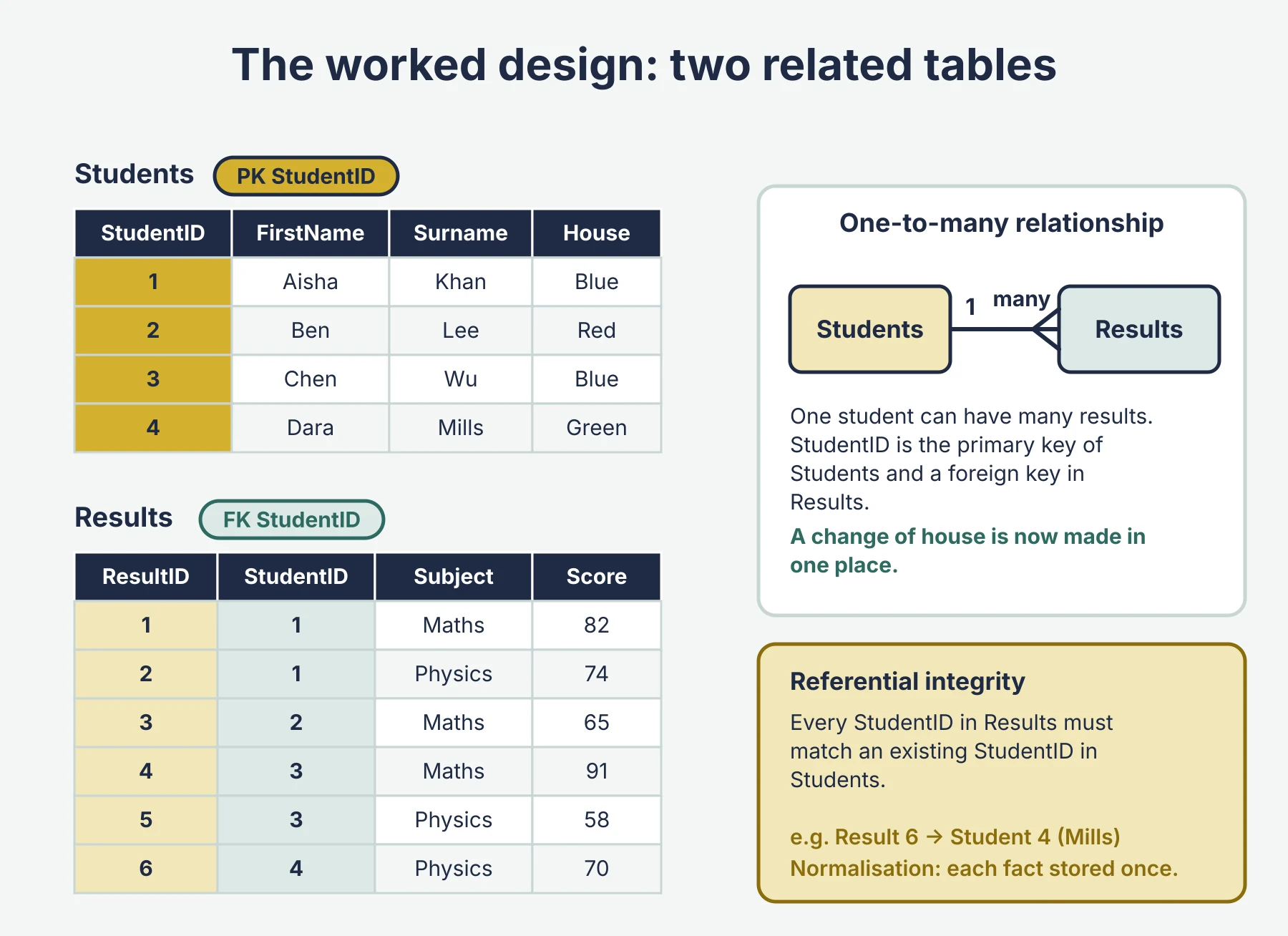
| Primary key | Uniquely identifies each record in its table |
| Foreign key | Field referring to a primary key in another table |
| Composite key | A primary key made of two or more fields |
| Referential integrity | Every foreign key value matches an existing primary key value |
| Normalisation | Organising data into related tables so each fact is stored once |
| DDL | Data definition language: defines structure (e.g. CREATE TABLE) |
| DML | Data manipulation language: works with data (SELECT, INSERT, UPDATE, DELETE) |
| View (HL) | A saved query presented like a table |
| Transaction (HL) | Operations that succeed or fail as one unit |
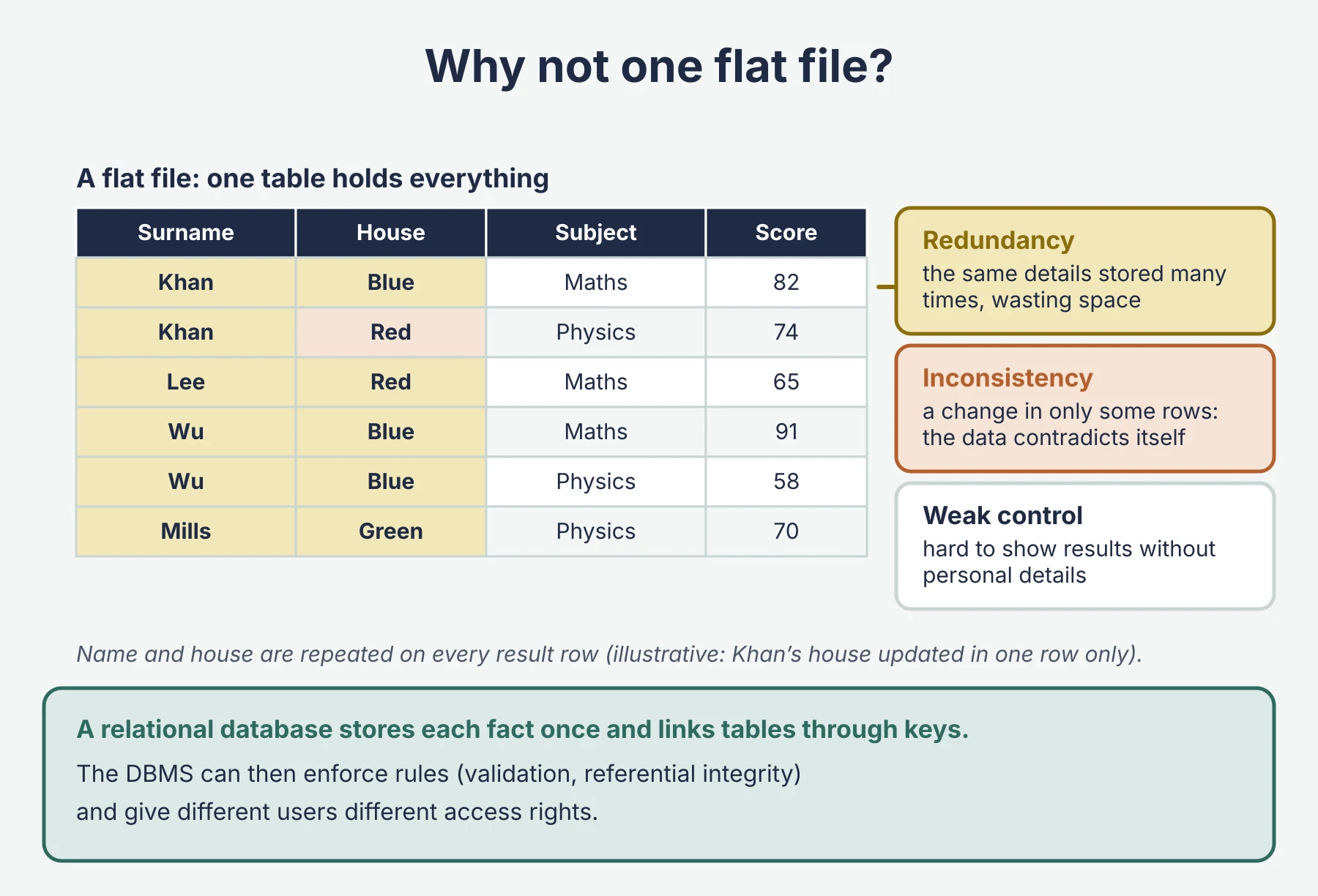
Why databases beat flat files
- Less redundancy: each fact stored once.
- Integrity: one update changes the fact everywhere; rules can be enforced.
- Access control: users can be given different permissions.
SQL clause sheet
| Clause | Use |
|---|---|
SELECT |
Fields to show |
DISTINCT |
Remove duplicate rows from the result |
FROM |
Table(s) to read |
JOIN ... ON |
Combine tables where key values match |
WHERE |
Filter rows before grouping |
AND / OR / NOT |
Combine or reverse conditions |
BETWEEN x AND y |
Inclusive range |
LIKE 'A%' |
Pattern match; % stands for any characters |
ORDER BY ... ASC/DESC |
Sort ascending (default) or descending |
GROUP BY |
Form groups for aggregate functions |
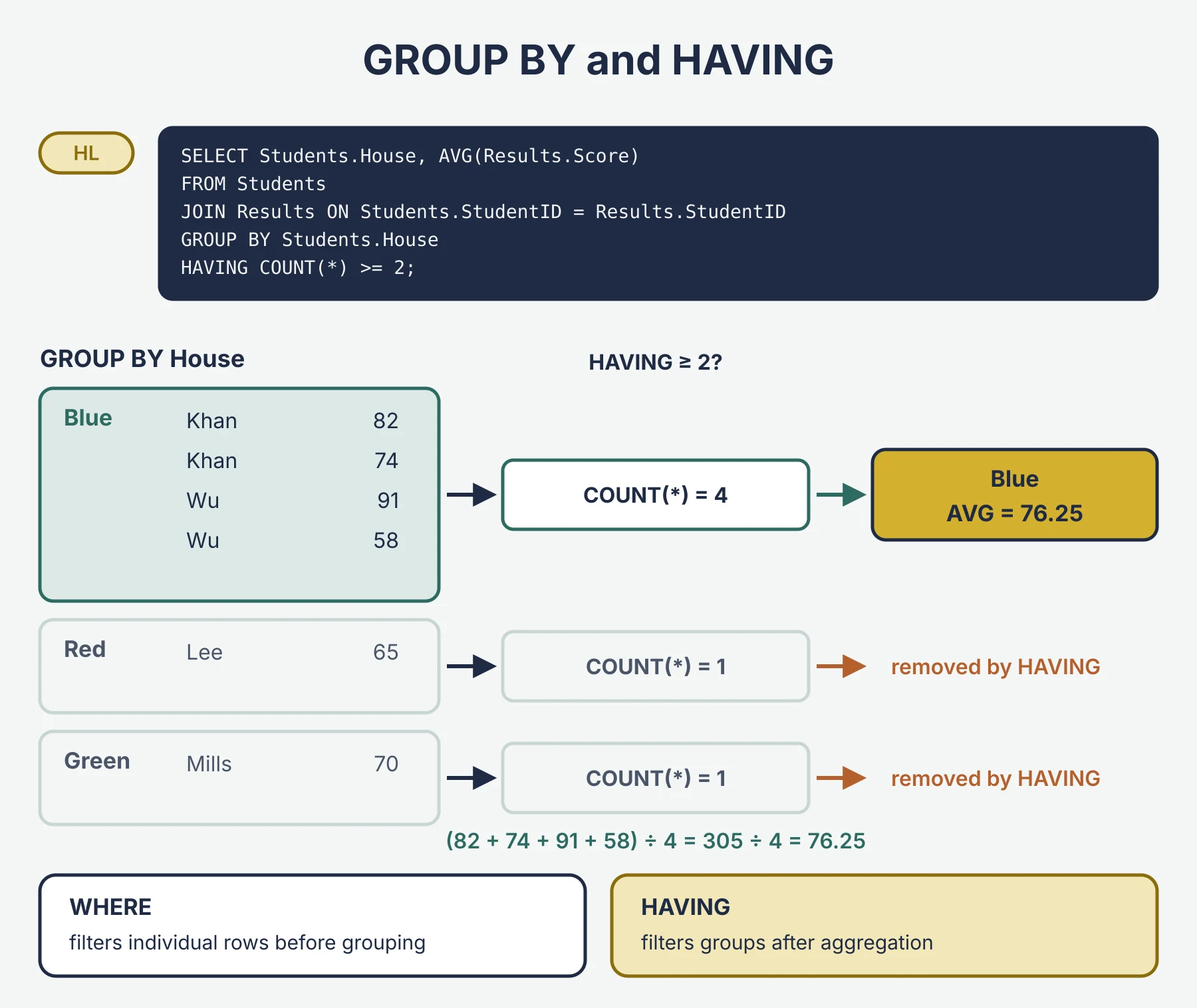
HAVING |
Filter groups after aggregation |
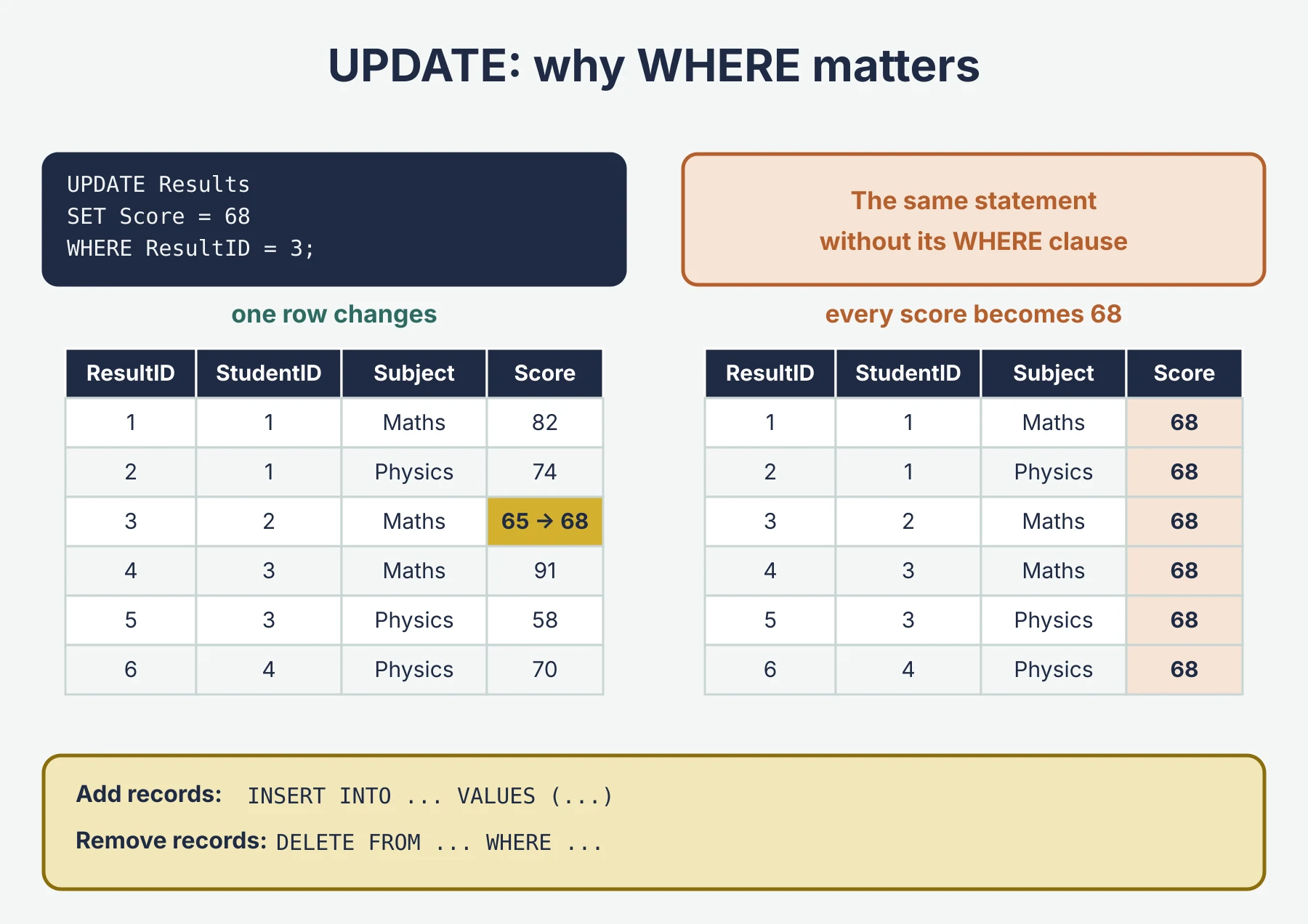
UPDATE ... SET ... WHERE |
Change existing data |
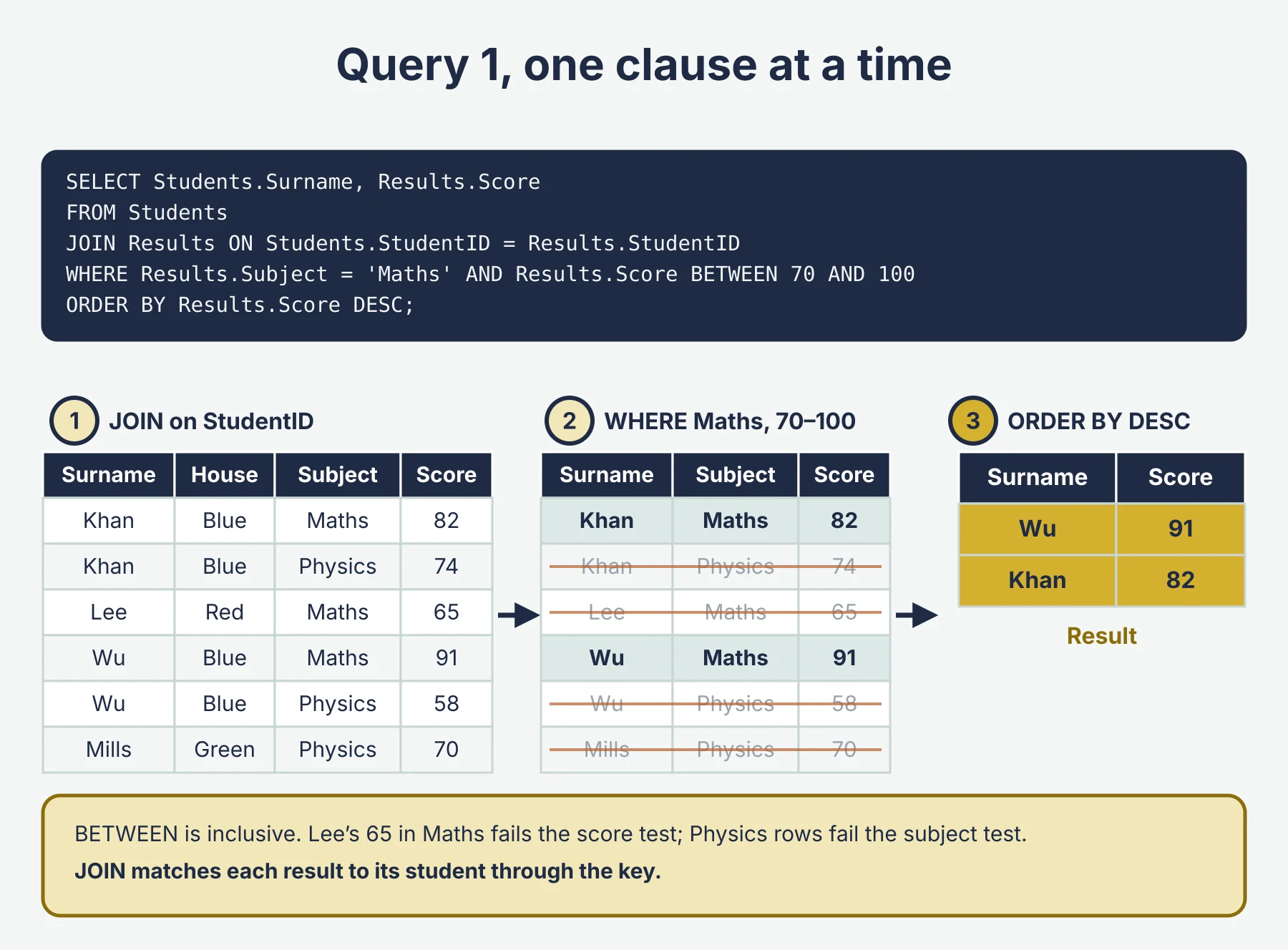
Order of clauses: SELECT → FROM → JOIN → WHERE → GROUP BY → HAVING → ORDER BY.
Query patterns to learn
Two-table join with filter and sort
SELECT A.field, B.field
FROM A
JOIN B ON A.key = B.key
WHERE condition
ORDER BY field DESC;
Pattern match
SELECT field FROM A WHERE field LIKE 'Mc%';Update one record
UPDATE A SET field = value WHERE key = 7;HL: aggregate by group
SELECT field, COUNT(*) FROM A GROUP BY field HAVING COUNT(*) > 1;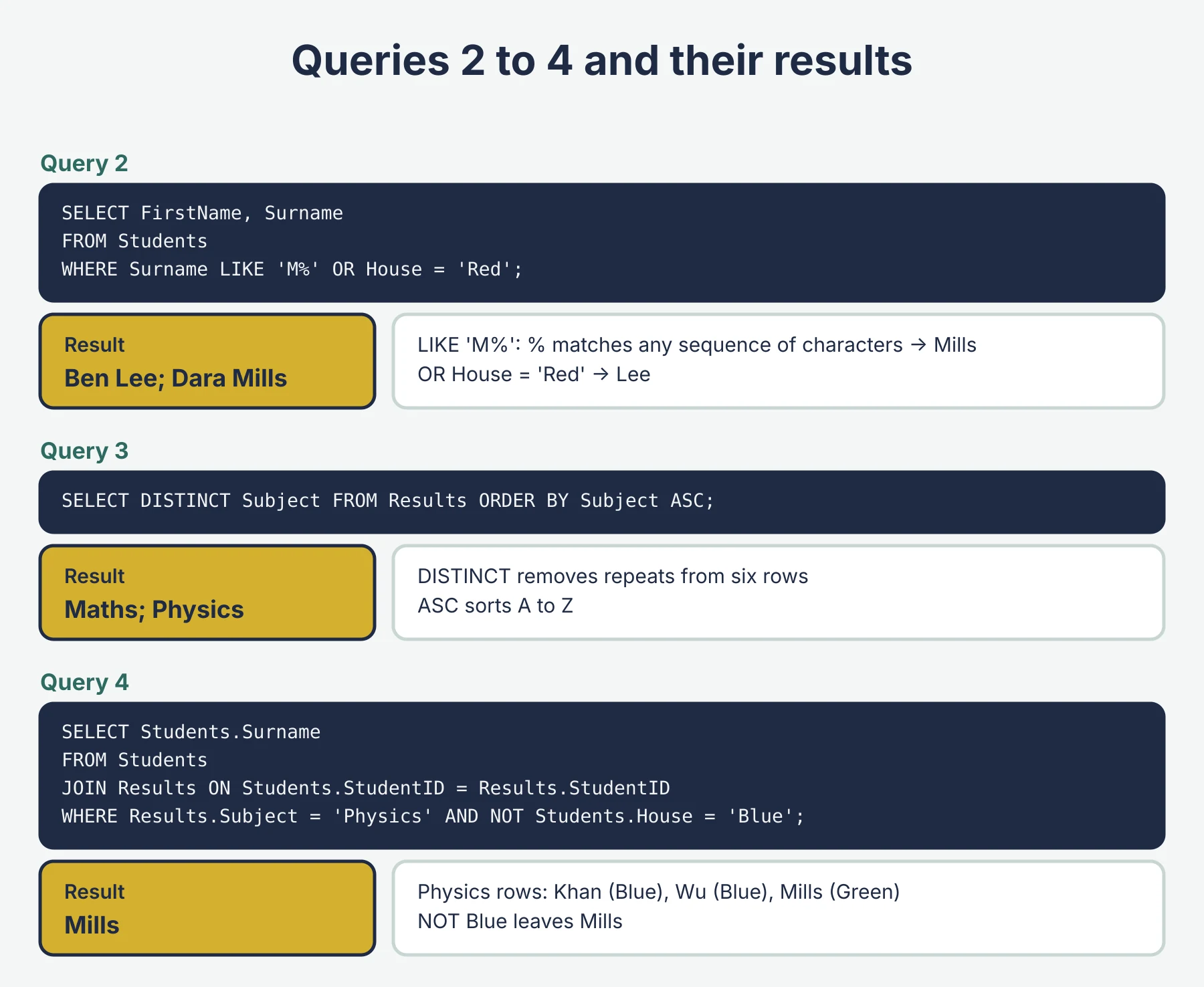
HL summaries
Aggregates: average (AVG in most systems), COUNT, MAX, MIN, SUM; used with GROUP BY; filter groups with HAVING.
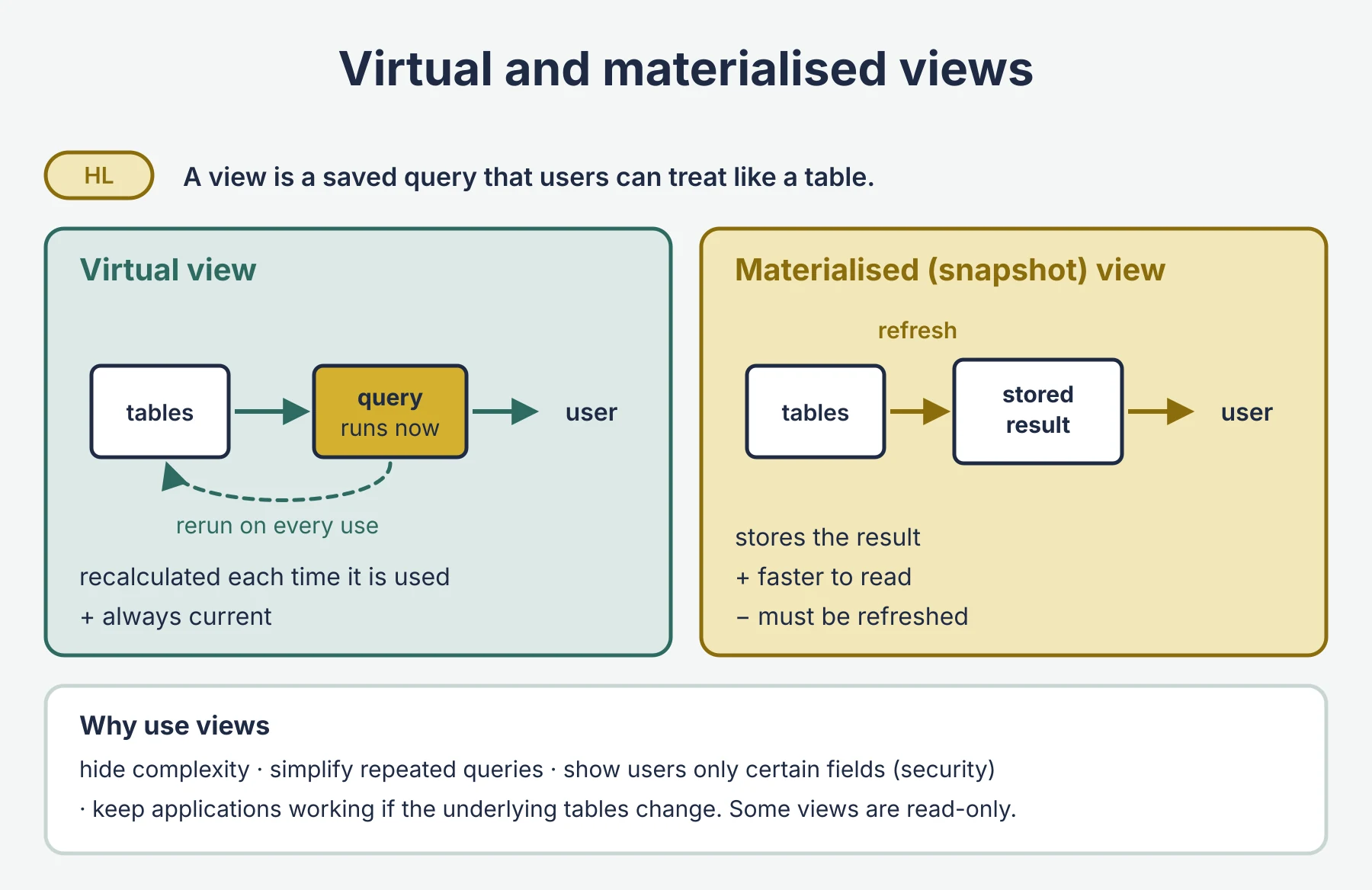
Views:
- Virtual: recalculated each time; always current.
- Materialised (snapshot): stored result; fast to read; must be refreshed.
- Benefits: hide complexity, simplify queries, security (show selected fields only), consistency, independence from table changes, performance (materialised); may be read-only or updatable.
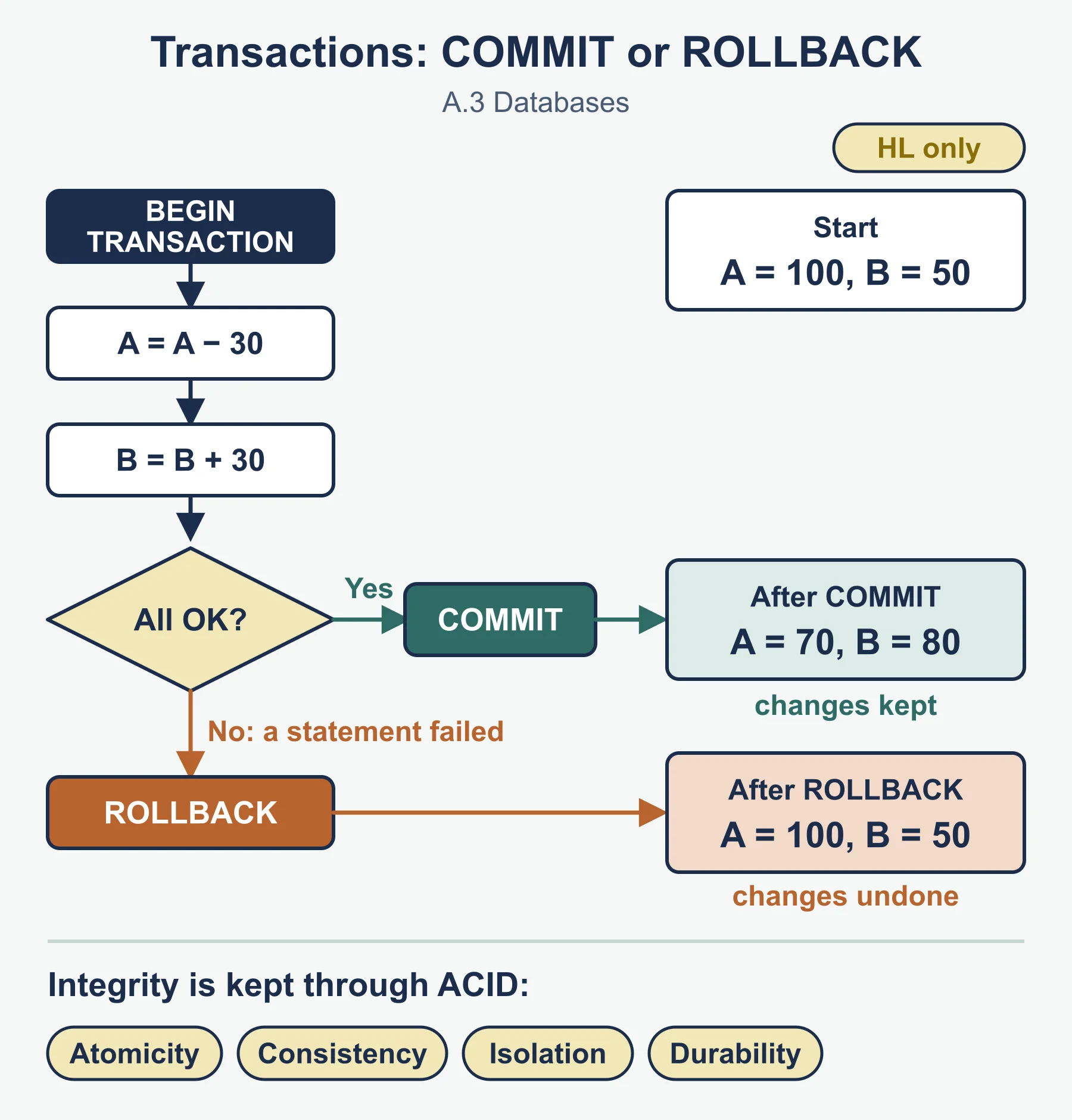
ACID:
- Atomicity: all or nothing.
- Consistency: valid state to valid state.
- Isolation: concurrent transactions do not interfere.
- Durability: committed changes survive failures.
Commands: BEGIN TRANSACTION, COMMIT, ROLLBACK.
Also HL: alternative databases and data warehouses; see the full guide for required detail.
Reading a query before writing one
Paper questions may ask what a query returns. Work in clause order: take the FROM and JOIN tables, keep only rows that pass WHERE, form groups if there is a GROUP BY, discard groups that fail HAVING, then pick the SELECT fields and sort with ORDER BY. Writing the intermediate rows down, as in a trace table, avoids most errors with BETWEEN (inclusive at both ends) and with NOT.
Exam traps
- Primary vs foreign key. The foreign key sits in the “many” table.
- Missing ON in a JOIN. Without it, every row is paired with every other row.
- UPDATE or DELETE without WHERE. Every record changes.
- WHERE instead of HAVING for a condition on an aggregate.
- Missing quotation marks around text values; numbers need none.
- Ambiguous field names in two-table queries: write Table.Field.
Self-test
Use these tables: Customers(CustomerID, Name, City) and Orders(OrderID, CustomerID, Item, Price), linked by CustomerID.
- Which field is the primary key of Customers?
- Which field in Orders is a foreign key?
- Give one example each of a DDL and a DML statement.
- Why would storing the customer’s city on every order row be a problem?
- Write a query listing every customer’s name and the items they ordered.
- Change it to show only orders costing between 10 and 50, cheapest first.
- Write a query listing the names of customers whose city begins with “Lon”.
- Write a statement changing the price of order 15 to 24.99.
- Write a query listing each city only once.
- (HL) Write a query giving the number of orders for each customer name, only where it is more than 3.
- (HL) Explain the difference between a virtual and a materialised view.
- (HL) Which ACID property ensures that a transfer is never half completed?
Answers: 1. CustomerID. 2. CustomerID. 3. DDL: CREATE TABLE; DML: SELECT, INSERT, UPDATE or
DELETE. 4. Redundancy, and the risk of inconsistency if the city is updated on some rows only.
5. SELECT Customers.Name, Orders.Item FROM Customers JOIN Orders ON Customers.CustomerID = Orders.CustomerID; 6. Add WHERE Orders.Price BETWEEN 10 AND 50 ORDER BY Orders.Price ASC;
7. SELECT Name FROM Customers WHERE City LIKE 'Lon%'; 8. UPDATE Orders SET Price = 24.99 WHERE OrderID = 15; 9. SELECT DISTINCT City FROM Customers; 10. SELECT Customers.Name, COUNT(*) FROM Customers JOIN Orders ON Customers.CustomerID = Orders.CustomerID GROUP BY Customers.Name HAVING COUNT(*) > 3; 11. A virtual view is recalculated each time it is used, so it is always current; a
materialised view stores its result, so it is faster but must be refreshed. 12. Atomicity.
Related pages
Official syllabus
International Baccalaureate Organization, Diploma Programme Subject Brief – Sciences: Computer science, first assessment 2027, © 2024.
Related resources
-
Study guides
IB DP Computer Science (DP Computer Science): Normalisation to Third Normal Form
Study guide to normalisation in IB DP Computer Science A.3: anomalies, dependencies, first, second and third normal form, with a full worked example.
Computer Science · International Baccalaureate · IB
Read guide -
Practice questions
IB DP Computer Science (DP Computer Science): Normalisation to Third Normal Form – Practice Questions
Twelve original questions on normalisation for IB DP Computer Science A.3: anomalies, dependencies and designs in 1NF, 2NF and 3NF, with full answers.
Computer Science · International Baccalaureate · IB
Try questions -
Revision notes
IB DP Computer Science (DP Computer Science): Normalisation to Third Normal Form – Revision Notes
Condensed notes on normalisation for IB DP Computer Science A.3: anomalies, functional dependency, 1NF, 2NF and 3NF tests, exam traps and a self-test.
Computer Science · International Baccalaureate · IB
Revise topic
Get free revision emails (optional)
Occasional emails with practice questions, worked explanations and links to free resources for the qualification and subjects you choose. No spam, and you can unsubscribe from any email. The free tools on this site never need an email.