
Study Guides
IB DP Computer Science A.3: Databases
Study guide to A.3 Databases in IB DP Computer Science (first assessment 2027): the relational model, keys, two-table SQL, updates, and HL views and ACID.
- Subject
- Computer Science
- Level
- IB
- Topic
- A.3 – Databases
- Author
- Marlbridge Academic Team
- Updated
- Reviewed by
- Harris Khan (what this means)
Aligned to International Baccalaureate IB Diploma Programme Computer Science (DP Computer Science), First assessment 2027. Official subject brief .
Syllabus page (what it covers and how it is assessed): IB Diploma Programme Computer Science.
Found an error? Report a correction.
Need help with this topic? Request a free trial class for IB Diploma Programme Computer Science (DP Computer Science (2014) / DP Computer Science (2027)).
A.3 Databases is the third sub-topic of Theme A, “Concepts of computer science”, in the IB Diploma Programme Computer Science course first assessed in 2027. It covers why organisations store data in databases rather than flat files, how the relational model links tables with keys, and how SQL is used to define, query and update data. It is the one part of Theme A where you must write code: SQL queries between two tables are required at both SL and HL. The subject brief recommends 11 hours at SL and 18 at HL, and HL adds aggregate functions, views, transactions and alternative databases.
Scope of this page. This page is written from the IB’s public Diploma Programme Subject Brief, Sciences: Computer science, first assessment 2027 (© International Baccalaureate Organization 2024) and the A.3 content summarised in our Theme A study guide. The detailed learning outcomes are in the full DP Computer Science guide; check your school’s copy for the exact content and depth. SQL syntax varies slightly between database systems.
What does A.3 cover?
- Why structured data is organised in databases: reducing redundancy, preserving integrity and controlling access.
- The relational model: tables, records, fields, primary and foreign keys, and relationships.
- SQL at SL and HL: the difference between data definition language (DDL) and data manipulation language (DML); queries between two tables using SELECT, DISTINCT, FROM, WHERE, BETWEEN, ORDER BY, GROUP BY, HAVING, ASC, DESC, JOIN, LIKE with the % wildcard, AND, OR and NOT; and updating data.
- HL only: aggregate functions (average, COUNT, MAX, MIN, SUM); virtual and materialised views; transactions, ACID and the commands BEGIN TRANSACTION, COMMIT and ROLLBACK; alternative databases and data warehouses.
Why use a database instead of a flat file?
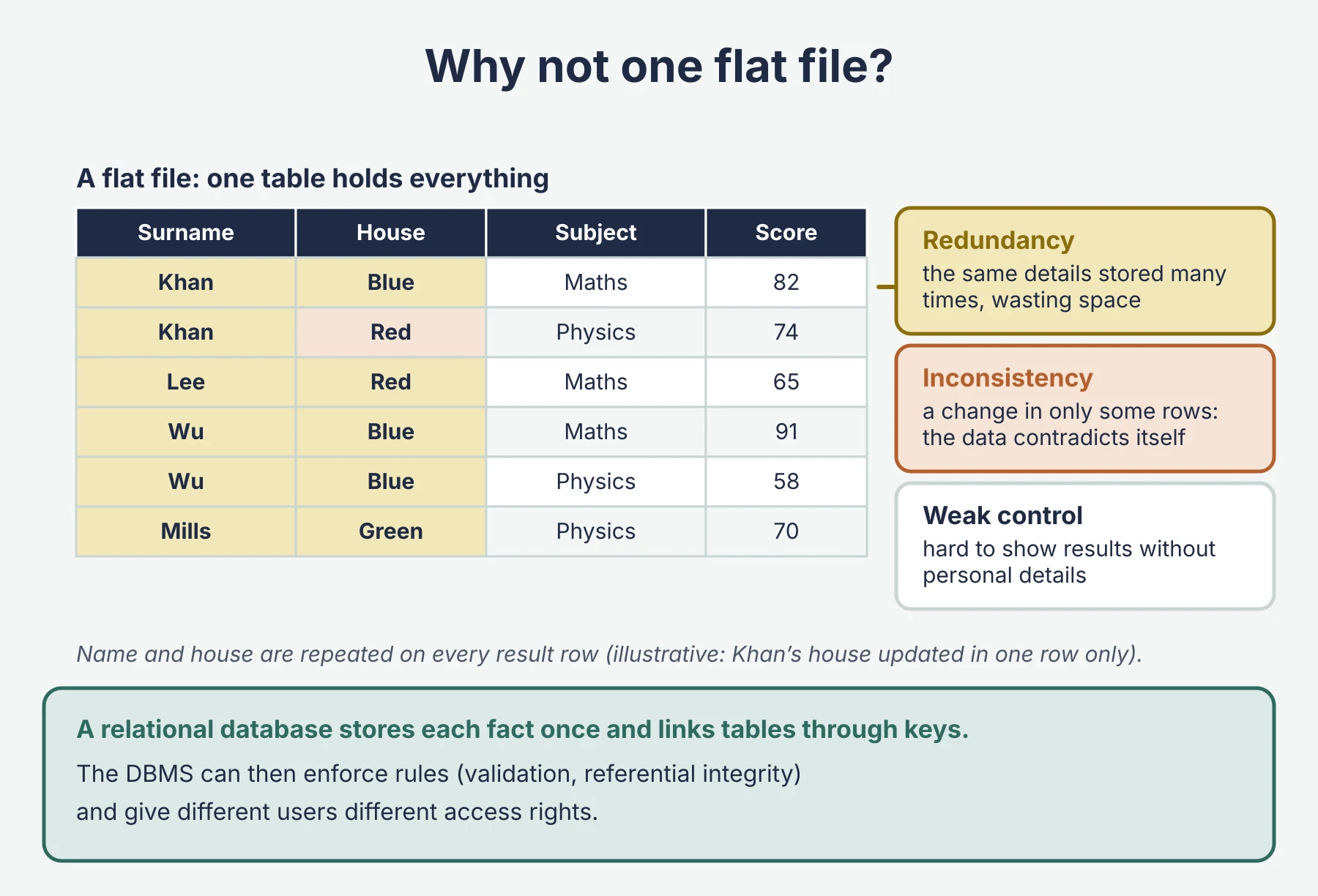
A flat file holds everything in one table. If a school records each exam result with the student’s name and house on every row, three problems follow:
- Redundancy: the same details are stored many times, wasting space.
- Inconsistency: if a student changes house and only some rows are updated, the data contradicts itself, so integrity is lost.
- Weak control: it is hard to let a teacher see results without also seeing personal details.
A relational database stores each fact once and links tables through keys. A database management system can then enforce rules (such as validation and referential integrity) and give different users different access rights.
What is the relational model?
| Term | Meaning |
|---|---|
| Table (relation) | A set of records about one kind of entity, such as students |
| Record (row, tuple) | One instance, such as one student |
| Field (column, attribute) | One item of data about each record, such as surname |
| Primary key | A field (or fields) whose value uniquely identifies each record in its table |
| Foreign key | A field in one table that refers to the primary key of another table |
| Relationship | A link between tables; one-to-many is the most common |
| Referential integrity | A foreign key value must match an existing primary key value |
Splitting data into related tables so that each fact is stored once is called normalisation.
A worked design
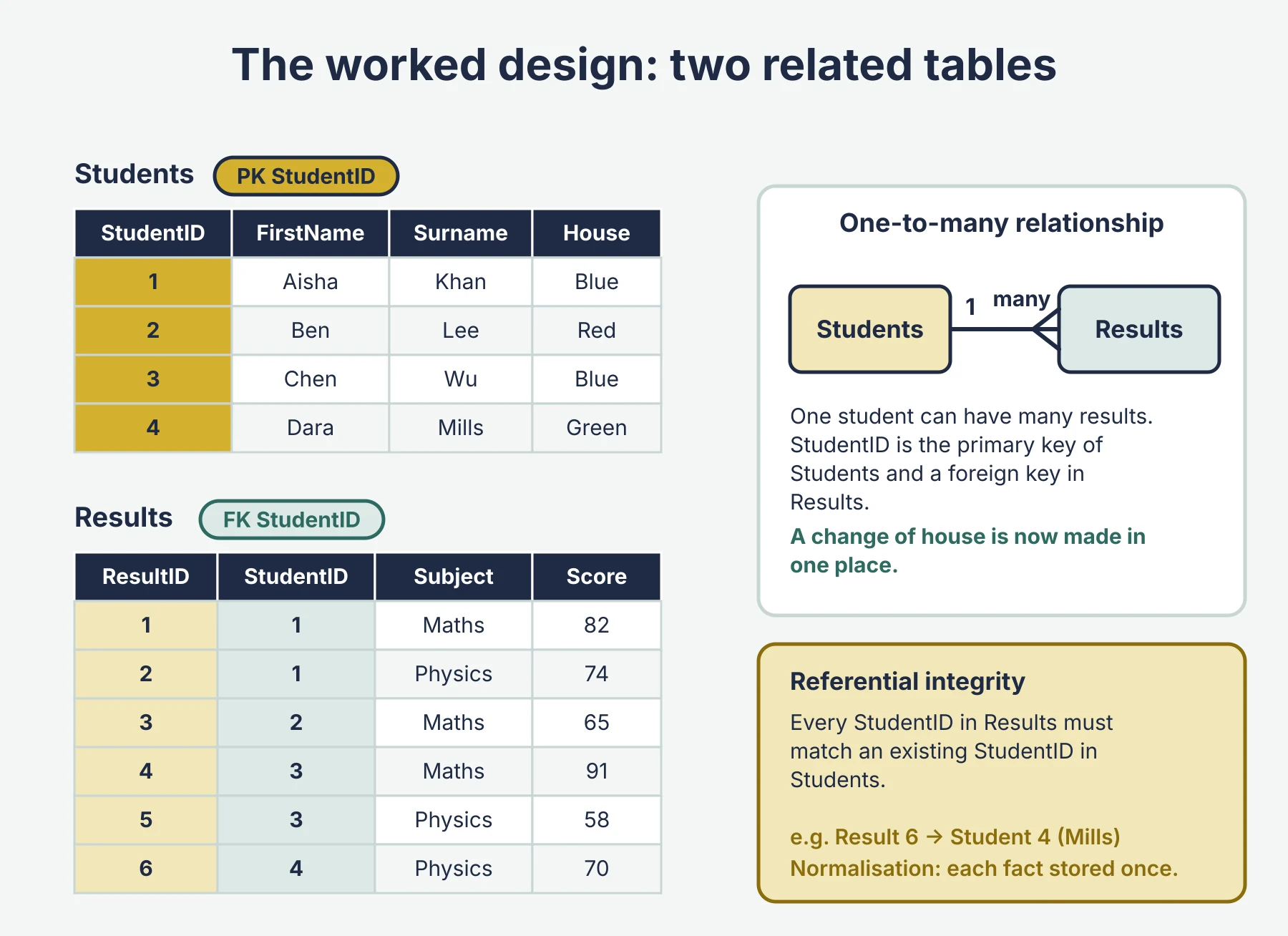
The flat file is split into two tables:
Students
| StudentID | FirstName | Surname | House |
|---|---|---|---|
| 1 | Aisha | Khan | Blue |
| 2 | Ben | Lee | Red |
| 3 | Chen | Wu | Blue |
| 4 | Dara | Mills | Green |
Results
| ResultID | StudentID | Subject | Score |
|---|---|---|---|
| 1 | 1 | Maths | 82 |
| 2 | 1 | Physics | 74 |
| 3 | 2 | Maths | 65 |
| 4 | 3 | Maths | 91 |
| 5 | 3 | Physics | 58 |
| 6 | 4 | Physics | 70 |
StudentID is the primary key of Students and a foreign key in Results. One student can have many results: a one-to-many relationship. A change of house is now made in one place.
DDL and DML
- DDL (data definition language) defines the structure: creating, altering and removing tables,
fields, data types and keys, for example
CREATE TABLE. - DML (data manipulation language) works with the data held: retrieving, adding, changing and
deleting records, for example
SELECT,INSERT,UPDATEandDELETE.
Querying two tables
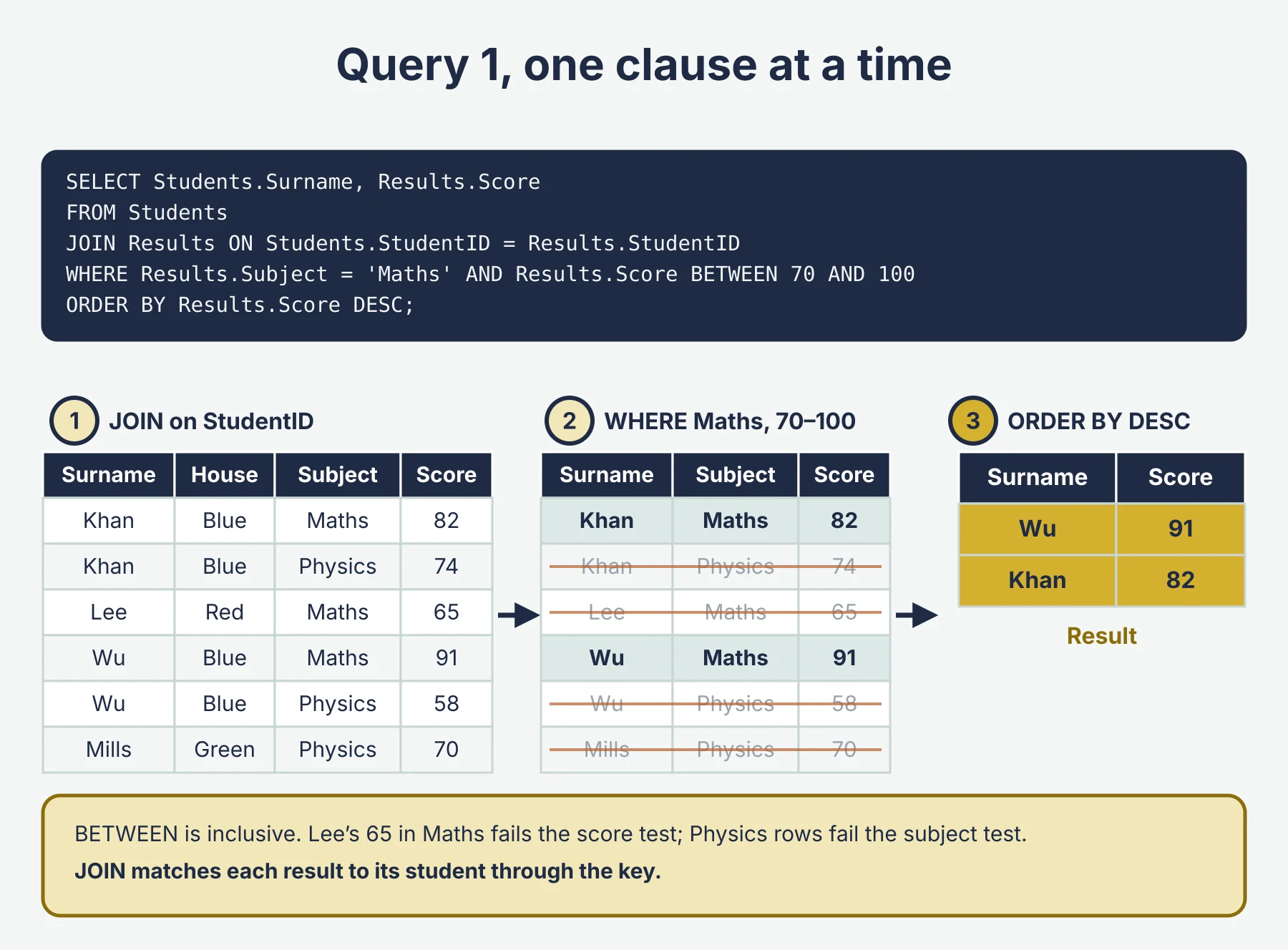
Query 1: surnames and scores of students who scored between 70 and 100 in Maths, highest first.
SELECT Students.Surname, Results.Score
FROM Students
JOIN Results ON Students.StudentID = Results.StudentID
WHERE Results.Subject = 'Maths' AND Results.Score BETWEEN 70 AND 100
ORDER BY Results.Score DESC;
Result: Wu 91; Khan 82. JOIN matches each result to its student through the key; WHERE filters with AND and BETWEEN (inclusive); ORDER BY … DESC sorts from highest.
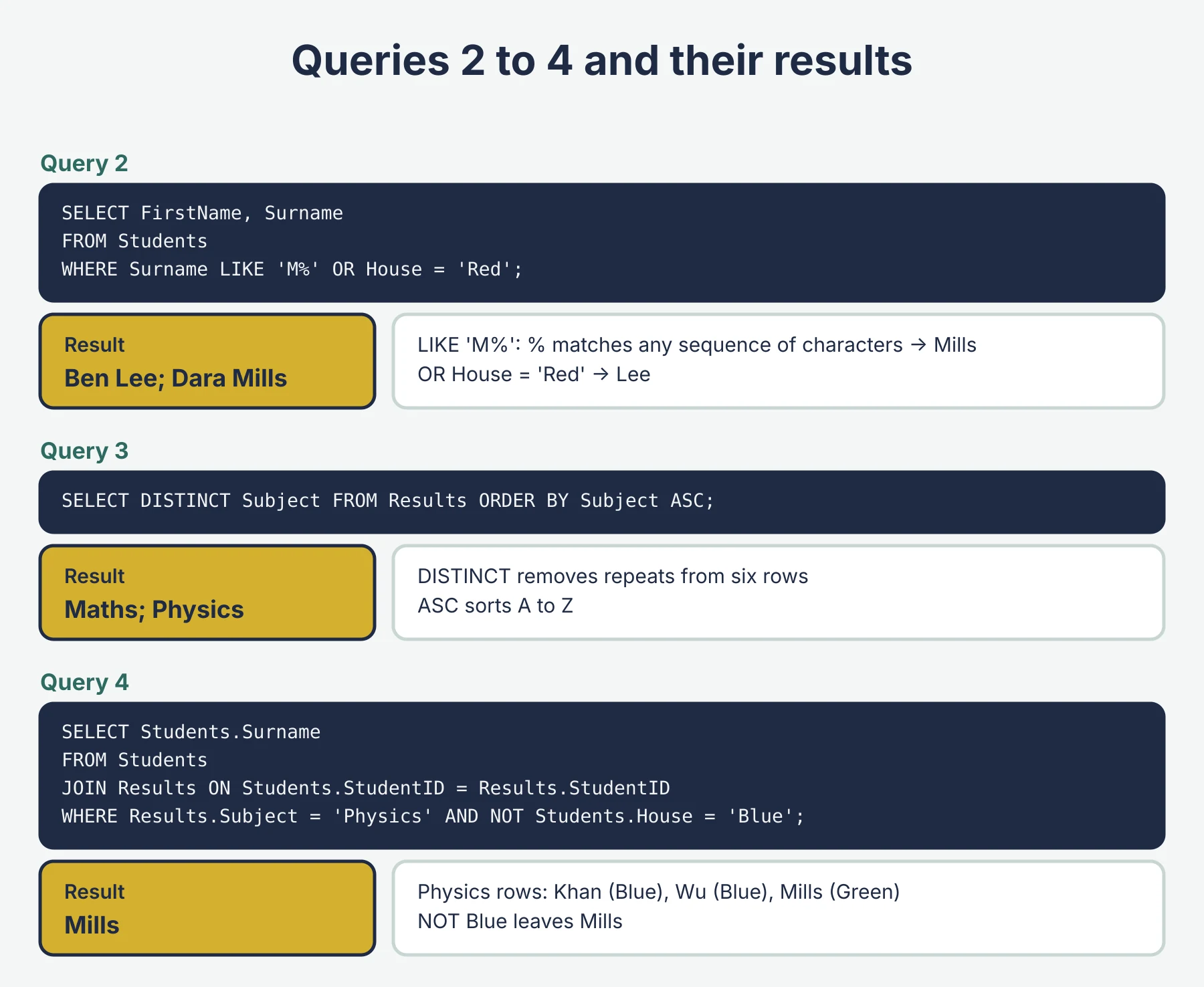
Query 2: students whose surname begins with M, or who are in Red house.
SELECT FirstName, Surname
FROM Students
WHERE Surname LIKE 'M%' OR House = 'Red';
Result: Ben Lee; Dara Mills. The % wildcard matches any sequence of characters.
Query 3: the different subjects recorded, without repeats.
SELECT DISTINCT Subject FROM Results ORDER BY Subject ASC;Result: Maths; Physics.
Query 4: surnames of students with a Physics result who are not in Blue house.
SELECT Students.Surname
FROM Students
JOIN Results ON Students.StudentID = Results.StudentID
WHERE Results.Subject = 'Physics' AND NOT Students.House = 'Blue';
Result: Mills.
Updating data
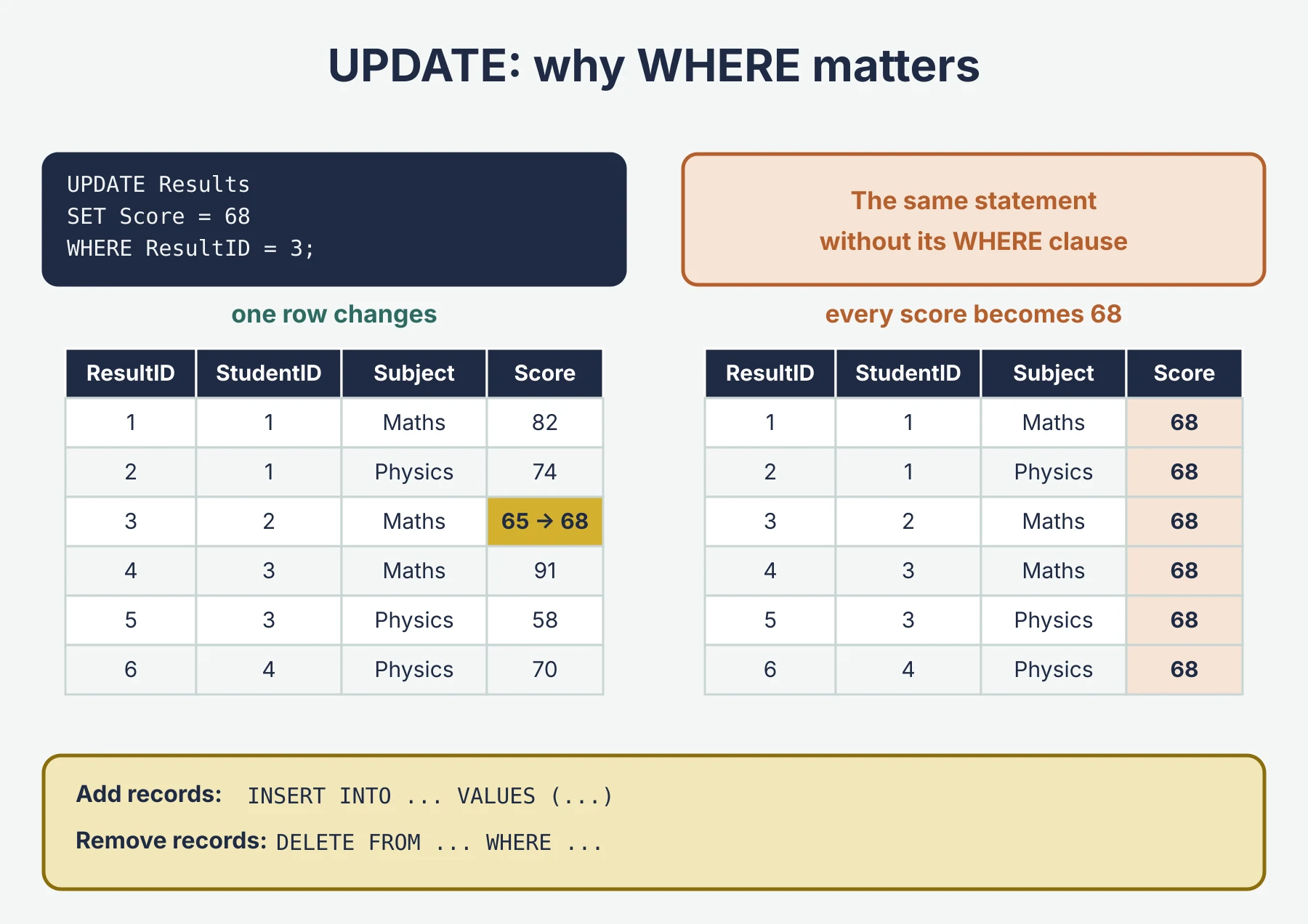
UPDATE Results
SET Score = 68
WHERE ResultID = 3;
The WHERE clause matters: without it, every score in the table would become 68. Records are added
with INSERT INTO ... VALUES (...) and removed with DELETE FROM ... WHERE ....
HL: aggregate functions with GROUP BY and HAVING
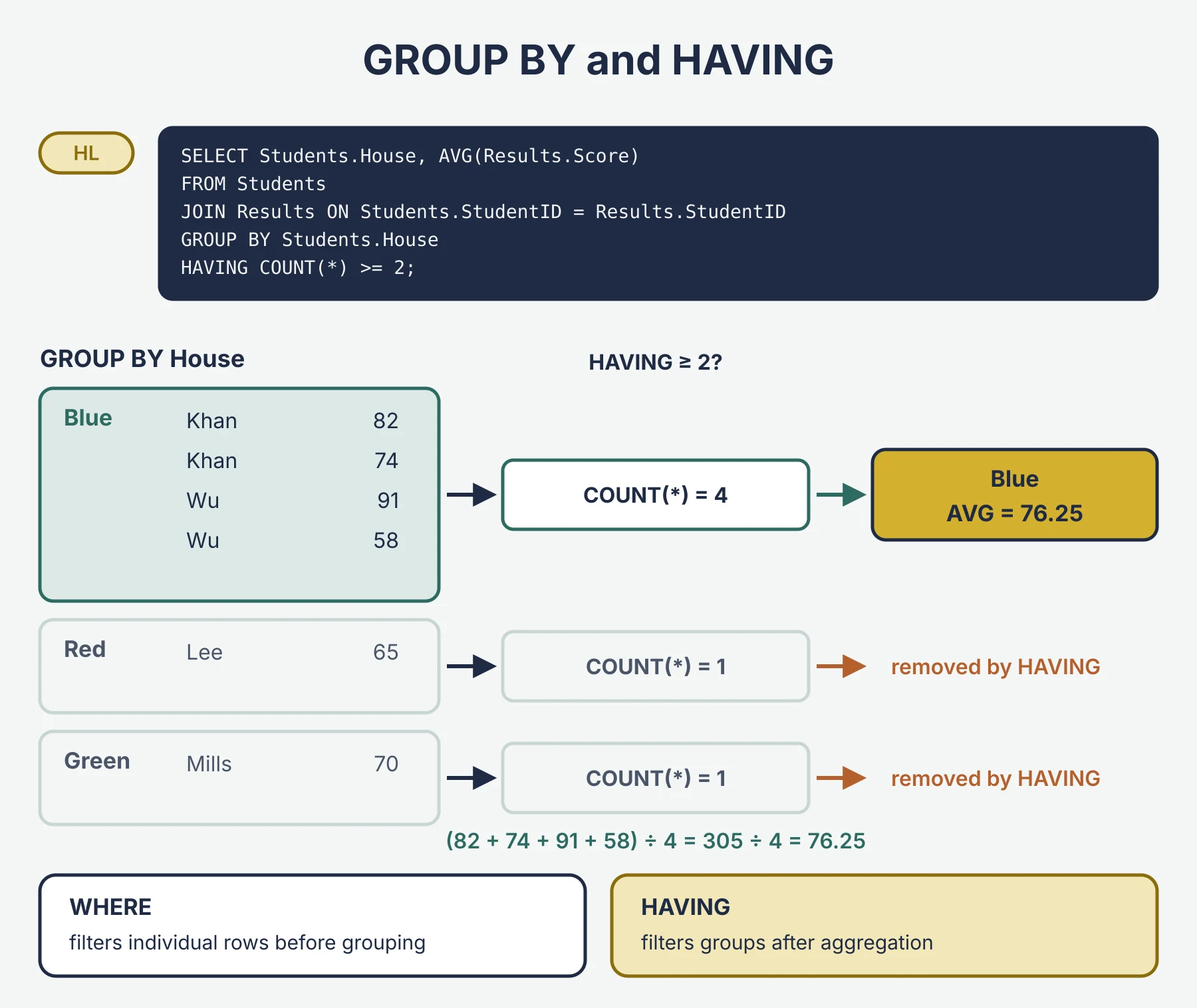
The average score for each house that has at least two results:
SELECT Students.House, AVG(Results.Score)
FROM Students
JOIN Results ON Students.StudentID = Results.StudentID
GROUP BY Students.House
HAVING COUNT(*) >= 2;
Result: Blue 76.25. GROUP BY forms one group per house; HAVING filters groups after aggregation, whereas WHERE filters individual rows before it. (The average function is written AVG in most systems.)
HL: views
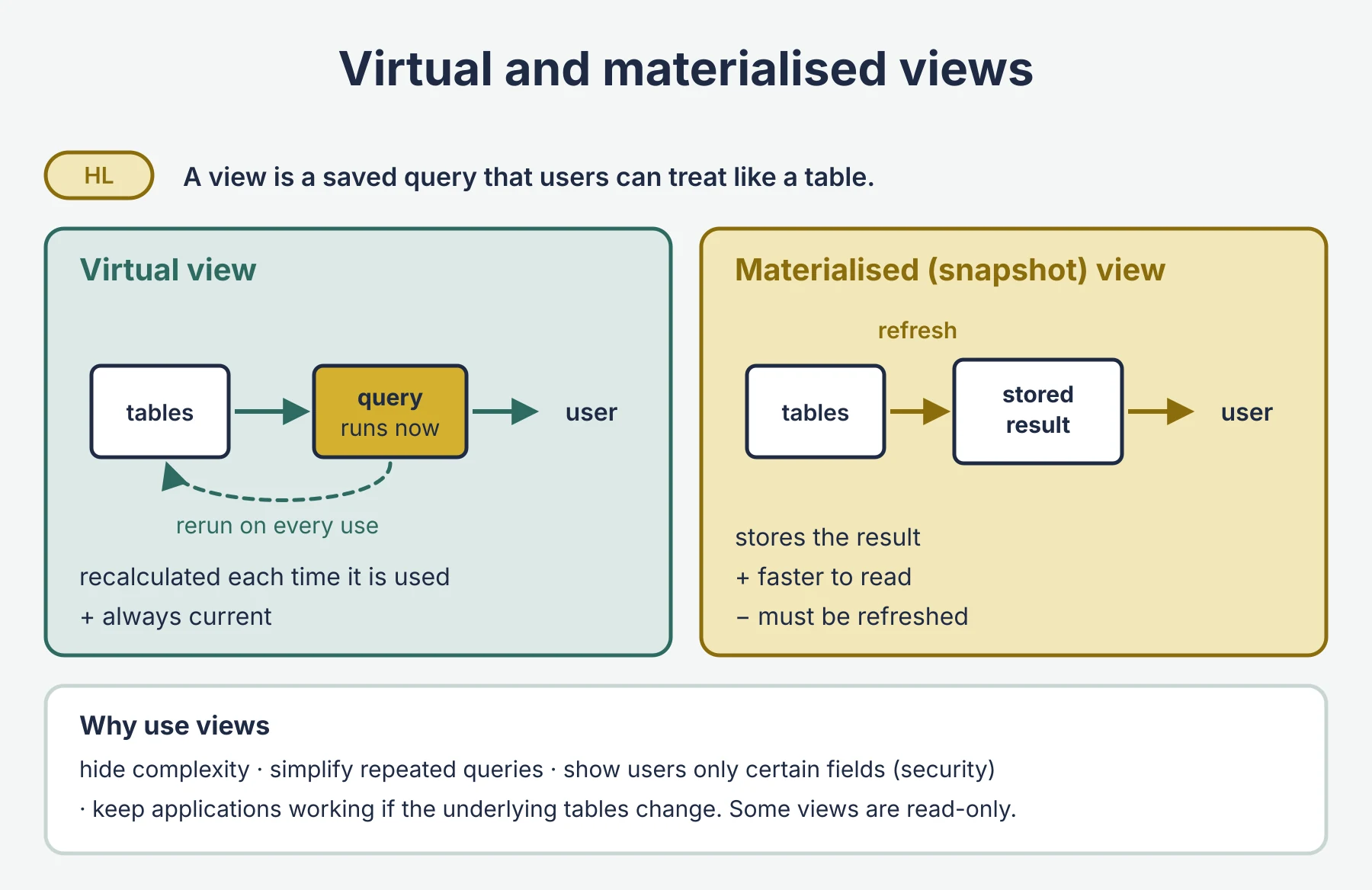
A view is a saved query that users can treat like a table. A virtual view is recalculated each time it is used, so it is always current; a materialised (snapshot) view stores the result, so it is faster to read but must be refreshed. Views hide complexity, simplify repeated queries, improve security by showing users only certain fields, and keep applications working if the underlying tables change. Some views are read-only; others allow updates.
HL: transactions and ACID
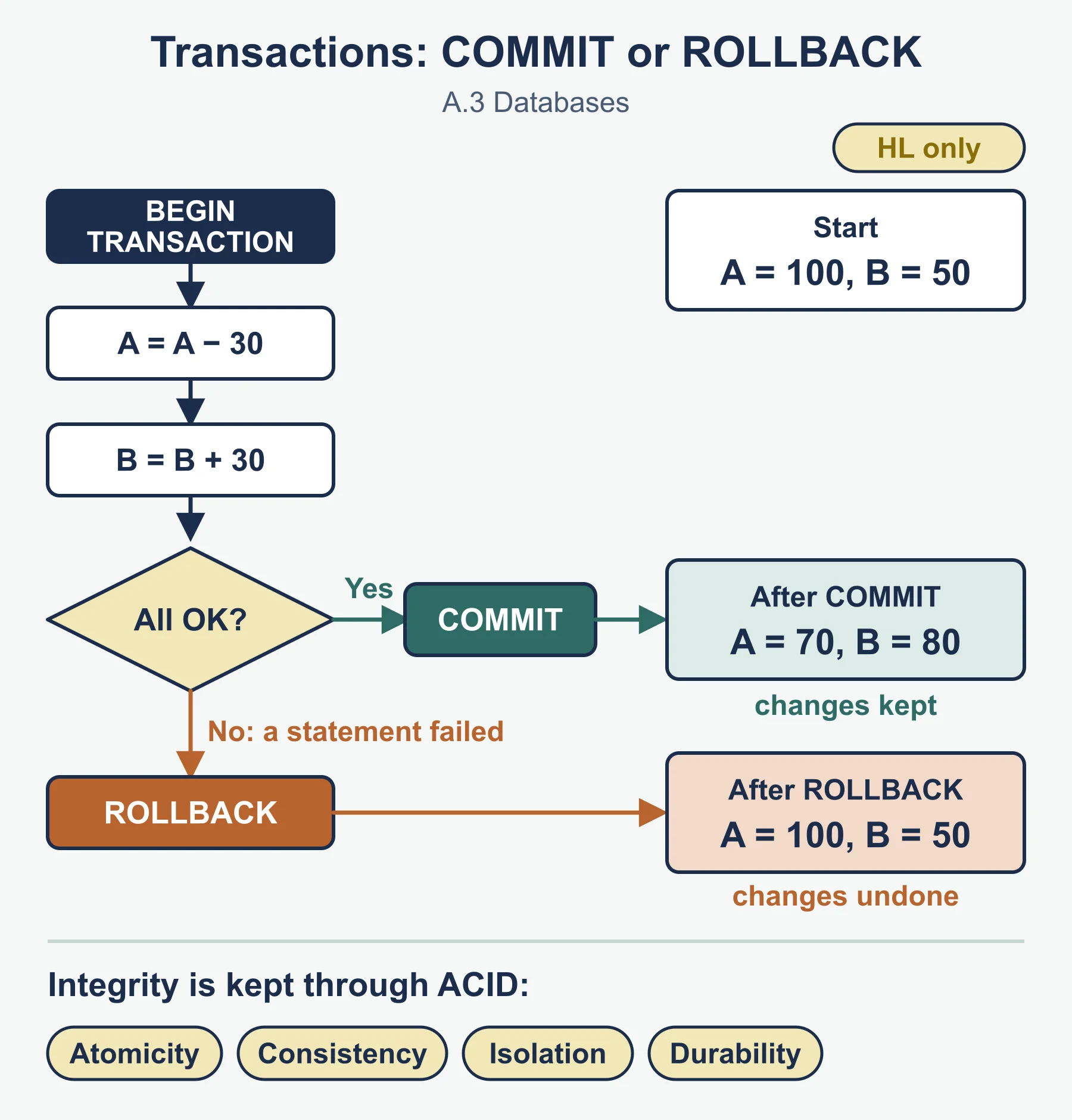
A transaction is a group of operations that must succeed or fail together, such as moving money from one account to another.
- Atomicity: all of the operations happen, or none do.
- Consistency: the database moves from one valid state to another, obeying its rules.
- Isolation: concurrent transactions do not interfere with each other.
- Durability: once committed, changes survive a crash or power failure.
BEGIN TRANSACTION starts it, COMMIT makes the changes permanent, and ROLLBACK undoes them if
something goes wrong.
Alternative databases and data warehouses are also HL content; use the full guide for the detail required.
Common mistakes
- Confusing a primary key with a foreign key.
- Forgetting the ON condition in a JOIN, which matches every row with every other row.
- Omitting WHERE from an UPDATE or DELETE.
- Using WHERE to filter aggregated groups instead of HAVING.
- Putting text values without quotation marks.
Frequently asked questions
Is SQL on the SL course? Yes. Two-table queries and updating data are required at SL and HL; aggregates, views and transactions are HL only.
Will the exam use one particular database system? Syntax varies between systems, so focus on correct, clear standard SQL.
Related pages
- A.3 Databases revision notes
- A.3 Databases practice questions
- A.4 Machine learning study guide
- Theme A study guide
Source
International Baccalaureate Organization, Diploma Programme Subject Brief, Sciences: Computer science, first assessment 2027 (© 2024). The complete subject guide is available through the IB Programme Resource Centre.
Related resources
-
Practice questions
IB DP Computer Science A.3: Databases – Practice Questions
Twelve original questions on keys, flat files, two-table SQL, updates, and HL aggregates and transactions for IB DP Computer Science A.3, with worked answers.
Computer Science · International Baccalaureate · IB
Try questions -
Revision notes
IB DP Computer Science A.3: Databases – Revision Notes
Recall notes on IB DP Computer Science A.3 Databases: keys, DDL and DML, an SQL clause sheet, query patterns, and HL views and ACID, with a self-test.
Computer Science · International Baccalaureate · IB
Revise topic -
Study guides
IB DP Computer Science (DP Computer Science): Normalisation to Third Normal Form
Study guide to normalisation in IB DP Computer Science A.3: anomalies, dependencies, first, second and third normal form, with a full worked example.
Computer Science · International Baccalaureate · IB
Read guide
Get free revision emails (optional)
Occasional emails with practice questions, worked explanations and links to free resources for the qualification and subjects you choose. No spam, and you can unsubscribe from any email. The free tools on this site never need an email.