
Study Guides
IB DP Computer Science A.1: Computer Fundamentals
Study guide to A.1 Computer fundamentals in IB DP Computer Science (first assessment 2027): the CPU, the fetch-execute cycle, storage, binary data and the OS.
- Subject
- Computer Science
- Level
- IB
- Topic
- A.1 – Computer fundamentals
- Author
- Marlbridge Academic Team
- Updated
- Reviewed by
- Harris Khan (what this means)
Aligned to International Baccalaureate IB Diploma Programme Computer Science (DP Computer Science), First assessment 2027. Official subject brief .
Syllabus page (what it covers and how it is assessed): IB Diploma Programme Computer Science.
Found an error? Report a correction.
Need help with this topic? Request a free trial class for IB Diploma Programme Computer Science (DP Computer Science (2014) / DP Computer Science (2027)).
A.1 Computer fundamentals is the first sub-topic of Theme A, “Concepts of computer science”, in the IB Diploma Programme Computer Science course first assessed in 2027. It asks how a computer actually works: the parts of the processor, how an instruction is fetched and executed, where data and programs are stored, how every kind of data becomes binary, and what the operating system does. The subject brief gives it 11 teaching hours at SL and 18 at HL, and Theme A is examined on Paper 1 together with the pre-released case study.
Scope of this page. This page is written from the IB’s public Diploma Programme Subject Brief, Sciences: Computer science, first assessment 2027 (© International Baccalaureate Organization 2024) and the A.1 content summarised in our Theme A study guide. The detailed learning outcomes, including any HL-only extensions, are in the full DP Computer Science guide, available to IB schools through the Programme Resource Centre. Check your school’s copy for the exact content and depth.
What does A.1 cover?
- The hardware layer: the CPU and its components (control unit, arithmetic logic unit, registers); the fetch-execute cycle; primary and secondary storage.
- Data representation: how numbers, text, images and sound are represented in binary, and the units used to measure data (bits and bytes).
- The operating system: how it manages hardware resources and acts between applications and the machine.
What are the components of the CPU?
| Component | Role |
|---|---|
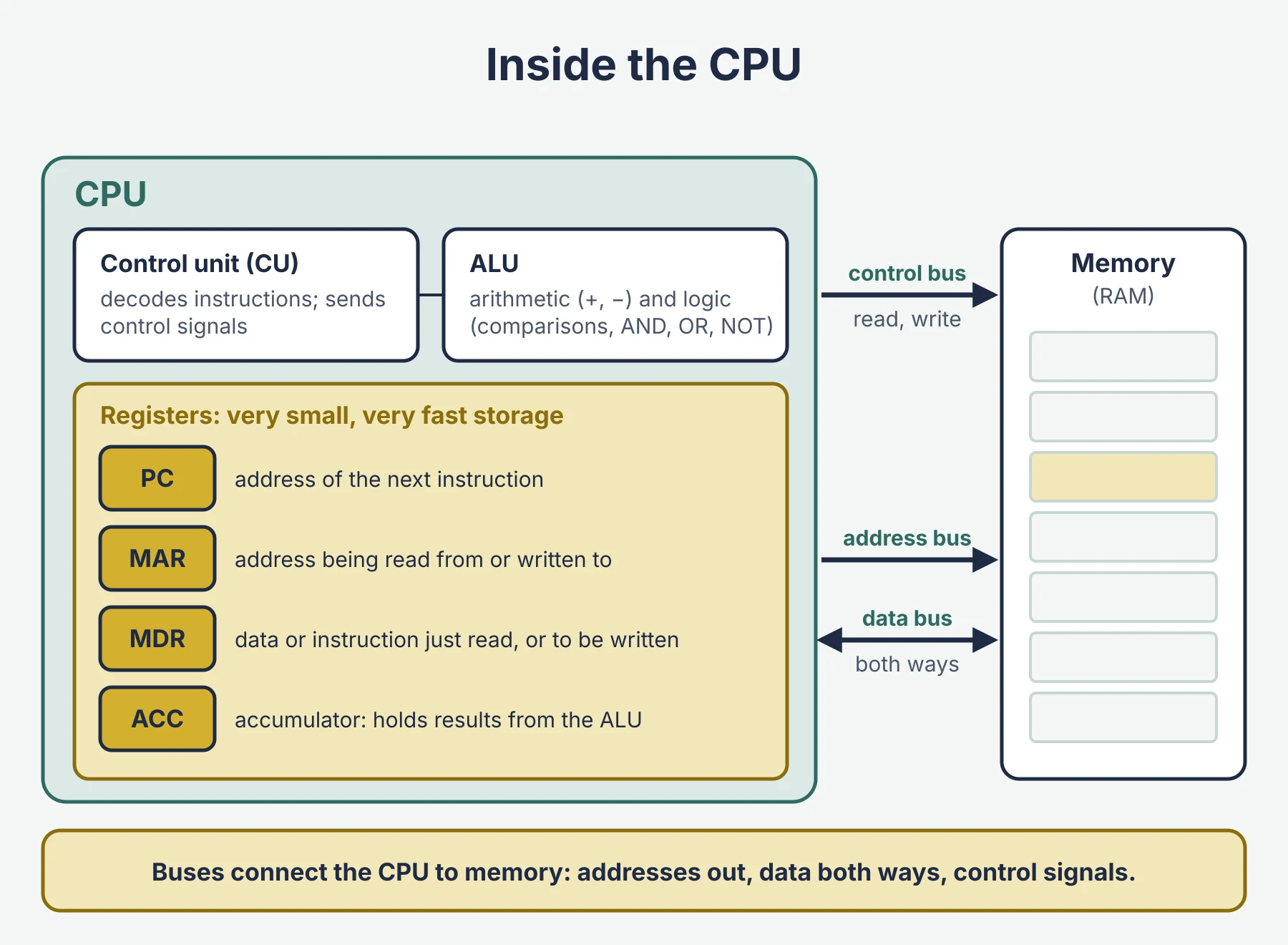
| Control unit (CU) | Decodes instructions and sends control signals that coordinate the other components and the movement of data |
| Arithmetic logic unit (ALU) | Carries out arithmetic (addition, subtraction) and logical operations (comparisons, AND, OR, NOT) |
| Registers | Very small, very fast storage locations inside the CPU that hold the data, addresses and instructions currently in use |
Registers you should be able to describe include the program counter (PC), which holds the address of the next instruction; the memory address register (MAR), which holds the address being read from or written to; the memory data register (MDR), which holds the data or instruction just read or about to be written; and an accumulator, which holds results from the ALU. The CPU is connected to memory by buses: the address bus carries addresses from the CPU, the data bus carries data in both directions, and the control bus carries signals such as “read” and “write”.
What happens in the fetch-execute cycle?
The CPU repeats the same cycle billions of times a second. An answer that earns credit says what happens to data at each stage, not only the stage names:
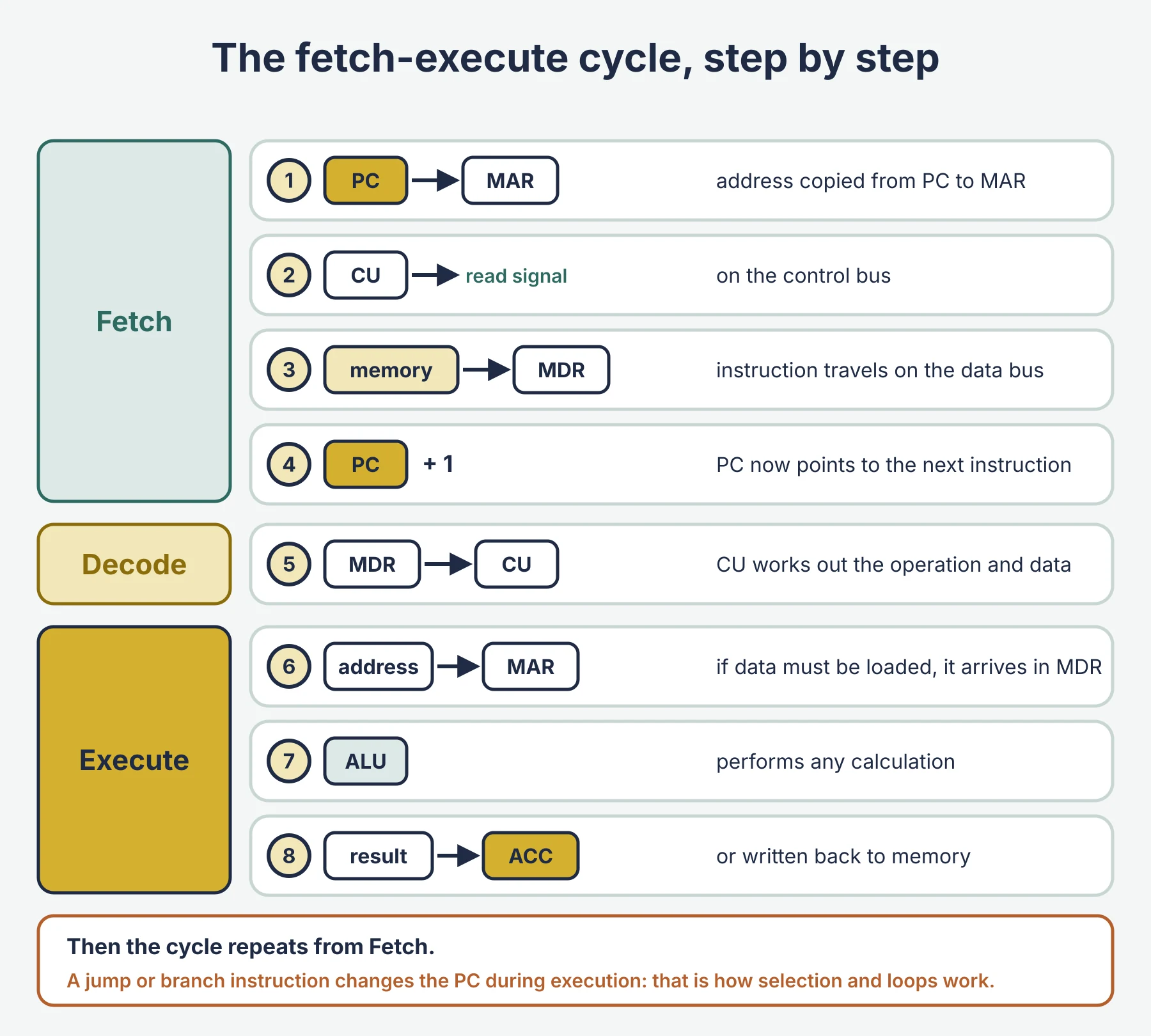
- Fetch. The address in the PC is copied to the MAR. The CU sends a read signal on the control bus; the instruction stored at that address travels along the data bus into the MDR. The PC is incremented so that it points to the next instruction.
- Decode. The instruction is passed from the MDR to the CU, which works out what operation it specifies and what data it needs.
- Execute. The CU sends signals to carry out the operation. If data must be loaded, its address goes to the MAR and the data arrives in the MDR; the ALU performs any calculation and the result is stored, for example in the accumulator or written back to memory.
A jump or branch instruction changes the PC during execution, which is how selection and loops in a program become different paths through memory.
How do primary and secondary storage differ?
| Primary storage | Secondary storage | |
|---|---|---|
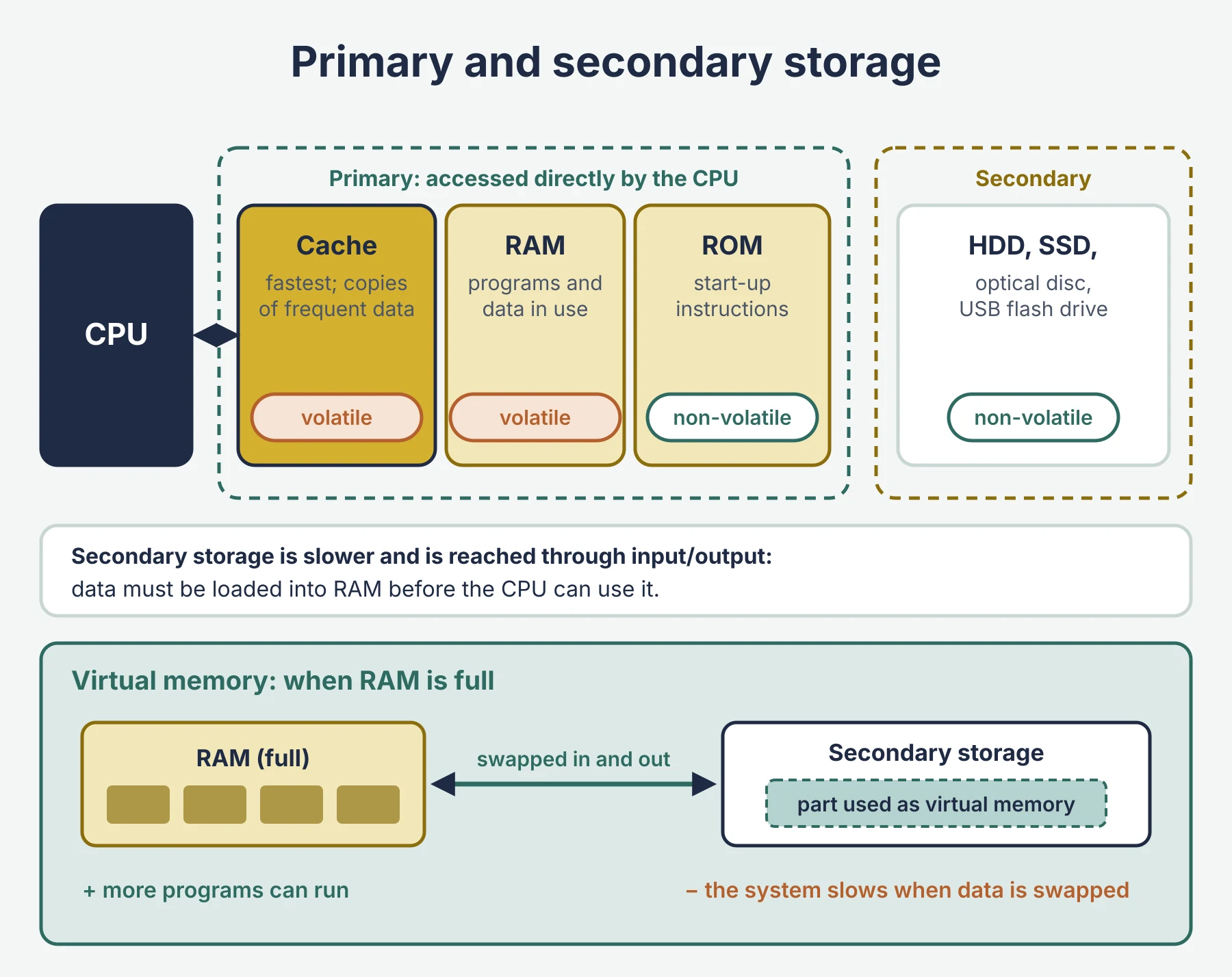
| Examples | RAM, cache, ROM | Hard disk drive, solid-state drive, optical disc, USB flash drive |
| Access | Directly by the CPU | Through input/output; data must be loaded into RAM first |
| Speed | Fast (cache fastest) | Slower |
| Volatility | RAM and cache are volatile; ROM is not | Non-volatile |
| Purpose | Programs and data currently in use; ROM holds start-up instructions | Long-term storage of files and programs |
Cache is small, very fast memory close to the CPU that keeps copies of frequently used instructions and data, so the CPU waits less for RAM. When RAM is full, the operating system can use part of secondary storage as virtual memory, which lets more programs run but slows the system when data must be swapped in and out.
How is data represented in binary?
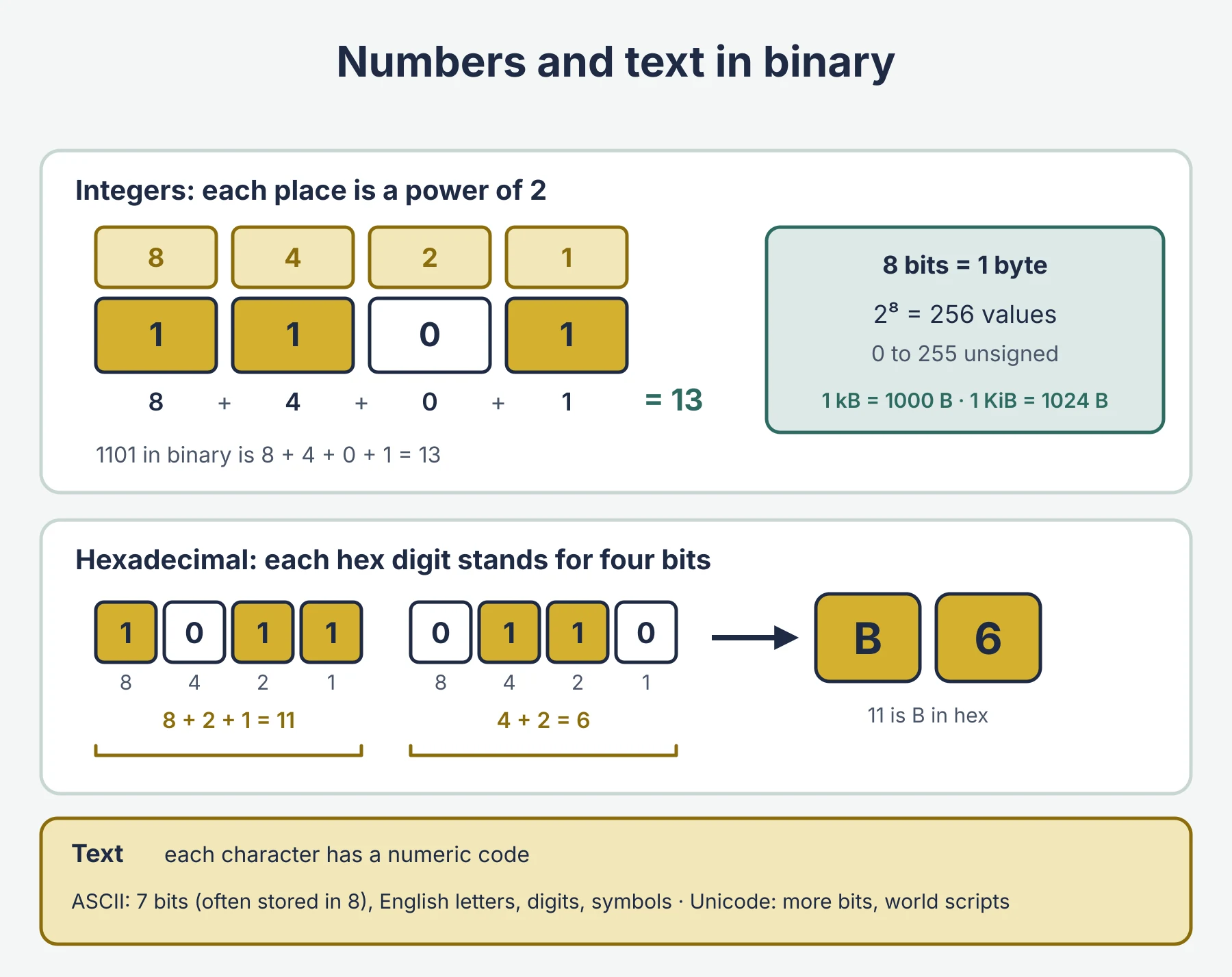
Everything stored or processed is a pattern of bits (binary digits, 0 or 1). Eight bits make a byte. Larger units are multiples: a kilobyte is 1000 bytes, a kibibyte 1024; check which convention your course uses.
Integers. Each binary place is a power of 2. 1101 in binary is 8 + 4 + 0 + 1 = 13. Eight bits can hold 2⁸ = 256 different values, 0 to 255 when unsigned. Hexadecimal (base 16, digits 0–9 and A–F) is a compact way to write binary: each hex digit stands for four bits, so 1011 0110 is B6.
Text. Each character is given a numeric code. ASCII uses 7 bits (often stored in 8), enough for English letters, digits and symbols; Unicode uses more bits so that it can represent characters from writing systems across the world.
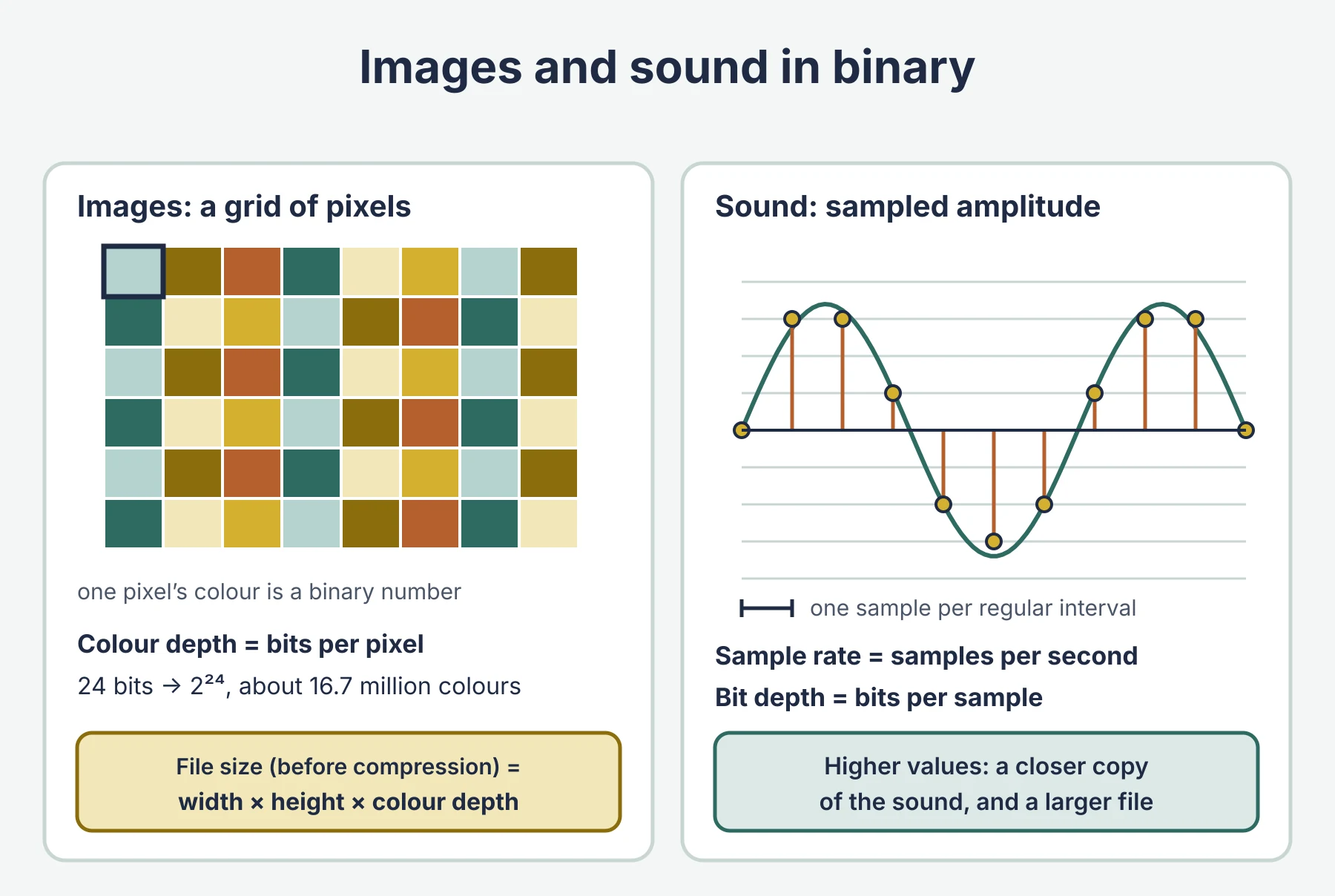
Images. A bitmap image is a grid of pixels; each pixel’s colour is stored as a binary number. The colour depth is the number of bits per pixel: 24 bits allow 2²⁴, about 16.7 million, colours. File size (before compression) = width × height × colour depth.
Sound. Sound is sampled: its amplitude is measured at regular intervals. The sample rate is samples per second; the bit depth is bits per sample. Higher values give a closer copy of the original sound and a larger file.
Worked example 1: calculating file sizes
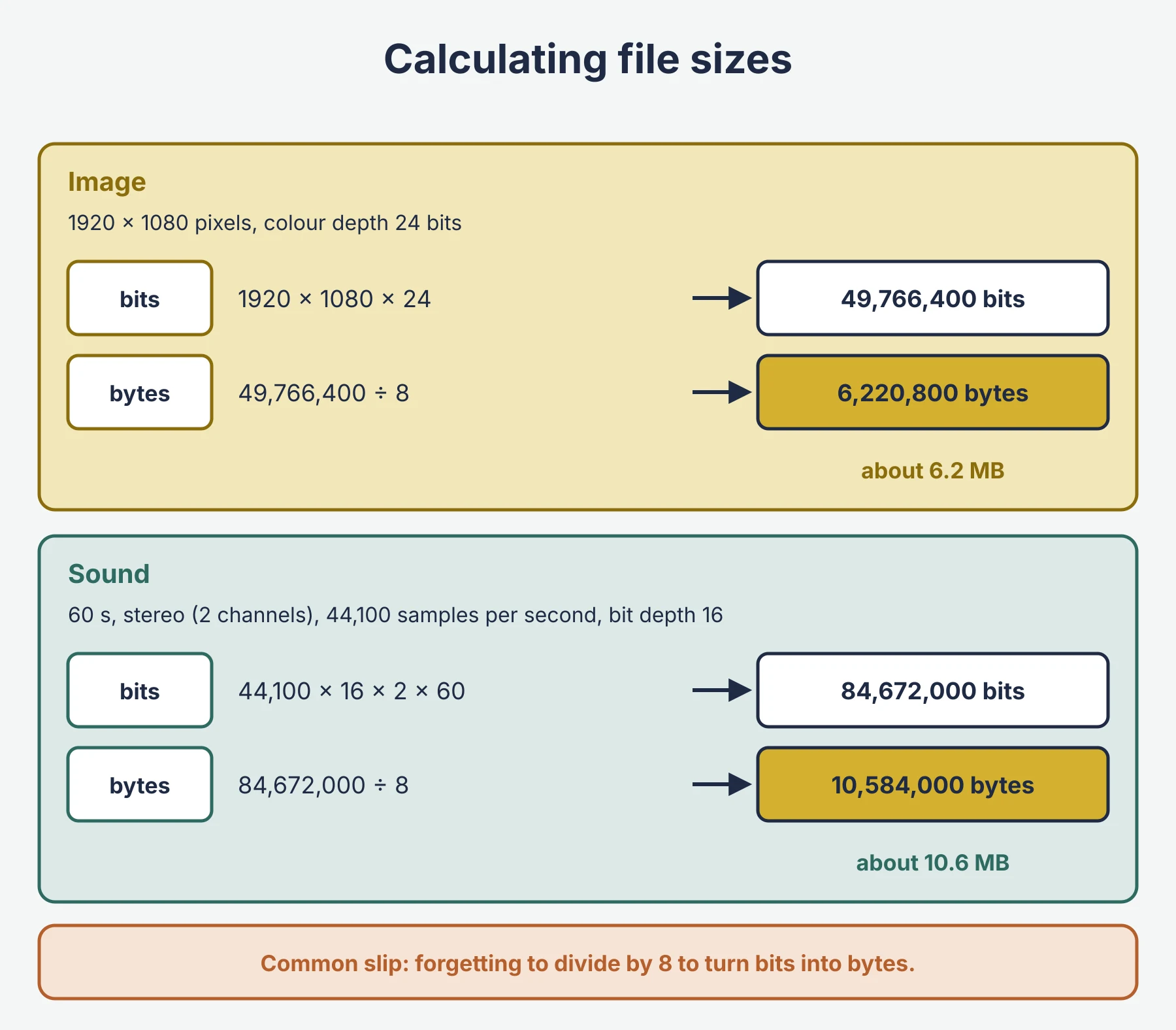
An image is 1920 × 1080 pixels with a colour depth of 24 bits.
- Bits = 1920 × 1080 × 24 = 49,766,400 bits.
- Bytes = 49,766,400 ÷ 8 = 6,220,800 bytes, about 6.2 MB.
A sound is recorded for 60 seconds in stereo (2 channels) at 44,100 samples per second with a bit depth of 16.
- Bits = 44,100 × 16 × 2 × 60 = 84,672,000 bits.
- Bytes = 84,672,000 ÷ 8 = 10,584,000 bytes, about 10.6 MB.
Worked example 2: an algorithm for denary to binary
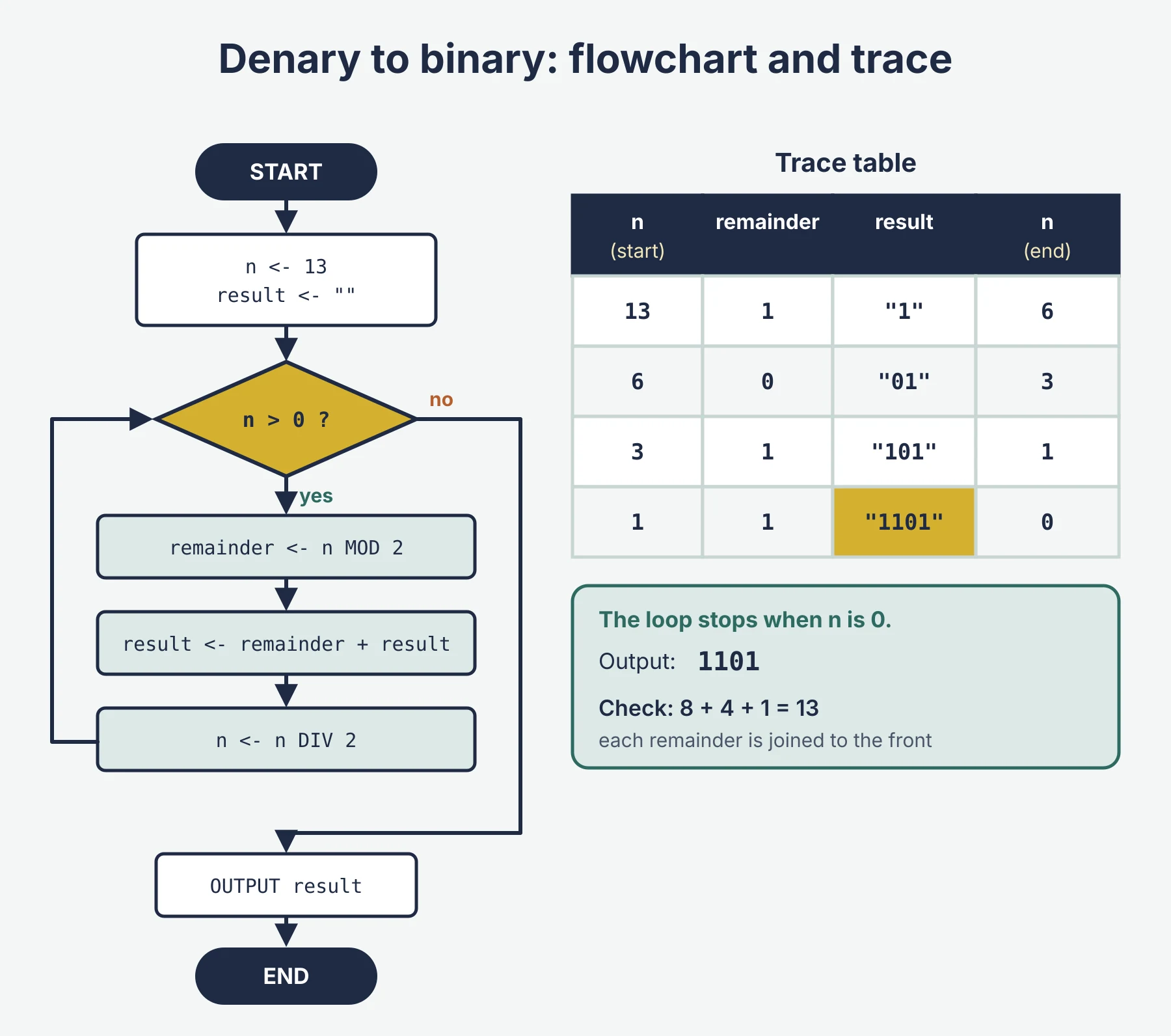
n <- 13
result <- ""
WHILE n > 0
    remainder <- n MOD 2
    result <- remainder + result      // join the digit to the front
    n <- n DIV 2
ENDWHILE
OUTPUT result| n (start of loop) | remainder | result | n (end of loop) |
|---|---|---|---|
| 13 | 1 | “1” | 6 |
| 6 | 0 | “01” | 3 |
| 3 | 1 | “101” | 1 |
| 1 | 1 | “1101” | 0 |
The loop stops when n is 0, and the output is 1101, which checks back to 8 + 4 + 1 = 13.
What does the operating system do?
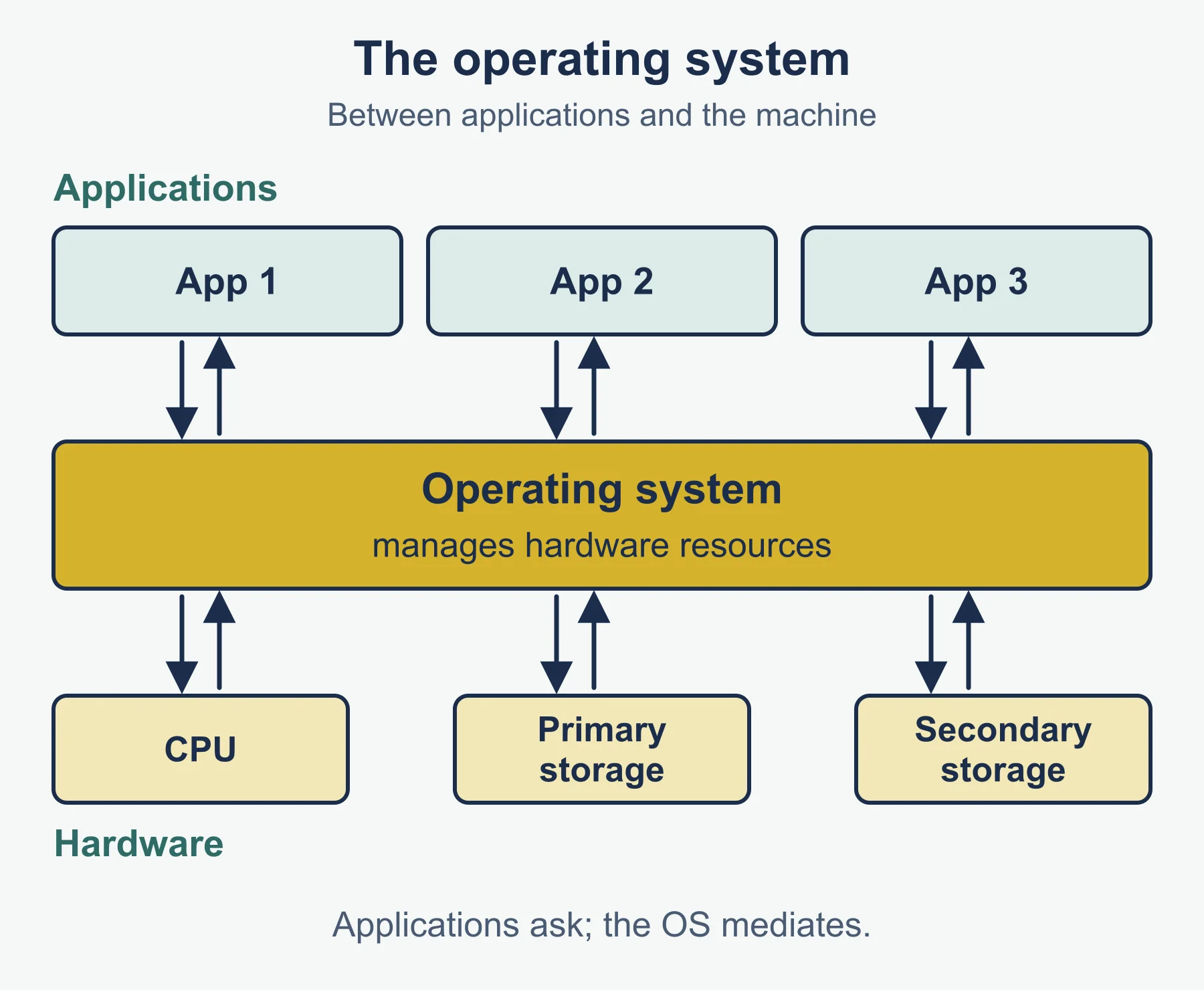
The operating system (OS) sits between applications and hardware. Its main roles:
- Memory management: allocating RAM to programs, keeping them apart, and using virtual memory.
- Process management: scheduling which program runs on the CPU and when, so several appear to run at once.
- Device management: communicating with peripherals through drivers.
- File management: organising data on secondary storage into files and folders, with permissions.
- Security: user accounts, passwords and access rights.
- User interface: a graphical or command-line interface through which users run programs.
Applications request services from the OS instead of controlling hardware directly, so the same program can run on different hardware.
Applying A.1 to a case-study scenario
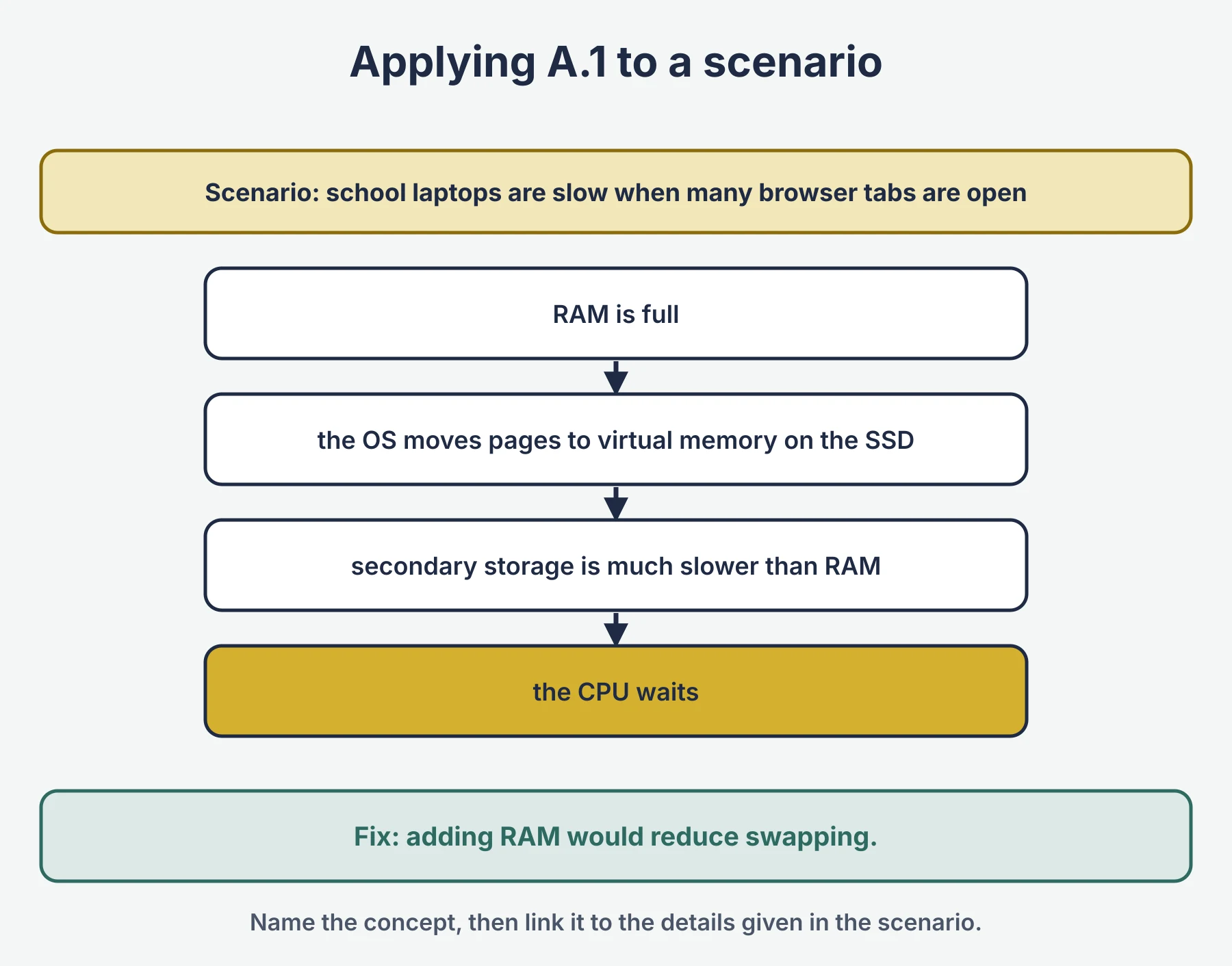
Paper 1 often sets Theme A content inside a scenario. Suppose a school’s laptops are slow when many browser tabs are open. A strong answer applies A.1 precisely: RAM is full, so the OS moves pages to virtual memory on the SSD; because secondary storage is much slower than RAM, the CPU waits, so adding RAM would reduce swapping. Naming the concepts and linking them to the details given is what earns marks.
Common mistakes
- Naming the stages of the fetch-execute cycle without saying what the PC, MAR and MDR do.
- Saying ROM is “secondary storage”: it is primary storage that the CPU can access directly.
- Forgetting to divide by 8 when converting bits to bytes.
- Describing the OS only as “the user interface”.
- Confusing cache (fast memory near the CPU) with virtual memory (secondary storage used as RAM).
Frequently asked questions
How many hours is A.1? The subject brief recommends 11 hours at SL and 18 at HL.
Which paper examines A.1? Paper 1, which is set on Theme A together with the pre-released case study.
Do I need to write code for A.1? Theme A is mostly explanation and application; short algorithms such as number conversion are useful practice, but programming is assessed mainly through Theme B.
Related pages
- A.1 Computer fundamentals revision notes
- A.1 Computer fundamentals practice questions
- A.2 Networks study guide
- Theme A study guide
Source
International Baccalaureate Organization, Diploma Programme Subject Brief, Sciences: Computer science, first assessment 2027 (© 2024). The complete subject guide is available through the IB Programme Resource Centre.
Related resources
-
Practice questions
IB DP Computer Science A.1: Computer Fundamentals – Practice Questions
Twelve original questions on the CPU, fetch-execute, storage, binary, file sizes, a trace table and the OS for IB DP Computer Science A.1, with worked answers.
Computer Science · International Baccalaureate · IB
Try questions -
Revision notes
IB DP Computer Science A.1: Computer Fundamentals – Revision Notes
Recall notes on IB DP Computer Science A.1 Computer fundamentals: CPU registers, fetch-execute, storage, binary, hex, file sizes and the OS, with a self-test.
Computer Science · International Baccalaureate · IB
Revise topic -
Study guides
IB DP Computer Science (DP Computer Science): Control Systems (HL)
HL study guide to control systems in IB DP Computer Science A.1: sensors, controllers, actuators, feedback, open and closed loops, with worked scenarios.
Computer Science · International Baccalaureate · IB
Read guide
Get free revision emails (optional)
Occasional emails with practice questions, worked explanations and links to free resources for the qualification and subjects you choose. No spam, and you can unsubscribe from any email. The free tools on this site never need an email.