
Study Guides
IB DP Computer Science A.2: Networks
Study guide to A.2 Networks in IB DP Computer Science (first assessment 2027): clients and servers, devices, TCP/IP layers, protocols and packet switching.
- Subject
- Computer Science
- Level
- IB
- Topic
- A.2 – Networks
- Author
- Marlbridge Academic Team
- Updated
- Reviewed by
- Harris Khan (what this means)
Aligned to International Baccalaureate IB Diploma Programme Computer Science (DP Computer Science), First assessment 2027. Official subject brief .
Syllabus page (what it covers and how it is assessed): IB Diploma Programme Computer Science.
Found an error? Report a correction.
Need help with this topic? Request a free trial class for IB Diploma Programme Computer Science (DP Computer Science (2014) / DP Computer Science (2027)).
A.2 Networks is the second sub-topic of Theme A, “Concepts of computer science”, in the IB Diploma Programme Computer Science course first assessed in 2027. It explains how computers communicate: the roles of clients and servers, the difference between local and wide area networks, the devices that move data, the protocols that govern it, and how data crosses the internet in packets. The subject brief recommends 11 hours at SL and 18 at HL, and A.2 is examined on Paper 1 with the pre-released case study.
Scope of this page. This page is written from the IB’s public Diploma Programme Subject Brief, Sciences: Computer science, first assessment 2027 (© International Baccalaureate Organization 2024) and the A.2 content summarised in our Theme A study guide. The detailed learning outcomes are in the full DP Computer Science guide; check your school’s copy for the exact content and depth.
What does A.2 cover?
- Network fundamentals: clients and servers; local area networks (LANs) and wide area networks (WANs).
- Network devices: gateways, hardware firewalls, modems, network interface cards, routers, switches and wireless access points, and how they map to the layers of the TCP/IP model (SL and HL).
- Protocols: TCP, UDP, HTTP, HTTPS and DHCP.
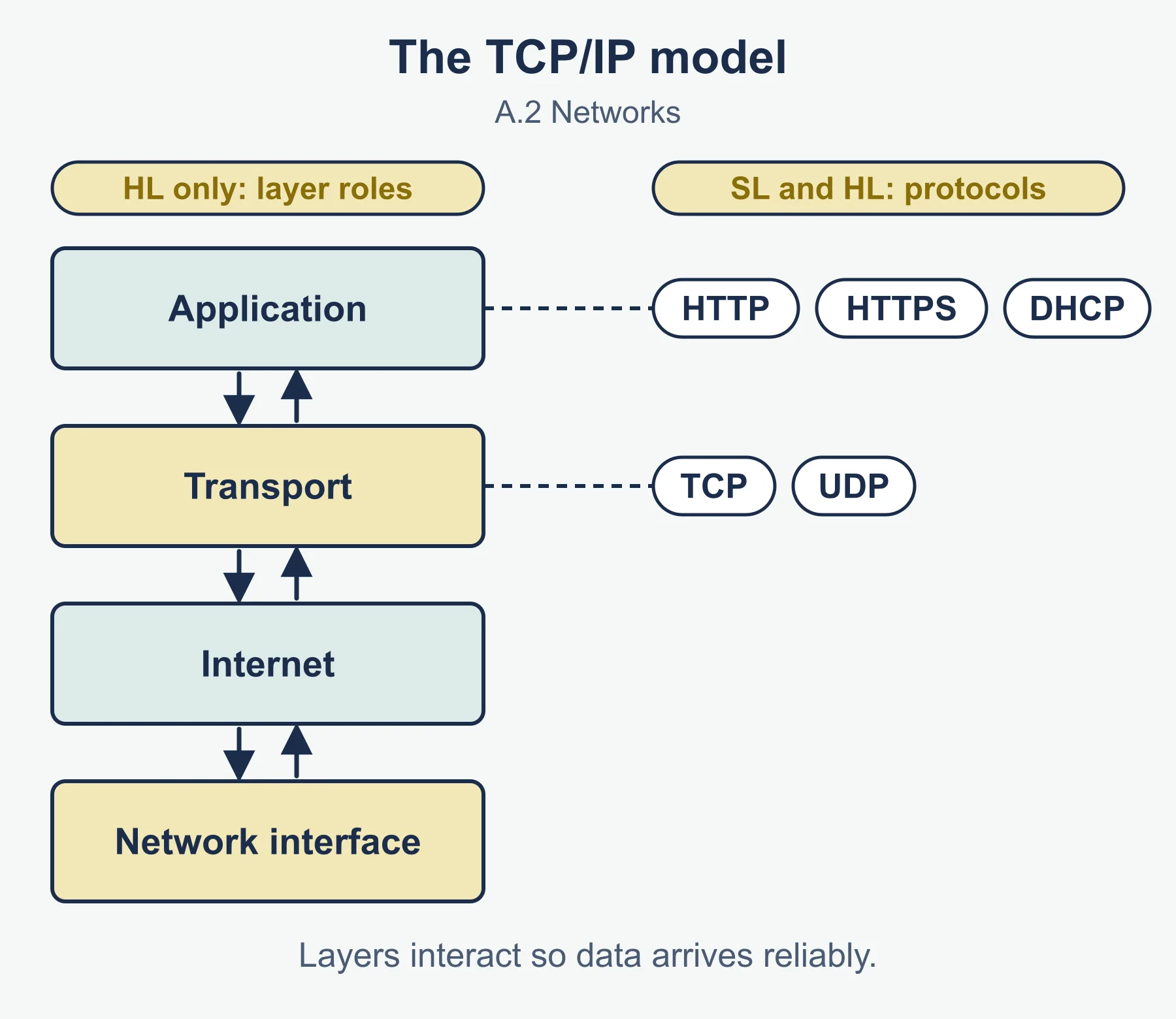
- HL only: the function of the TCP/IP model itself: the role of the application, transport, internet and network interface layers and how they interact to ensure reliable transmission.
- Data transmission: packet switching, bandwidth, common causes of transmission error, and why the internet’s architecture is described as decentralised.
Clients, servers, LANs and WANs
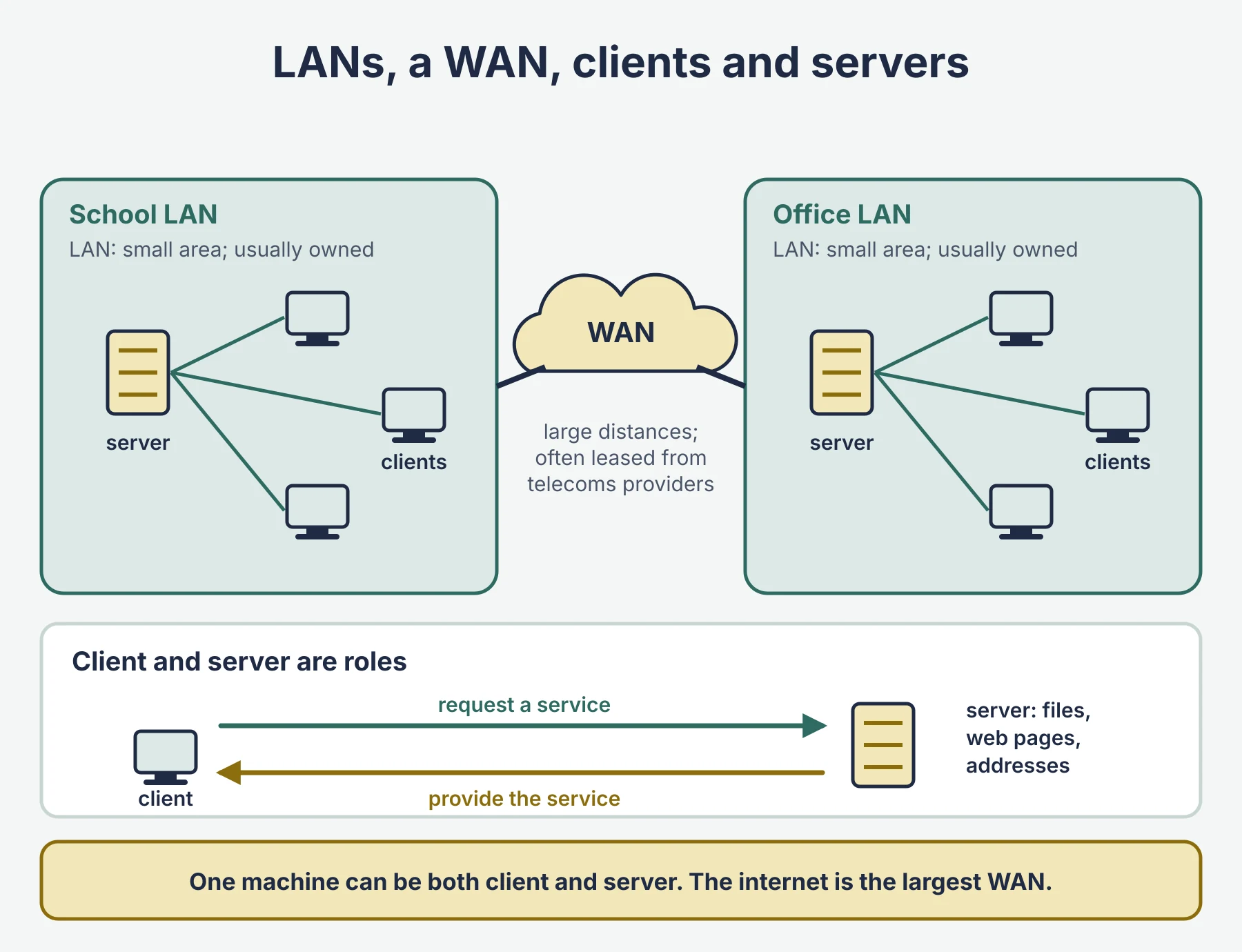
A server is a computer or program that provides a service, such as storing files, hosting web pages or handing out addresses. A client requests that service. One machine can be both: a laptop is a client when it browses the web and a server when it shares a printer.
A LAN covers a small geographical area, such as a school or office, and the organisation usually owns its infrastructure. A WAN connects LANs over large distances, often through infrastructure leased from telecommunications providers; the internet is the largest WAN.
What does each device do?
| Device | Function | TCP/IP layer it typically works at |
|---|---|---|
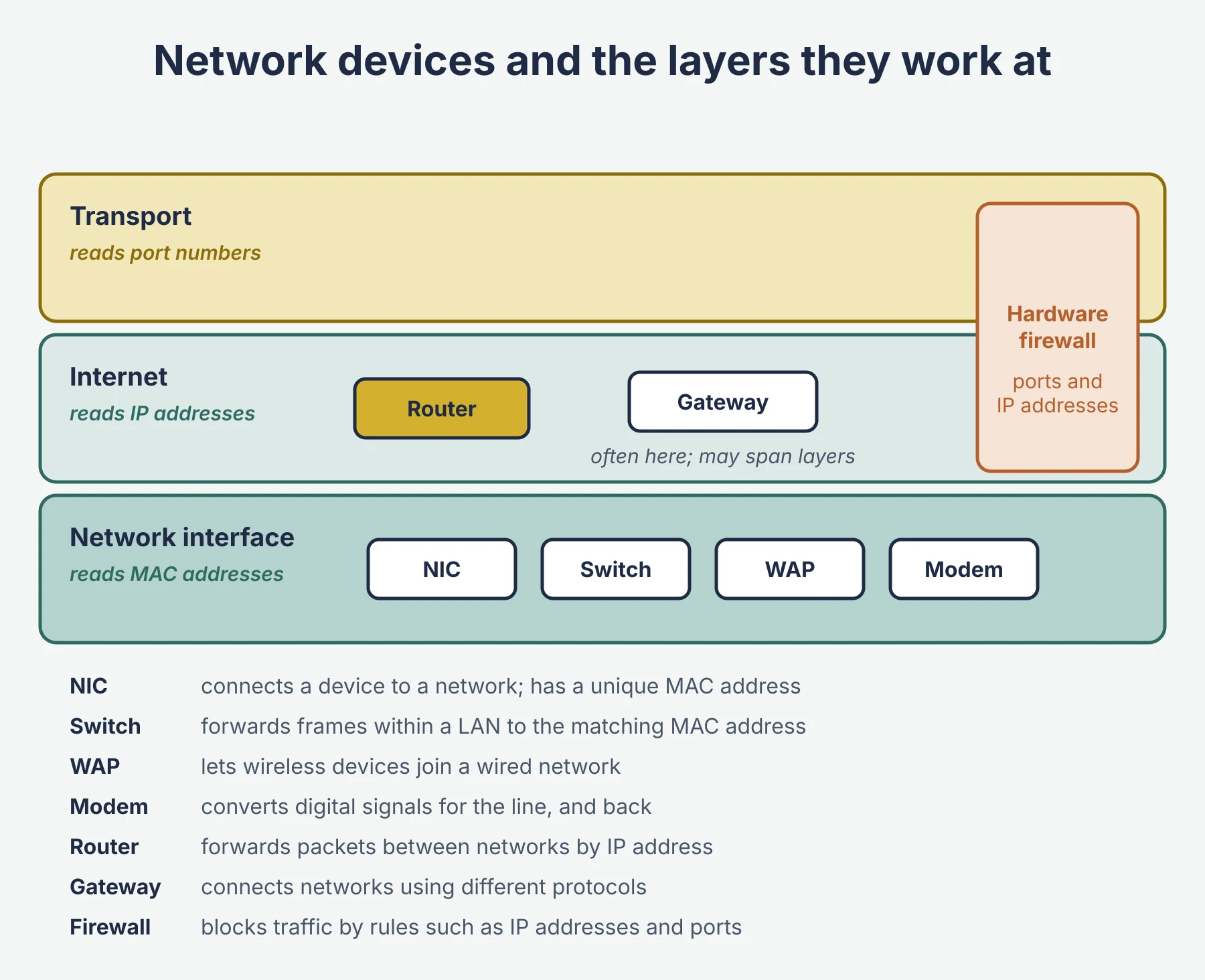
| Network interface card (NIC) | Connects a device to a network; has a unique MAC address | Network interface |
| Switch | Connects devices within a LAN and forwards frames only to the device whose MAC address matches | Network interface |
| Wireless access point (WAP) | Lets wireless devices join a wired network | Network interface |
| Modem | Converts digital signals to a form that can travel over a line (and back) | Network interface |
| Router | Forwards packets between different networks using IP addresses, choosing a route | Internet |
| Gateway | Connects networks that use different protocols, translating between them | Often the internet layer, and may work across several layers |
| Hardware firewall | Inspects traffic entering or leaving a network and blocks it according to rules, such as IP addresses and port numbers | Internet and transport (some firewalls also inspect application data) |
The reason for the mapping is what each device reads: a switch reads MAC addresses (network interface layer); a router reads IP addresses (internet layer); a firewall that filters by port reads transport-layer information.
Which protocols must you know?
A protocol is an agreed set of rules for communication.
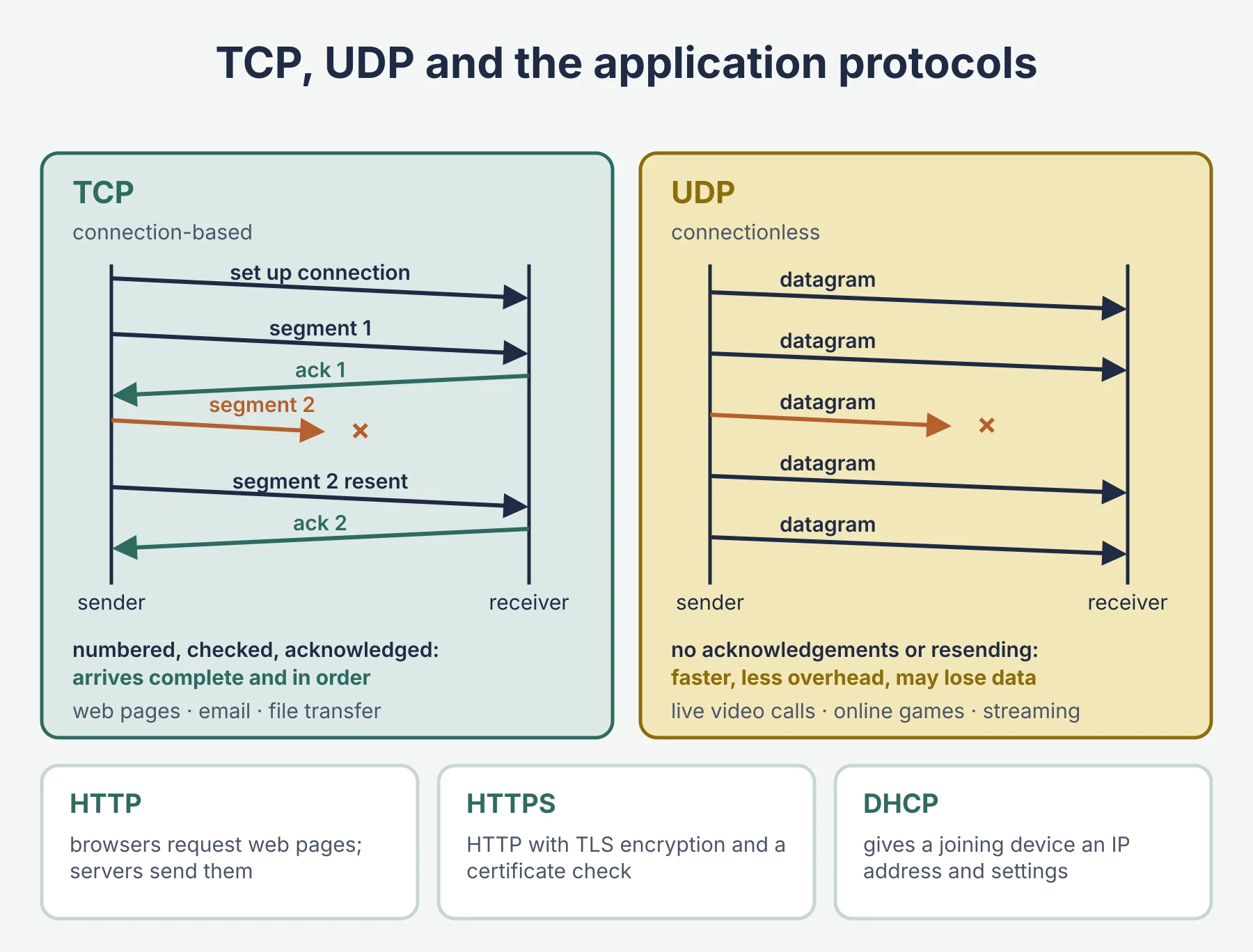
- TCP (Transmission Control Protocol): connection-based; sets up a connection, numbers the segments, checks for errors, acknowledges receipt and resends anything lost, so data arrives complete and in order. Used for web pages, email and file transfer.
- UDP (User Datagram Protocol): connectionless; sends datagrams without acknowledgements or resending. Faster with less overhead, but some data may be lost. Used for live video calls, online games and streaming, where speed matters more than every packet.
- HTTP (Hypertext Transfer Protocol): the application-layer rules by which browsers request web pages and servers send them.
- HTTPS: HTTP with encryption (using TLS), so data cannot be read if intercepted and the server’s identity can be checked with a certificate. Essential for logins and payments.
- DHCP (Dynamic Host Configuration Protocol): automatically gives a device joining a network an IP address and other settings, such as the default gateway, for a period of time.
The TCP/IP model (layer functions are HL only)
| Layer | Role | Examples |
|---|---|---|
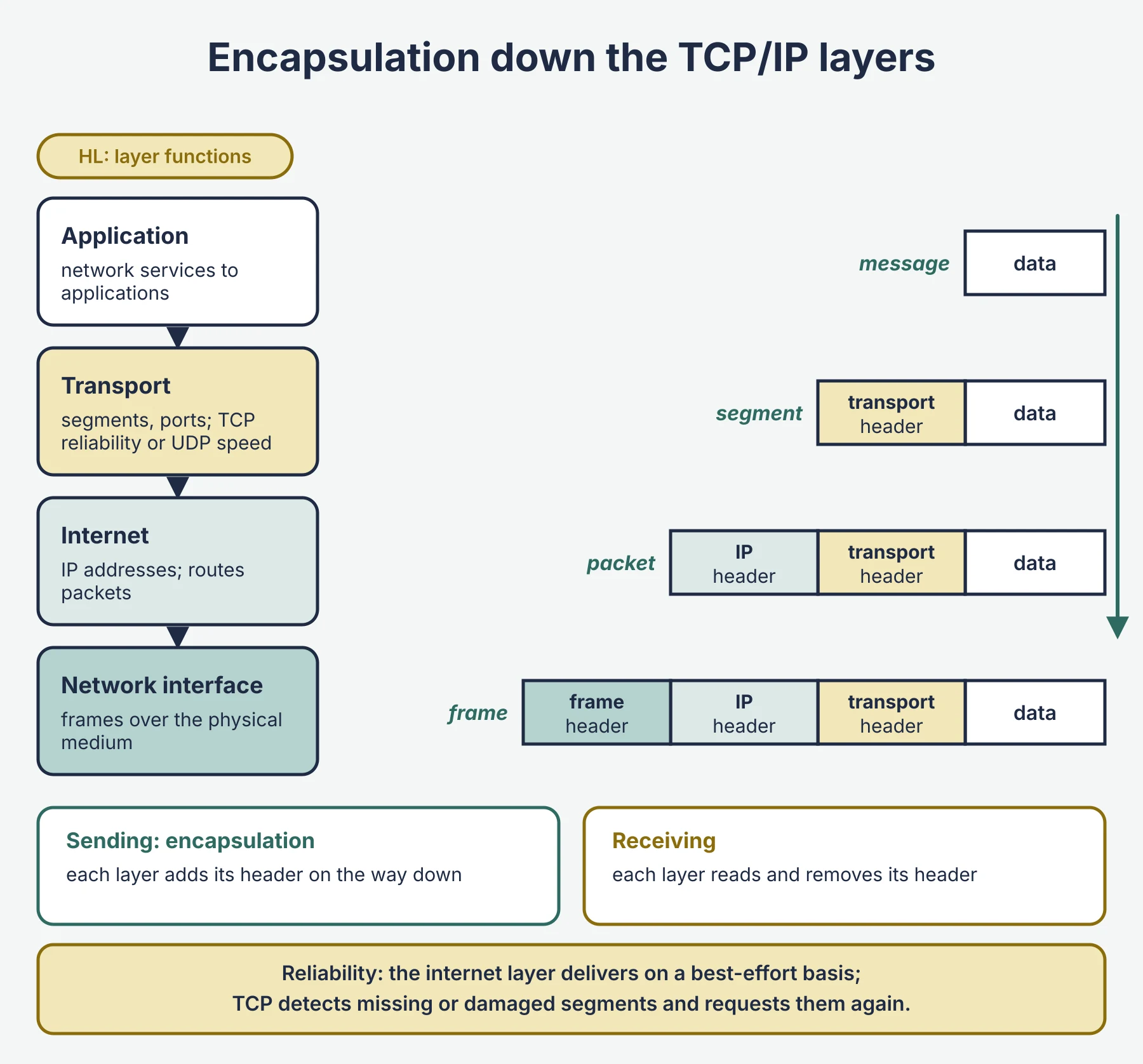
| Application | Provides network services to applications | HTTP, HTTPS, DHCP |
| Transport | Splits data into segments, manages ports, and provides reliability (TCP) or speed (UDP) | TCP, UDP |
| Internet | Adds IP addresses and routes packets across networks | IP; routers |
| Network interface | Sends frames over the physical medium within one network | Ethernet, Wi-Fi; NICs, switches |
When a message is sent, each layer adds its own header (encapsulation) as data moves down; at the receiver, each layer reads and removes its header as data moves up. Reliability comes from the layers working together: the internet layer delivers packets on a best-effort basis, and TCP at the transport layer detects missing or damaged segments and requests them again.
How does packet switching work?
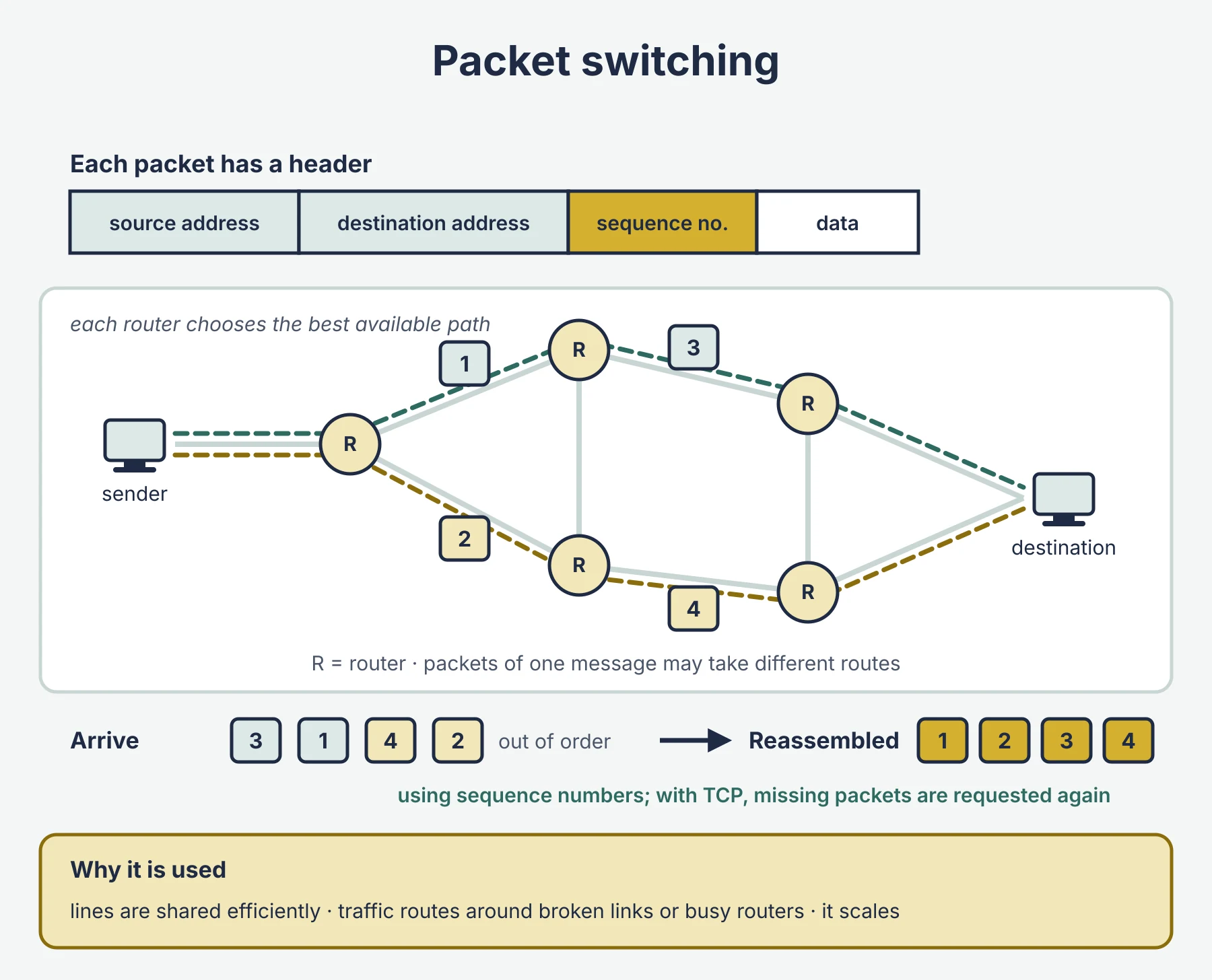
Data is split into packets, each with a header containing the source and destination addresses and a sequence number. Packets travel independently: each router chooses the best available path, so packets of one message may take different routes and arrive out of order. At the destination they are reassembled using the sequence numbers; with TCP, missing packets are requested again.
Why it is used: lines are shared efficiently rather than reserved for one conversation; traffic can be routed around a broken link or a busy router; and it scales to very large networks.
Bandwidth and transmission errors
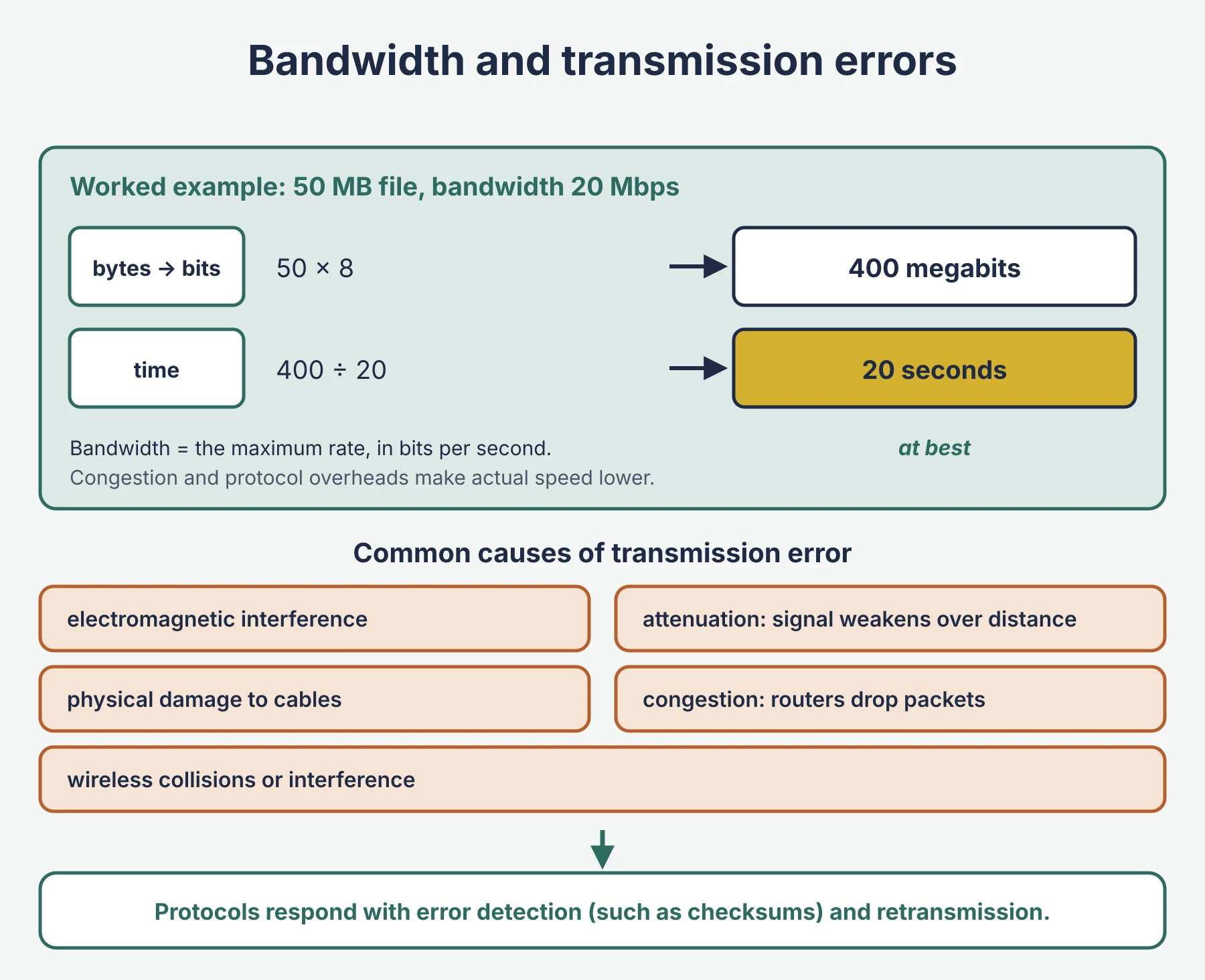
Bandwidth is the maximum rate at which data can be transferred, measured in bits per second. Actual speed is often lower because of congestion and protocol overheads.
Worked example: a 50 MB file is sent over a connection with a bandwidth of 20 Mbps.
- 50 MB = 50 × 8 = 400 megabits.
- Time = 400 ÷ 20 = 20 seconds, at best.
Common causes of transmission error: electromagnetic interference; signal weakening over long cables or distance from a wireless access point (attenuation); physical damage to cables; congestion, which causes routers to drop packets; and collisions or interference between wireless signals. Protocols respond with error detection, such as checksums, and retransmission.
Why is the internet decentralised?
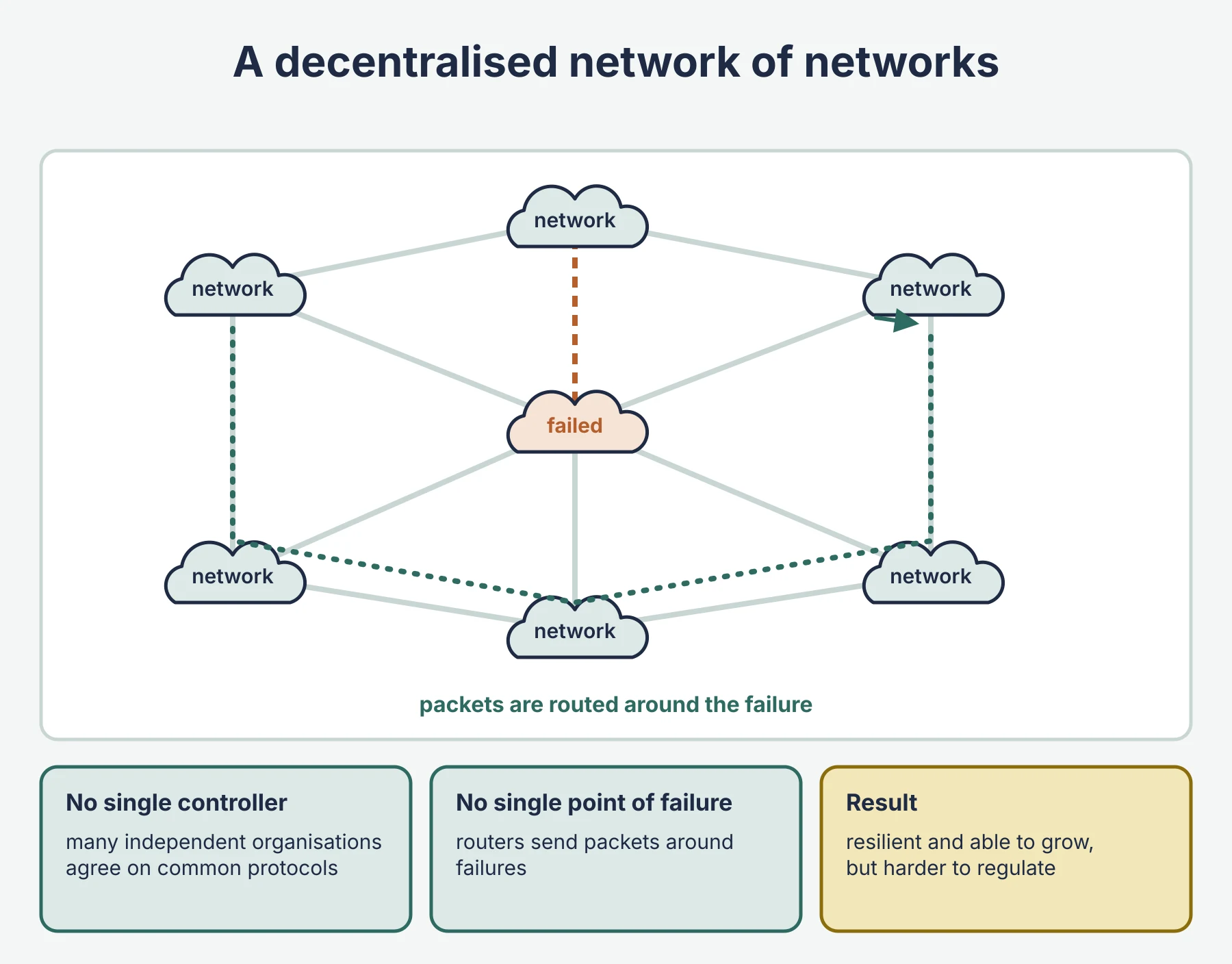
No single computer or organisation controls the internet. It is a network of networks, run by many independent organisations that agree to use common protocols. Because routers can send packets around failures, there is no single point whose failure stops the whole system. This makes the internet resilient and able to grow, but also harder to regulate.
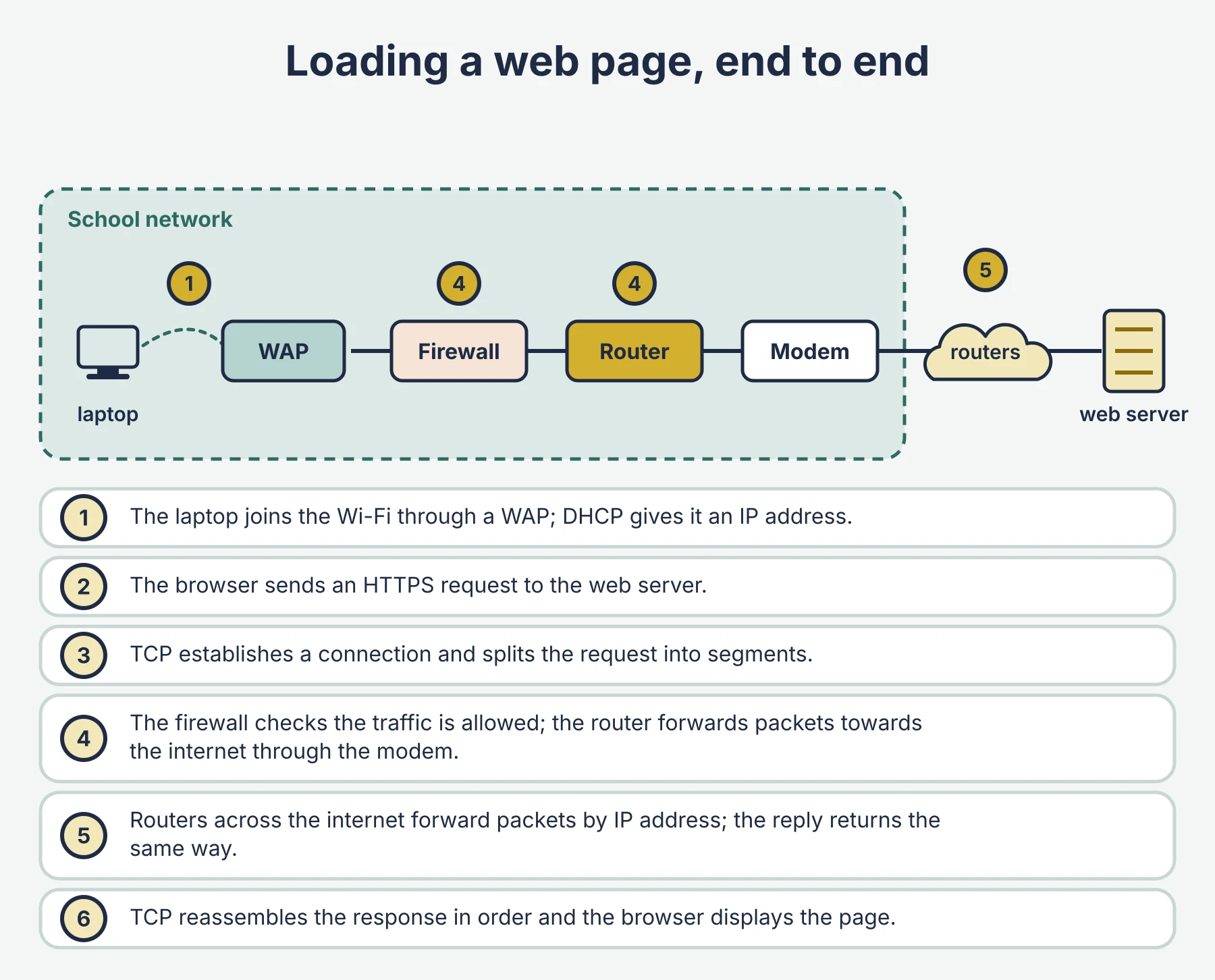
Worked example: loading a web page
- A laptop joins the school Wi-Fi through a WAP; DHCP gives it an IP address.
- The browser sends an HTTPS request to the web server.
- TCP establishes a connection and splits the request into segments.
- The school firewall checks that the traffic is allowed; the router forwards packets towards the internet through the modem.
- Routers across the internet forward packets by IP address; the server’s reply returns the same way.
- TCP reassembles the response in order and the browser displays the page.
Common mistakes
- Saying a switch and a router do the same thing: a switch works within a LAN using MAC addresses; a router connects networks using IP addresses.
- Calling HTTPS “a faster HTTP”: it adds encryption and authentication.
- Saying UDP is “unreliable so never used”: it is chosen when speed matters more than completeness.
- Forgetting the 8 when converting bytes to bits in bandwidth calculations.
- At SL, writing at length about layer functions when the question asks only for a device’s role.
Frequently asked questions
Is the TCP/IP model on the SL course? Mapping devices to the layers is SL and HL; the function of the model’s layers is HL only.
Do I need to know IP address formats in detail? Know what an IP address is for and how it differs from a MAC address; check the full guide for any further detail.
Related pages
- A.2 Networks revision notes
- A.2 Networks practice questions
- A.1 Computer fundamentals study guide
- Theme A study guide
Source
International Baccalaureate Organization, Diploma Programme Subject Brief, Sciences: Computer science, first assessment 2027 (© 2024). The complete subject guide is available through the IB Programme Resource Centre.
Related resources
-
Practice questions
IB DP Computer Science A.2: Networks – Practice Questions
Twelve original questions on network devices, protocols, the TCP/IP model, packet switching and bandwidth for IB DP Computer Science A.2, with worked answers.
Computer Science · International Baccalaureate · IB
Try questions -
Revision notes
IB DP Computer Science A.2: Networks – Revision Notes
Recall notes on IB DP Computer Science A.2 Networks: devices and layers, TCP, UDP, HTTP, HTTPS, DHCP, packet switching, bandwidth and errors, with a self-test.
Computer Science · International Baccalaureate · IB
Revise topic -
Study guides
IB DP Computer Science (DP Computer Science): Servers, Client-Server and Peer-to-Peer Models
Study guide to the function of servers (HL) and the comparison of client-server and peer-to-peer models (SL and HL) in IB DP Computer Science A.2.
Computer Science · International Baccalaureate · IB
Read guide
Get free revision emails (optional)
Occasional emails with practice questions, worked explanations and links to free resources for the qualification and subjects you choose. No spam, and you can unsubscribe from any email. The free tools on this site never need an email.