
Revision Notes
OxfordAQA IGCSE Computer Science (9210): Programming concepts – Revision Notes
Revision notes for OxfordAQA IGCSE Computer Science 9210 section 3.2.2: statement types, constants, loop choice, nesting, identifiers, traps and a self-test.
- Subject
- Computer Science
- Level
- IGCSE
- Topic
- Topic 2 – Programming
- Author
- Marlbridge Academic Team
- Updated
- Reviewed by
- Harris Khan (what this means)
Aligned to OxfordAQA IGCSE Computer Science (9210), For teaching from September 2017, exams from May/June 2019. Official specification .
Syllabus page (what it covers and how it is assessed): OxfordAQA IGCSE Computer Science.
Syllabus points this page covers
9210
- 3.2.2 Programming concepts
Found an error? Report a correction.
Need help with this topic? Request a free trial class for IGCSE Computer Science (9210).
Condensed notes for section 3.2.2 Programming concepts of OxfordAQA International GCSE Computer Science (9210). The full explanations and traced examples are in the programming concepts study guide.
What the specification asks
- Use, understand and combine: variable declaration, constant declaration, assignment, iteration, selection, subroutine (procedure/function).
- Know why named constants and variables are used.
- Use definite and indefinite iteration, with the condition at the start or the end.
- Use nested selection and nested iteration.
- Use meaningful identifier names (variables, constants, subroutines) and know why they matter.
Combining principles
Sequence (one statement after another), iteration/repetition and selection/choice are basic to all imperative languages. Every program is built from them.
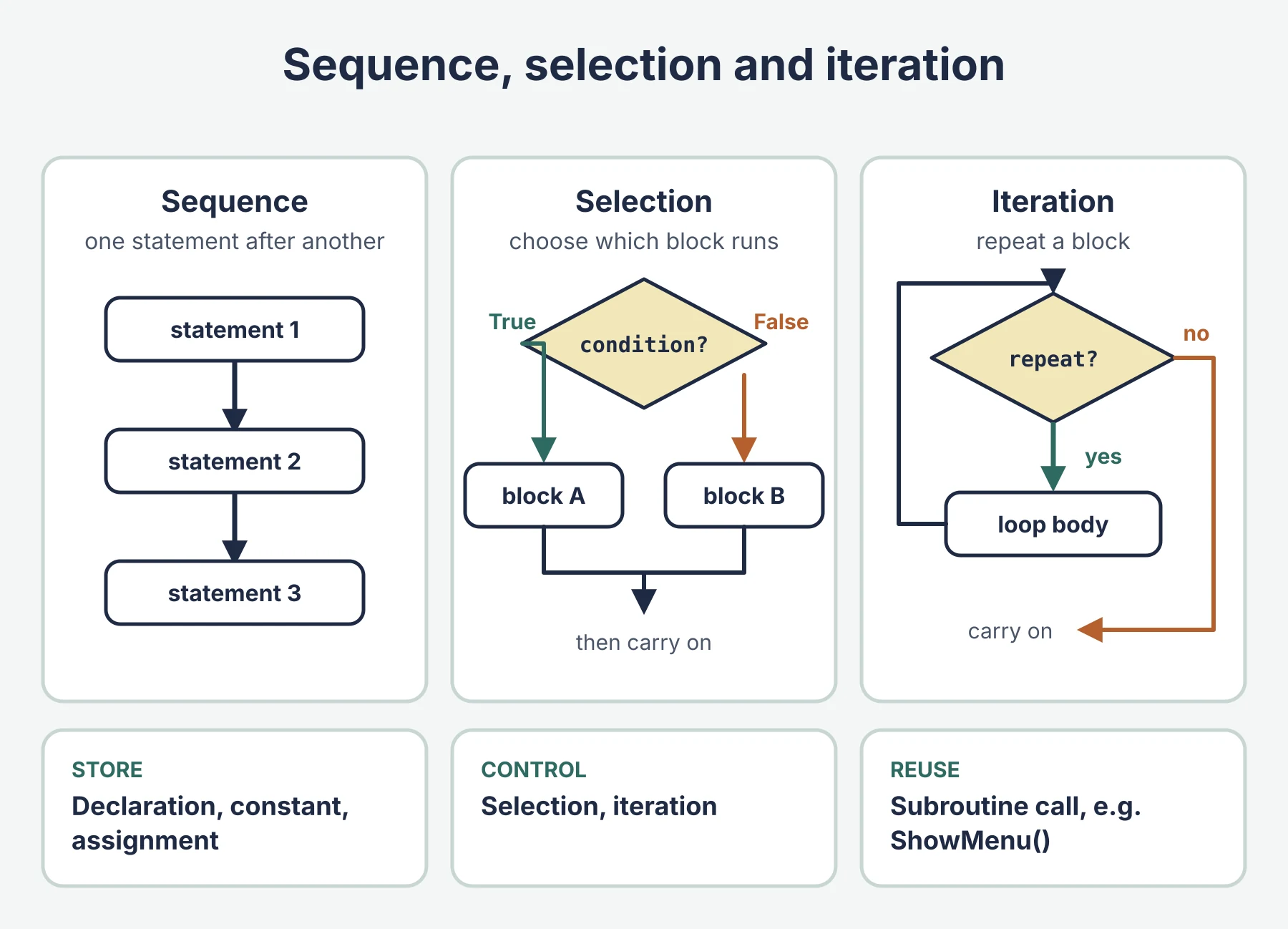
Statement types at a glance
| Type | Recognise it by | Example |
|---|---|---|
| Variable declaration | A name introduced to hold changing data | int lives; in C#, or first use in Python |
| Constant declaration | CONSTANT keyword; value fixed while running |
CONSTANT Rounds ← 10 |
| Assignment | ← (value on the right stored on the left) |
lives ← lives - 1 |
| Iteration | FOR, WHILE, REPEAT...UNTIL |
WHILE lives > 0 |
| Selection | IF ... THEN ... ELSE ... ENDIF |
IF lives = 0 THEN |
| Subroutine | A call by name | DrawBoard() |
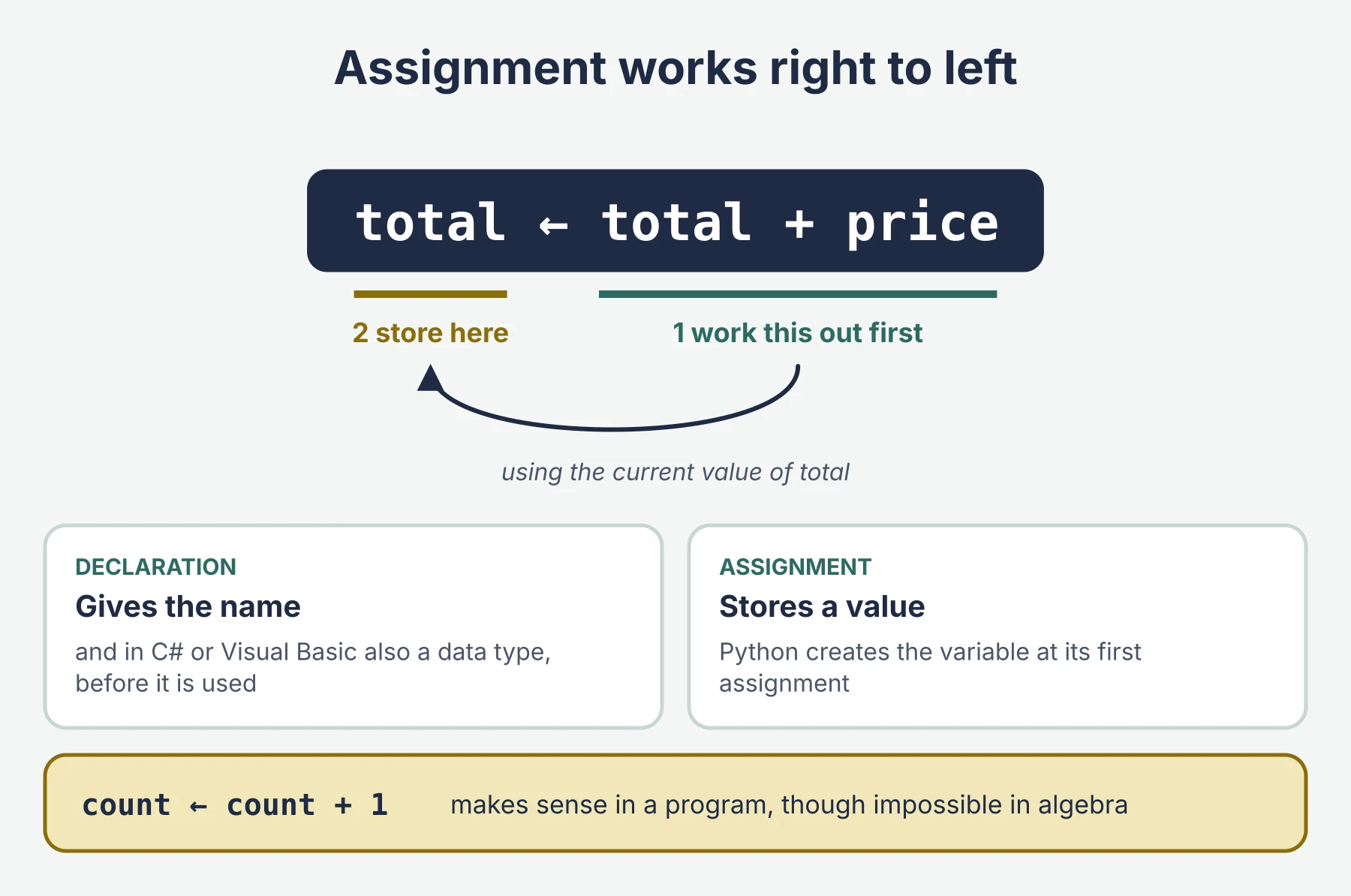
Why constants and variables
- Variables: hold values that change while the program runs, referred to by a name.
- Named constants: change the value in one place; code is easier to read (
Roundsnot10); the value cannot be changed by accident while running.
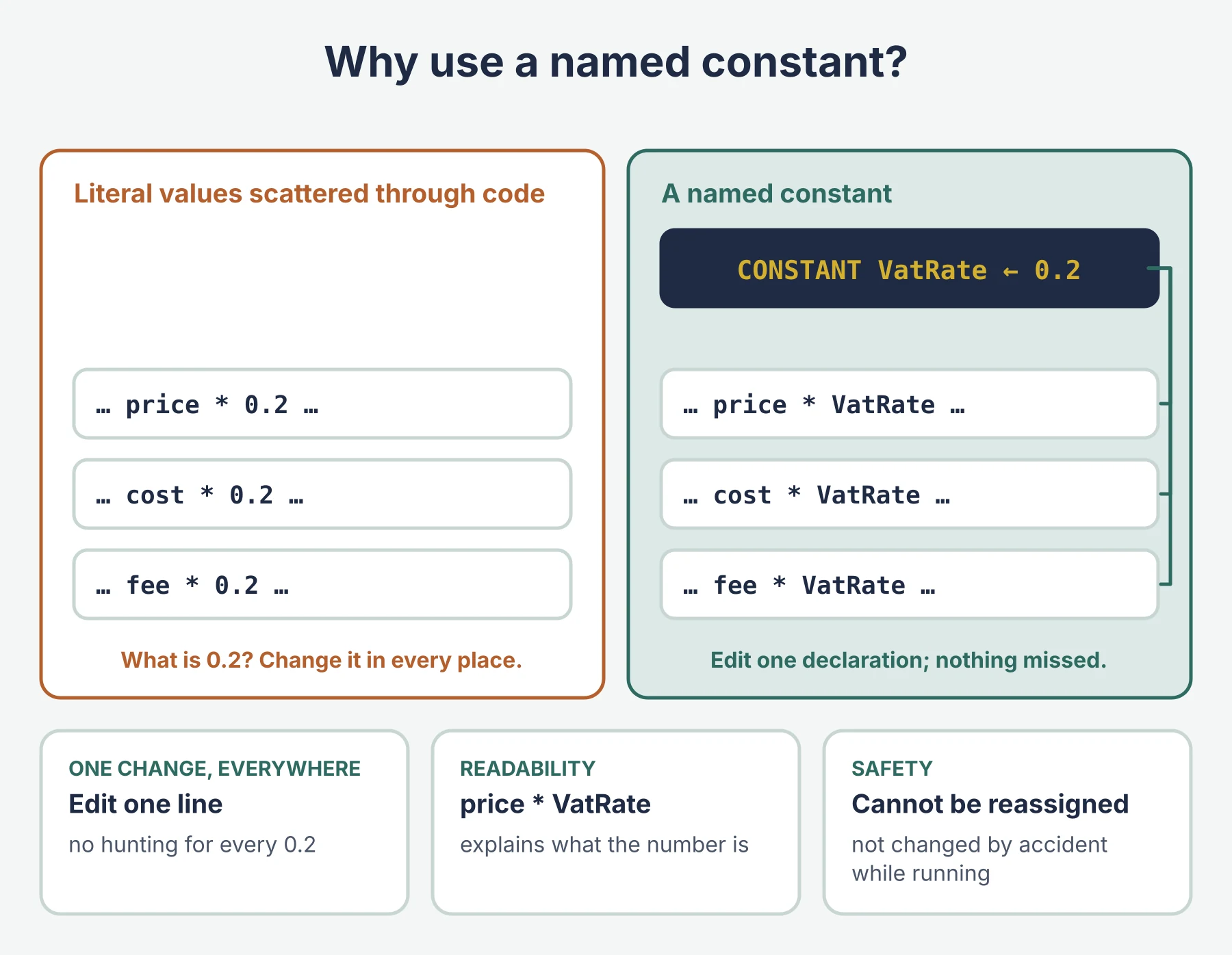
Loops compared
| Loop | Kind | Condition checked | Minimum runs | Repeats while… |
|---|---|---|---|---|
FOR i ← 1 TO n |
Definite | Count fixed at the start | 0 if the start value is beyond the end value | counter has not passed n |
WHILE cond |
Indefinite | Start | 0 | cond is true |
REPEAT ... UNTIL cond |
Indefinite | End | 1 | cond is false (stops when it becomes true) |
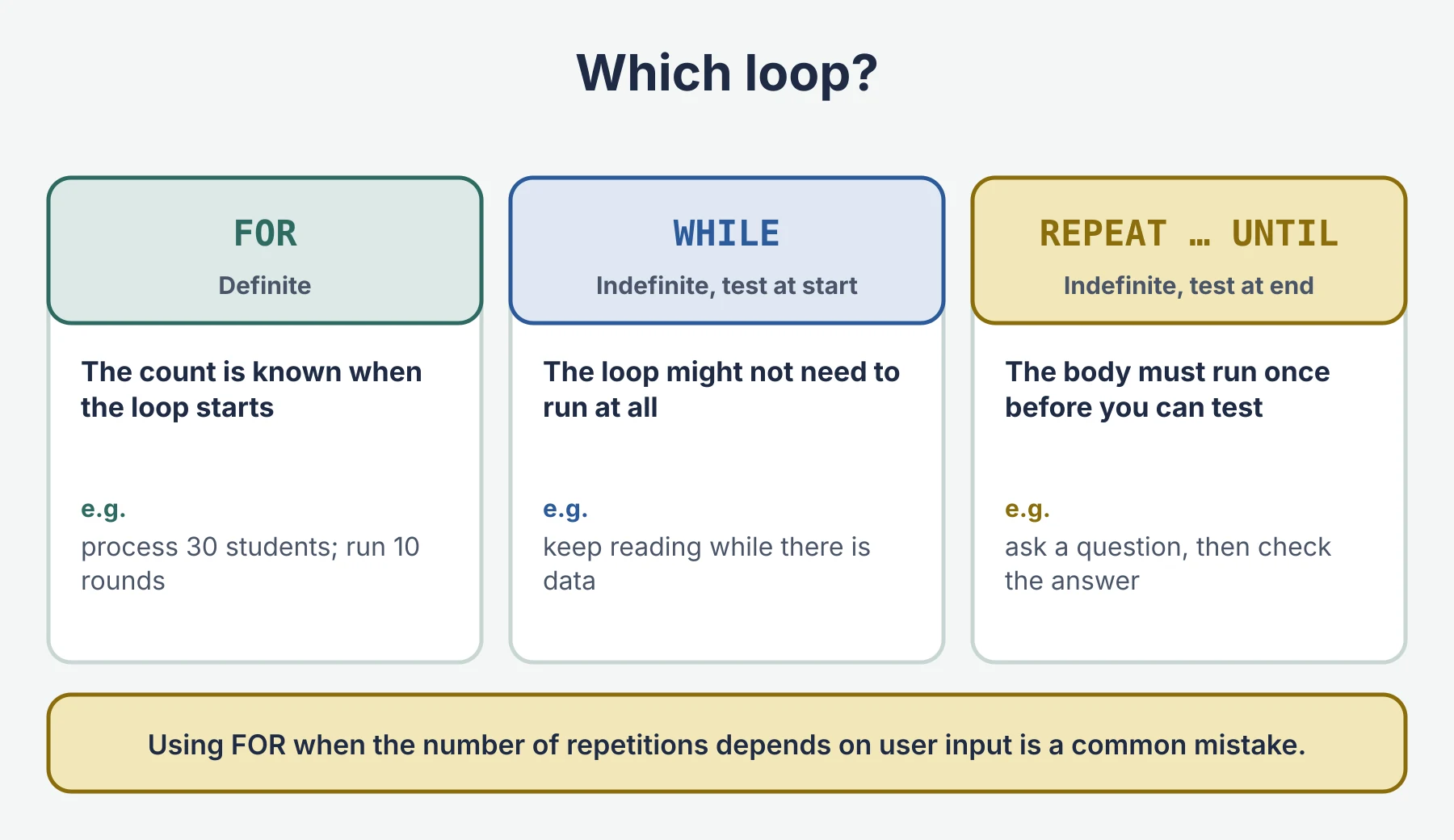
Converting between them: WHILE x < 5 and UNTIL x ≥ 5 stop at the same point; the conditions are opposites.
Choosing:
- Known count →
FOR. - May need zero runs →
WHILE. - Must run once before testing (ask, then check) →
REPEAT...UNTIL.
Nesting
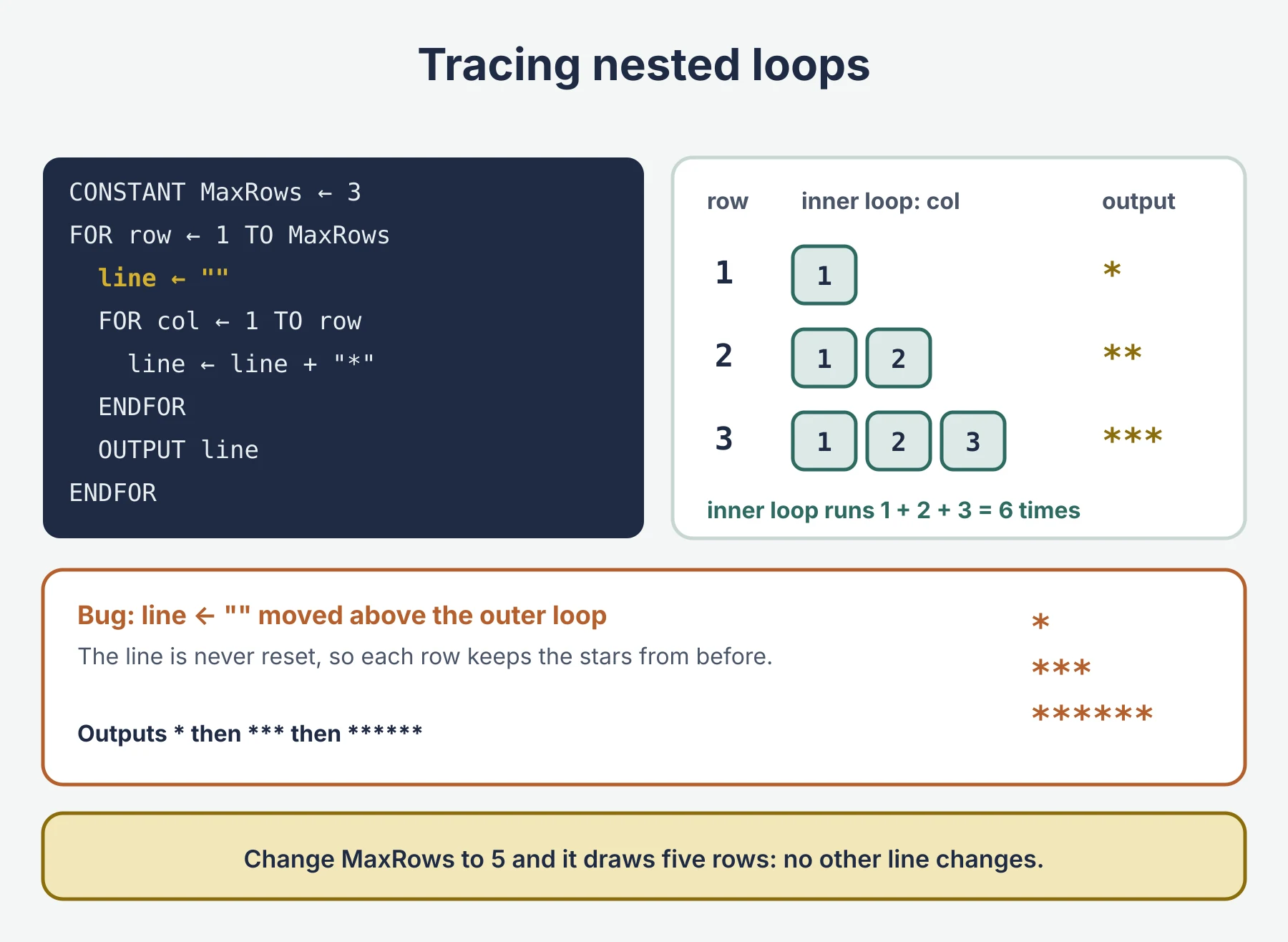
- Nested iteration: the inner loop completes all its repetitions for each outer repetition. An outer loop of 4 and inner loop of 3 runs the inner body 12 times.
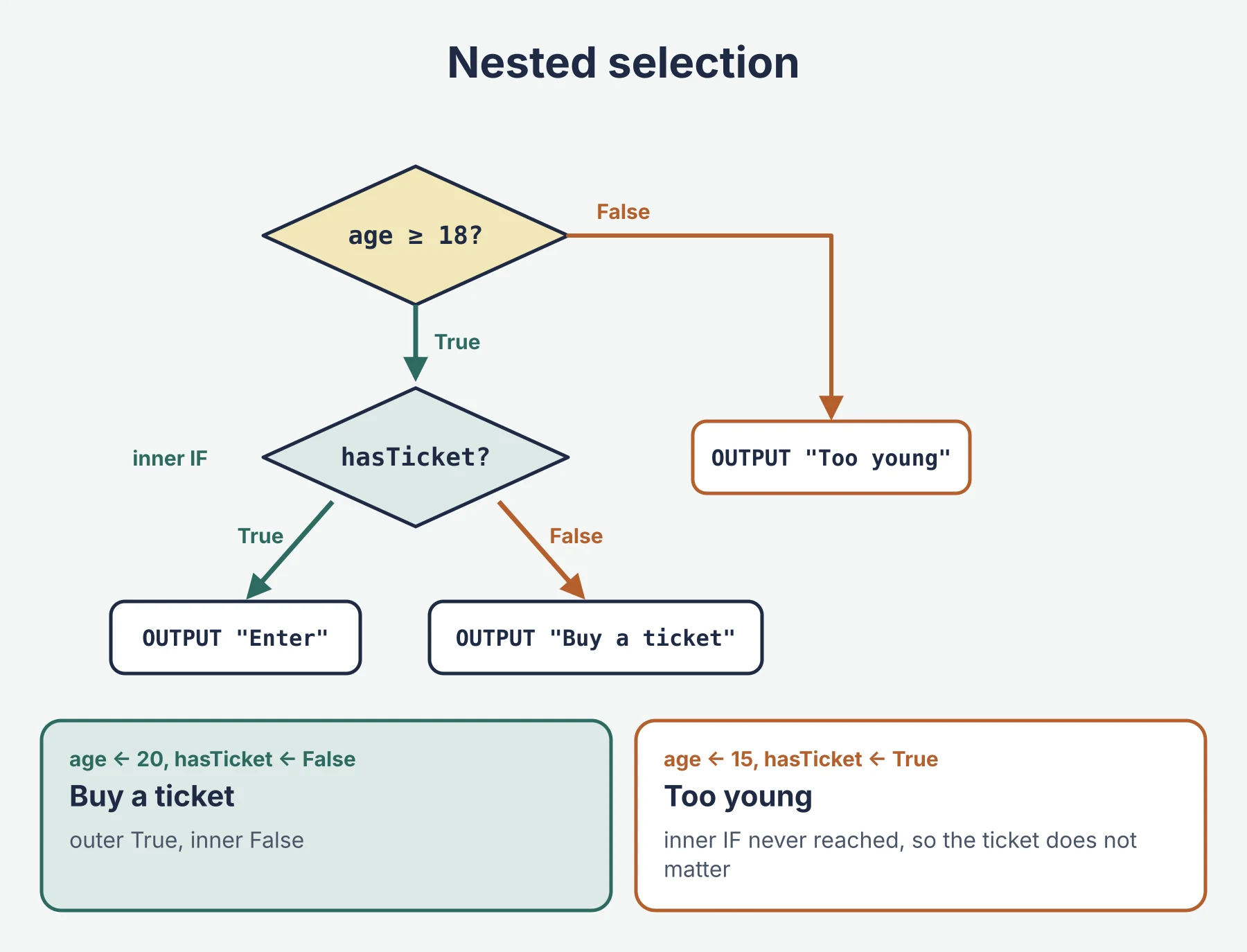
- Nested selection: the inner
IFis tested only when the outer condition allows it. - Where you put an initialisation matters: inside the outer loop it resets each time; outside it does not.
Meaningful identifiers
Good: averageMark, MaxPlayers, PrintReceipt. Poor: x, n2, stuff.
Why: easier to read, easier to debug (wrong logic stands out), easier to maintain by other
programmers.
Key terms
| Term | Meaning |
|---|---|
| Variable | A named storage location whose value can change while the program runs |
| Constant | A named value that cannot change while the program runs |
| Declaration | Introducing a variable or constant’s name (and often its type) before use |
| Assignment | Storing a value in a variable |
| Definite iteration | Repetition a known number of times |
| Indefinite iteration | Repetition until a condition is met; count not known in advance |
| Nesting | Placing one selection or iteration structure inside another |
| Identifier | The name of a variable, constant or subroutine |
Exam traps
- WHILE does not guarantee one run. Only the condition-at-the-end loop does.
- Same condition in WHILE and UNTIL gives opposite behaviour. Flip the condition when converting.
- Infinite loops: a
WHILEorREPEATwhose body never changes the condition variable never ends. - FOR for user-controlled repetition (“until the user types STOP”) is wrong; use indefinite iteration.
- Constant explained as “a variable that stays the same” misses that it cannot be changed.
- Missing reasons: “meaningful names are good practice” scores nothing on its own.
- Counting nested repetitions: multiply the counts when the inner loop’s range is fixed; add them when it depends on the outer counter (1 + 2 + 3…).
Self-test
- Name the three combining principles of imperative programming.
- State two reasons for using a named constant.
- Explain the difference between declaring a variable and assigning to it.
- State which loop always runs its body at least once.
- Rewrite
WHILE count < 10as the condition of aREPEAT...UNTILloop that stops at the same point. - An outer
FORloop runs 5 times and contains an innerFORloop that runs 4 times. How many times does the inner body run? FOR i ← 1 TO 3containsFOR j ← 1 TO i. How many times does the inner body run?- Give one situation where a
WHILEloop is better than aREPEAT...UNTILloop. - What is output by
x ← 3, thenREPEAT x ← x * 2 UNTIL x > 20, thenOUTPUT x? - Explain why
FORis not suitable for “keep asking for a guess until it is correct”. - Give two reasons for using meaningful identifier names.
- In nested selection, when is the inner condition tested?
Answers:
- Sequence, iteration (repetition) and selection (choice).
- Any two: the value is changed in one place only; the code is easier to read; the value cannot be changed by mistake while the program runs.
- Declaring introduces the variable’s name (and often its type); assigning stores a value in it.
REPEAT...UNTIL(condition at the end).UNTIL count ≥ 10.-
- 6 (1 + 2 + 3).
- When the body might not need to run at all, for example processing items while any remain, where there may be none.
- 24 (x becomes 6, 12, then 24, which is the first value greater than 20).
- The number of guesses is not known in advance, so indefinite iteration is needed.
- Any two: code is easier to read and understand; errors are easier to find; the program is easier for others to maintain.
- Only when the outer condition is true (or the branch containing it is taken).
More resources on this topic
Related resources
-
Study guides
OxfordAQA IGCSE Computer Science (9210): Random number generation in a programming language
Study guide to OxfordAQA IGCSE Computer Science 9210 section 3.2.9: using random numbers in programs for dice, games, choices and simple simulations.
Computer Science · OxfordAQA · IGCSE
Read guide -
Practice questions
OxfordAQA IGCSE Computer Science (9210): Random number generation in a programming language – Practice Questions
Original OxfordAQA IGCSE Computer Science 9210 practice questions with answers on random number ranges, chances, simulations and debugging random code.
Computer Science · OxfordAQA · IGCSE
Try questions -
Revision notes
OxfordAQA IGCSE Computer Science (9210): Random number generation in a programming language – Revision Notes
Revision notes for OxfordAQA IGCSE Computer Science 9210 section 3.2.9: random integers, ranges, chances, simulations, common errors and a self-test.
Computer Science · OxfordAQA · IGCSE
Revise topic
Get free revision emails (optional)
Occasional emails with practice questions, worked explanations and links to free resources for the qualification and subjects you choose. No spam, and you can unsubscribe from any email. The free tools on this site never need an email.