
Study Guides
OxfordAQA IGCSE Computer Science (9210): Random number generation in a programming language
Study guide to OxfordAQA IGCSE Computer Science 9210 section 3.2.9: using random numbers in programs for dice, games, choices and simple simulations.
- Subject
- Computer Science
- Level
- IGCSE
- Topic
- Topic 2 – Programming
- Author
- Marlbridge Academic Team
- Updated
- Reviewed by
- Harris Khan (what this means)
Aligned to OxfordAQA IGCSE Computer Science (9210), For teaching from September 2017, exams from May/June 2019. Official specification .
Syllabus page (what it covers and how it is assessed): OxfordAQA IGCSE Computer Science.
Syllabus points this page covers
9210
- 3.2.9 Random number generation in a programming language
Found an error? Report a correction.
Need help with this topic? Request a free trial class for IGCSE Computer Science (9210).
This guide covers section 3.2.9 Random number generation in a programming language of OxfordAQA International GCSE Computer Science (9210). The specification says students should “be able to use random number generation” and “will be expected to use random number generation within their computer programs”. It adds that “an understanding of how pseudo-random numbers are generated is not required”, so this section is entirely about using random numbers well. For the place of 3.2.9 in Topic 2, see the data structures, subroutines and translators study guide.
Generating a random integer
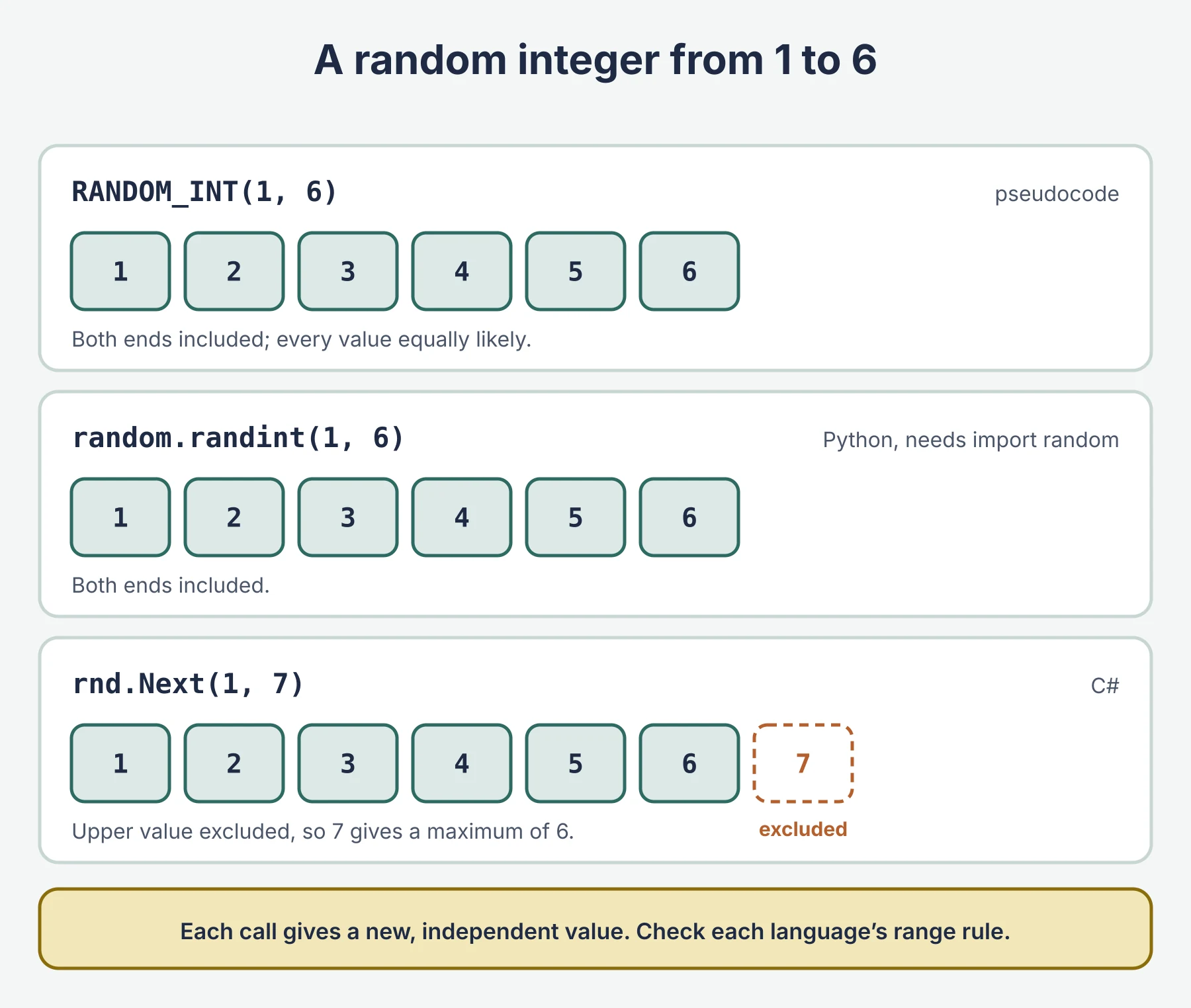
In pseudocode, RANDOM_INT(low, high) returns a random integer from low to high, including both ends:
roll ← RANDOM_INT(1, 6)       -- 1, 2, 3, 4, 5 or 6
coin ← RANDOM_INT(0, 1)       -- 0 or 1
Every value in the range is equally likely. Each call produces a new value, so calling the function twice gives two independent results.
Languages provide the same facility with different rules, which is why it pays to check the range:
| Language | Random integer from 1 to 6 | Notes |
|---|---|---|
| Pseudocode | RANDOM_INT(1, 6) |
Both ends included |
| Python | random.randint(1, 6) |
Both ends included; needs import random |
| C# | rnd.Next(1, 7) |
Upper value is excluded, so 7 gives a maximum of 6 |
Python’s random.random() gives a real number from 0 up to (but not including) 1, which some programs scale to
the range they need.
Choosing the right range
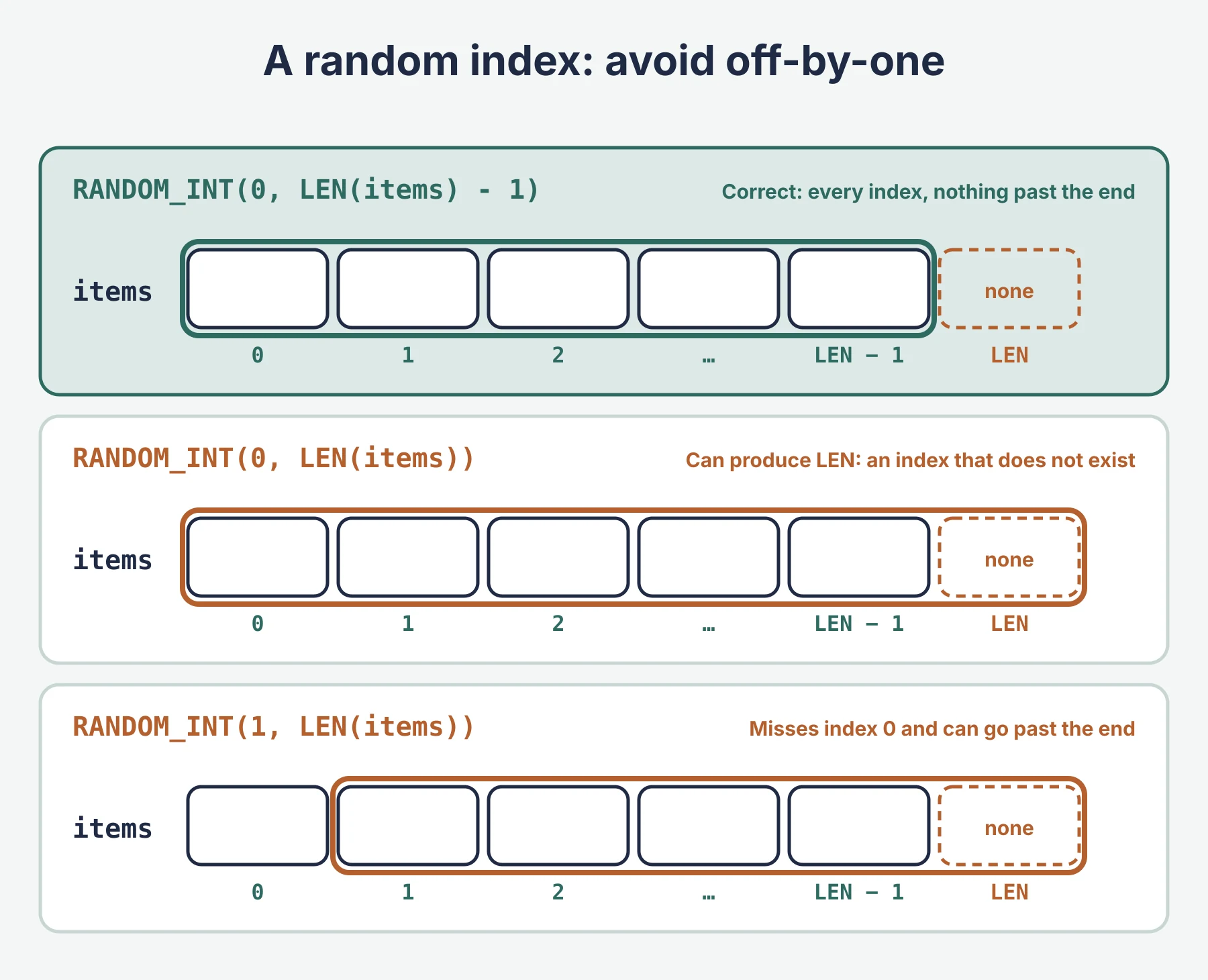
The most common error in this section is an off-by-one range. Work out the smallest and largest values the problem needs, then use them directly:
| Need | Call |
|---|---|
| A dice roll | RANDOM_INT(1, 6) |
| A percentage chance from 1 to 100 | RANDOM_INT(1, 100) |
A random index into an array items |
RANDOM_INT(0, LEN(items) - 1) |
| A random capital letter | CODE_TO_CHAR(RANDOM_INT(65, 90)) |
| A random two-digit number | RANDOM_INT(10, 99) |
The array index case is worth memorising: indexes run from 0 to LEN(items) - 1, so RANDOM_INT(0, LEN(items))
would sometimes produce an index that does not exist. The letter case uses the fact that the character codes for
A to Z run in sequence from 65 to 90 (see the string handling study
guide).
Using a random number for a choice
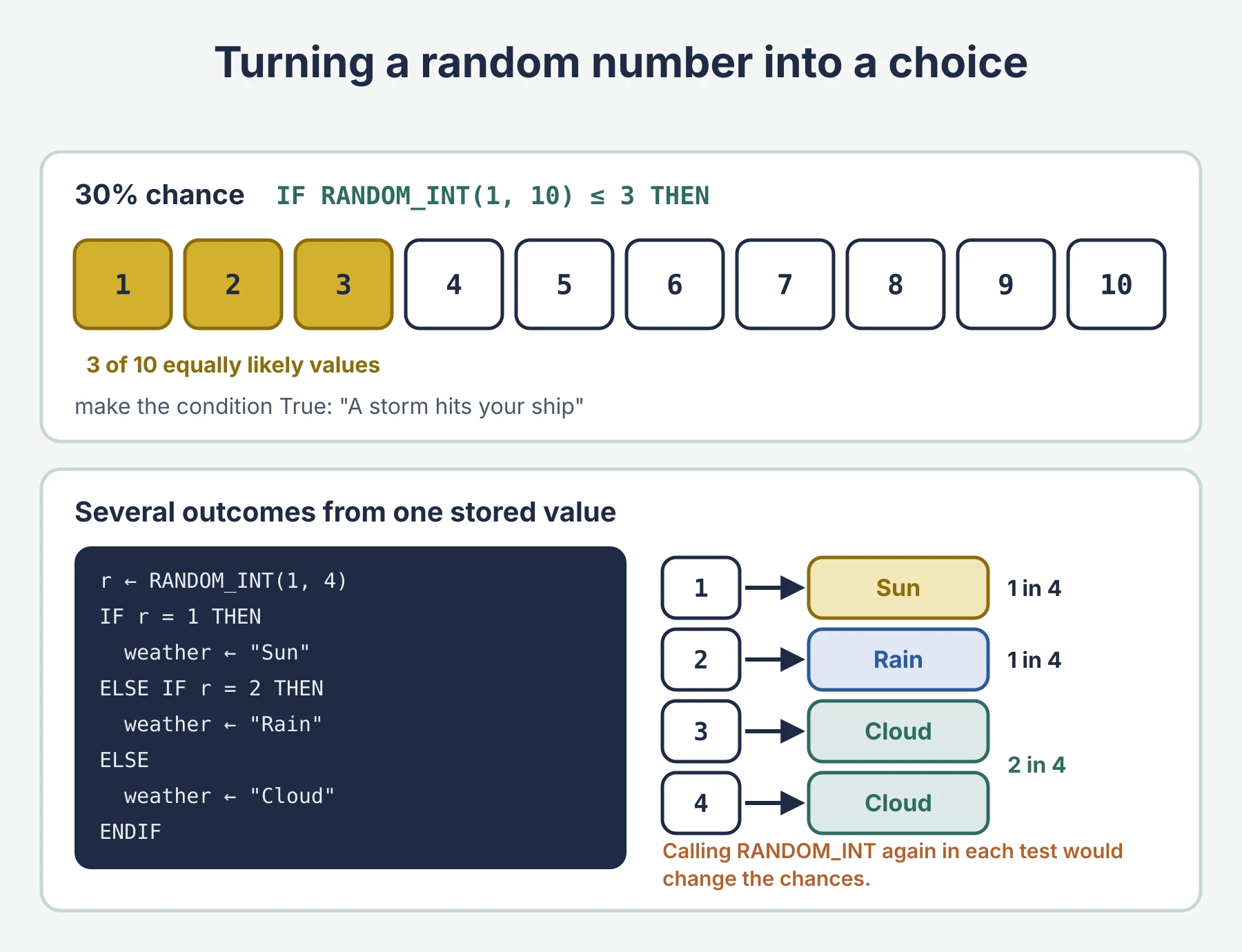
To make something happen with a given chance, compare a random number with a threshold. For a 30% chance:
IF RANDOM_INT(1, 10) ≤ 3 THEN
  OUTPUT "A storm hits your ship"
ENDIF
Three of the ten equally likely values (1, 2, 3) make the condition true. To choose between several outcomes, generate one number and test it with a selection chain:
r ← RANDOM_INT(1, 4)
IF r = 1 THEN
  weather ← "Sun"
ELSE IF r = 2 THEN
  weather ← "Rain"
ELSE
  weather ← "Cloud"
ENDIF
“Cloud” now has a 2 in 4 chance and the others 1 in 4 each. Storing the value in r first is essential: writing
IF RANDOM_INT(1, 4) = 1 THEN ... ELSE IF RANDOM_INT(1, 4) = 2 THEN ... generates a different number for each
test, which changes the chances and makes the code hard to follow.
Worked example: a guessing game
target ← RANDOM_INT(1, 50)
guesses ← 0
REPEAT
  OUTPUT "Guess a number from 1 to 50"
  guess ← STRING_TO_INT(USERINPUT)
  guesses ← guesses + 1
  IF guess > target THEN
    OUTPUT "Too high"
  ELSE IF guess < target THEN
    OUTPUT "Too low"
  ENDIF
UNTIL guess = target
OUTPUT "Correct in " + INT_TO_STRING(guesses) + " guesses"
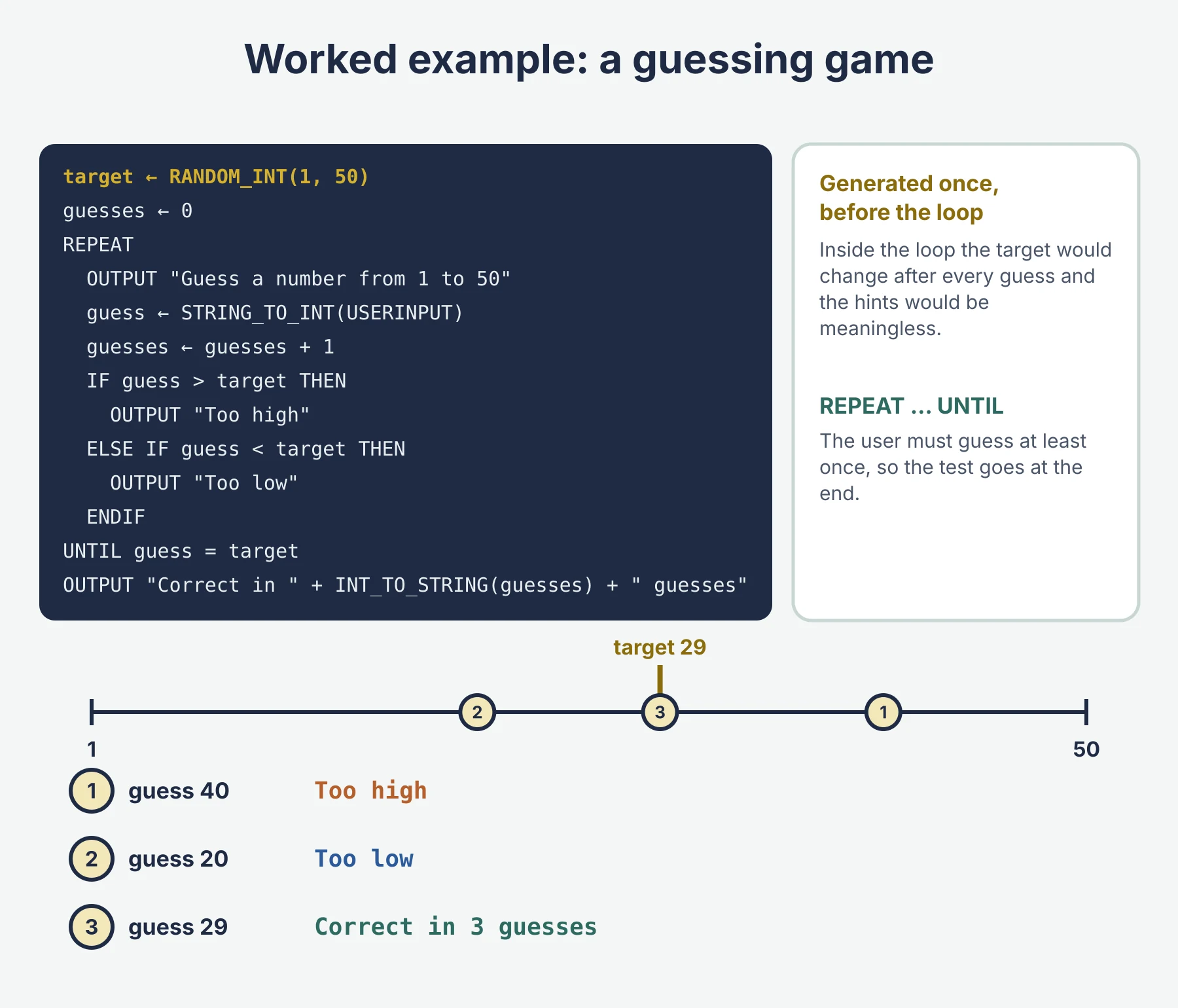
Key decisions: the random number is generated once, before the loop. If RANDOM_INT were inside the loop,
the target would change after every guess and the hints would be meaningless. A condition-at-the-end loop suits
the problem because the user must guess at least once.
To trace a program like this, a question will tell you the random value. If target is 29 and the guesses are
40, 20 and 29, the outputs are Too high, Too low, then Correct in 3 guesses.
Worked example: simulating dice rolls
Random numbers let a program simulate events many times and count the results:
counts ← [0, 0, 0, 0, 0, 0]
FOR i ← 1 TO 600
  roll ← RANDOM_INT(1, 6)
  counts[roll - 1] ← counts[roll - 1] + 1
ENDFOR
FOR face ← 1 TO 6
  OUTPUT INT_TO_STRING(face) + ": " + INT_TO_STRING(counts[face - 1])
ENDFOR
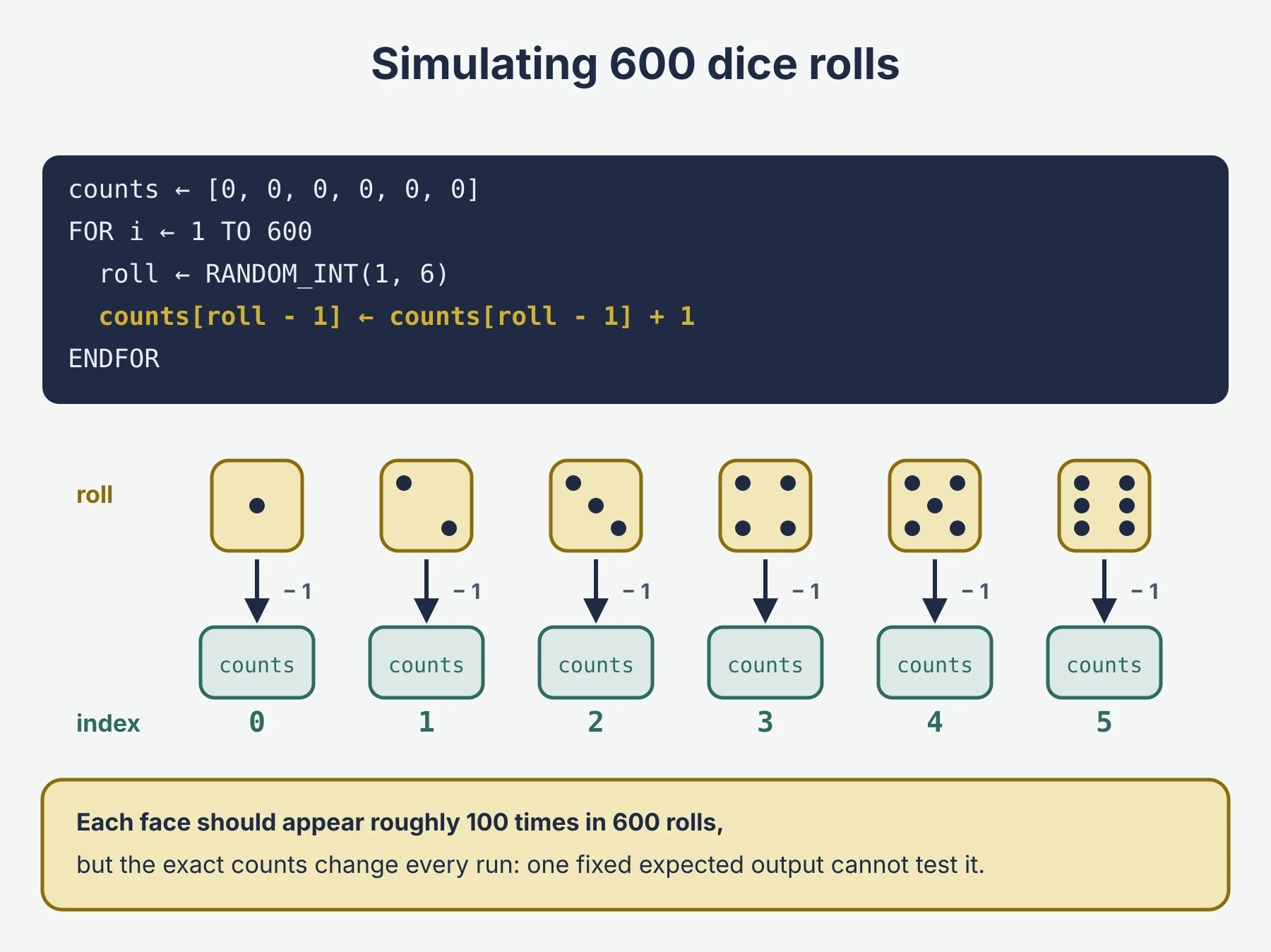
The array has six counters, at indexes 0 to 5, so a roll of roll is counted at index roll - 1. Each face
should appear roughly 100 times, but the exact counts change every run. That variation is expected: a random
program does not produce the same output twice, which is why it cannot be tested by comparing against one fixed
expected output.
Two dice are not one bigger dice
Simulating the total of two dice with RANDOM_INT(2, 12) is a classic error. It makes every total from 2 to 12
equally likely, but with two real dice a total of 7 can happen in six ways (1+6, 2+5, 3+4, 4+3, 5+2, 6+1) while a
total of 2 can happen in only one way. The correct simulation calls the function twice and adds the results:
total ← RANDOM_INT(1, 6) + RANDOM_INT(1, 6)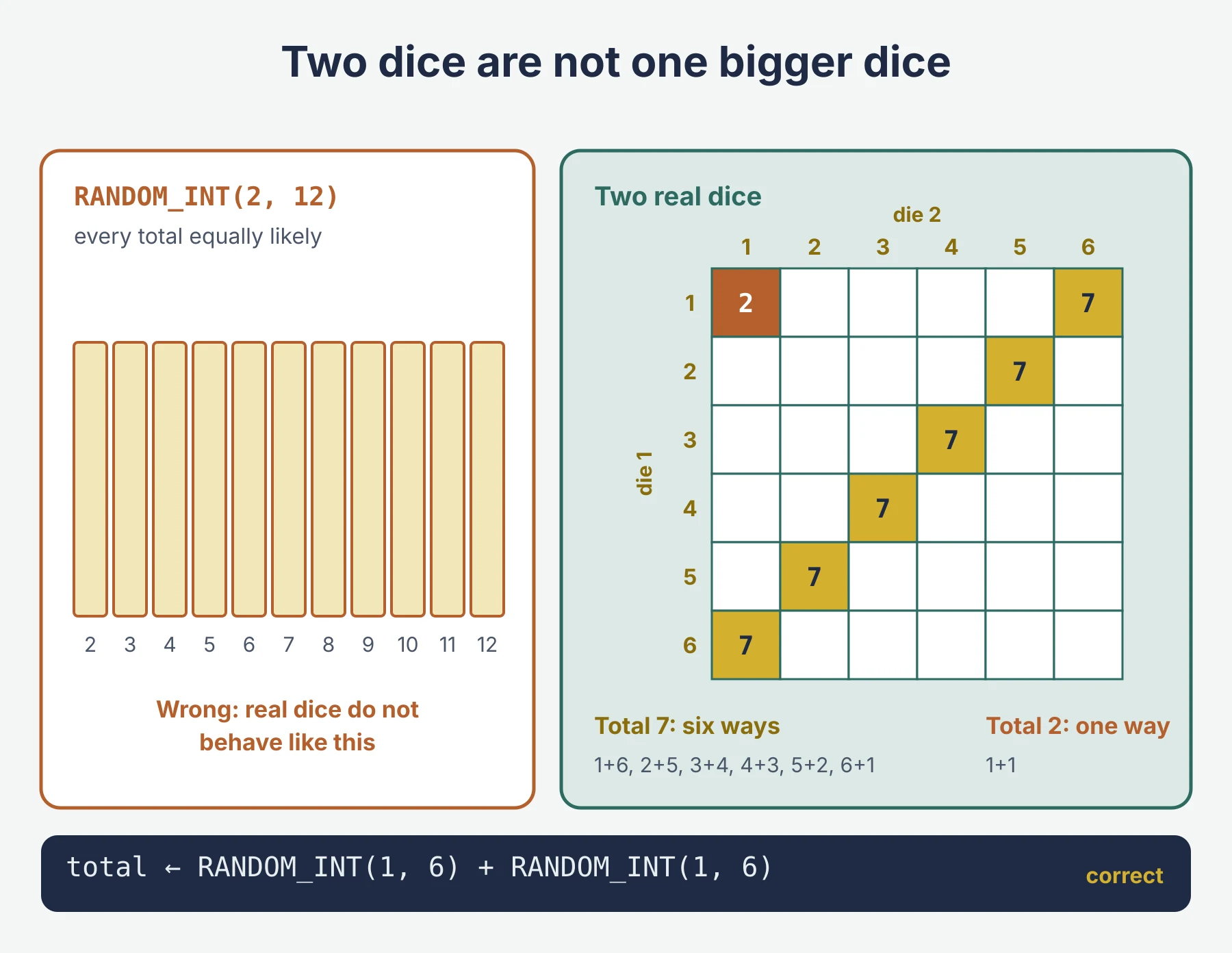
Testing programs that use random numbers
Because the output changes from run to run, testing focuses on properties that are always true:
- every generated value is within the range (for a dice program, never 0 or 7);
- every value in the range can occur, including both ends;
- the rest of the program behaves correctly for a given value, which can be checked by temporarily replacing the random call with a fixed number.
Annotated model answer
Question: Write pseudocode for a “lucky dip” that randomly selects and outputs one of the names stored in an
array entrants, which may contain any number of names. [3]
index ← RANDOM_INT(0, LEN(entrants) - 1)
OUTPUT entrants[index]
Why it scores: the random range starts at 0, the first index [1 mark]; it ends at LEN(entrants) - 1, so it
works for any size of array and never goes past the last element [1 mark]; the selected element, not the index,
is output [1 mark]. Writing RANDOM_INT(0, 9) would only be correct for an array of exactly ten names, which the
question rules out.
Common mistakes
- Wrong range:
RANDOM_INT(0, 6)for a dice includes 0;RANDOM_INT(1, LEN(a))for an index misses index 0 and can go past the end. - Generating inside a loop a value that should stay fixed, such as a target number.
- Calling the function again in each test of a selection chain instead of storing one value.
- Using one call for the total of two dice.
- Explaining how random numbers are generated: not required, and no credit is available for it.
Exam technique
- Write code: state the range you need and use it directly in the call; store the result in a meaningfully named variable.
- Trace code: use the random values the question gives, in order.
- Explain why a program behaves oddly: check where the random value is generated and how many times.
- Any suitable function name is accepted in your own code, as long as the range is clear.
Condensed notes and a self-test are in the random number generation revision notes, and exam-style questions are in the random number generation practice questions. Random choices are often wrapped in a function, as shown in the subroutines study guide.
Related resources
-
Practice questions
OxfordAQA IGCSE Computer Science (9210): Random number generation in a programming language – Practice Questions
Original OxfordAQA IGCSE Computer Science 9210 practice questions with answers on random number ranges, chances, simulations and debugging random code.
Computer Science · OxfordAQA · IGCSE
Try questions -
Revision notes
OxfordAQA IGCSE Computer Science (9210): Random number generation in a programming language – Revision Notes
Revision notes for OxfordAQA IGCSE Computer Science 9210 section 3.2.9: random integers, ranges, chances, simulations, common errors and a self-test.
Computer Science · OxfordAQA · IGCSE
Revise topic -
Study guides
OxfordAQA IGCSE Computer Science (9210): Relational operations in a programming language
Study guide to OxfordAQA IGCSE Computer Science 9210 section 3.2.4: the six relational operators, exam symbols, boundaries and conditions in loops and IFs.
Computer Science · OxfordAQA · IGCSE
Read guide
Get free revision emails (optional)
Occasional emails with practice questions, worked explanations and links to free resources for the qualification and subjects you choose. No spam, and you can unsubscribe from any email. The free tools on this site never need an email.