
Revision Notes
OxfordAQA IGCSE Computer Science (9210): String handling operations in a programming language – Revision Notes
Revision notes for OxfordAQA IGCSE Computer Science 9210 section 3.2.8: string operations, character codes, conversions, exam traps and a self-test.
- Subject
- Computer Science
- Level
- IGCSE
- Topic
- Topic 2 – Programming
- Author
- Marlbridge Academic Team
- Updated
- Reviewed by
- Harris Khan (what this means)
Aligned to OxfordAQA IGCSE Computer Science (9210), For teaching from September 2017, exams from May/June 2019. Official specification .
Syllabus page (what it covers and how it is assessed): OxfordAQA IGCSE Computer Science.
Syllabus points this page covers
9210
- 3.2.8 String handling operations in a programming language
Found an error? Report a correction.
Need help with this topic? Request a free trial class for IGCSE Computer Science (9210).
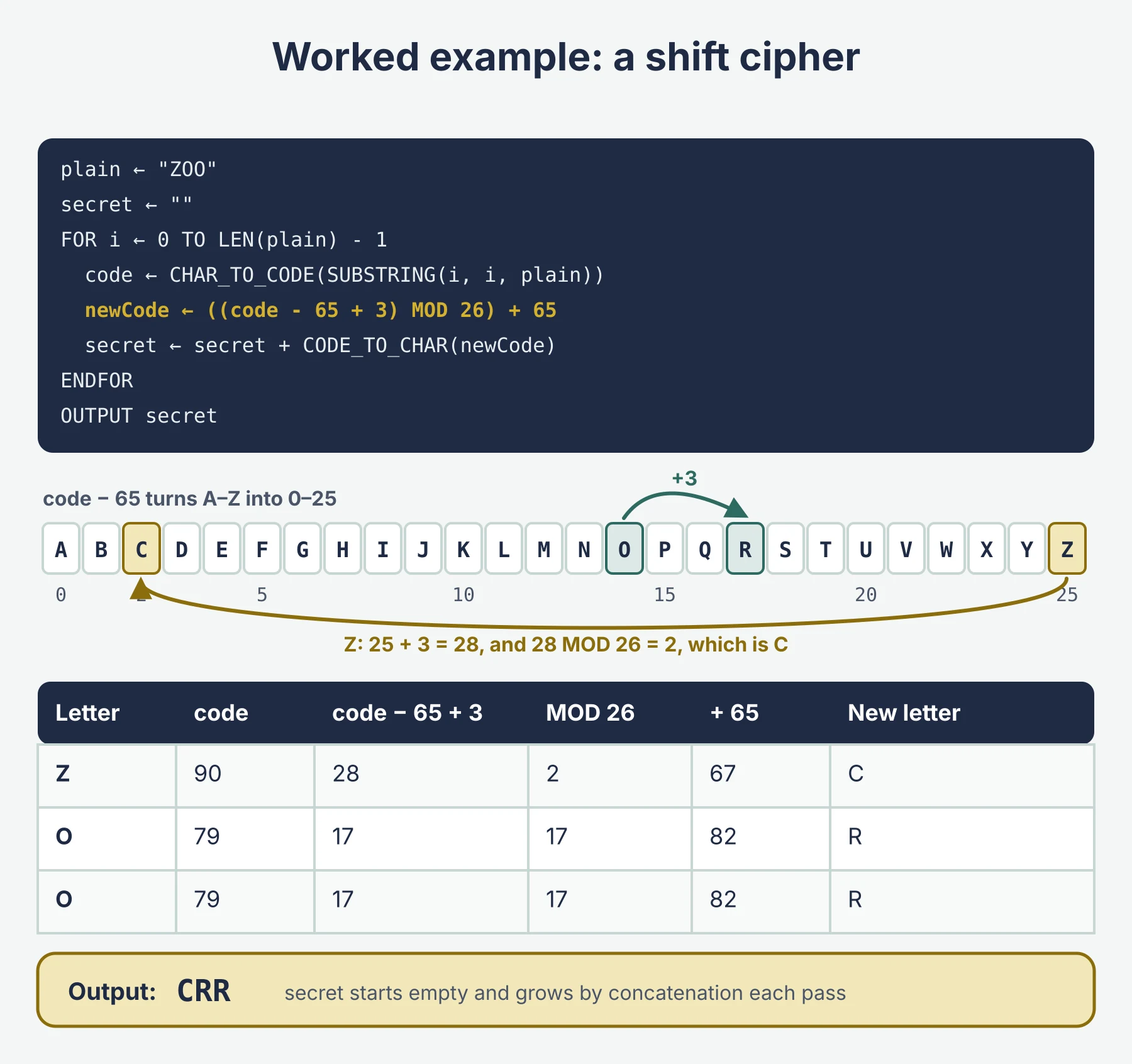
Condensed notes for section 3.2.8 String handling operations in a programming language of OxfordAQA International GCSE Computer Science (9210). The worked examples (a shift cipher and a username generator) are in the string handling study guide.
What the specification asks
Understand and use: length, position, substring, concatenation, convert character to character code, convert character code to character, string conversion operations (string to integer, string to real, integer to string, real to string).
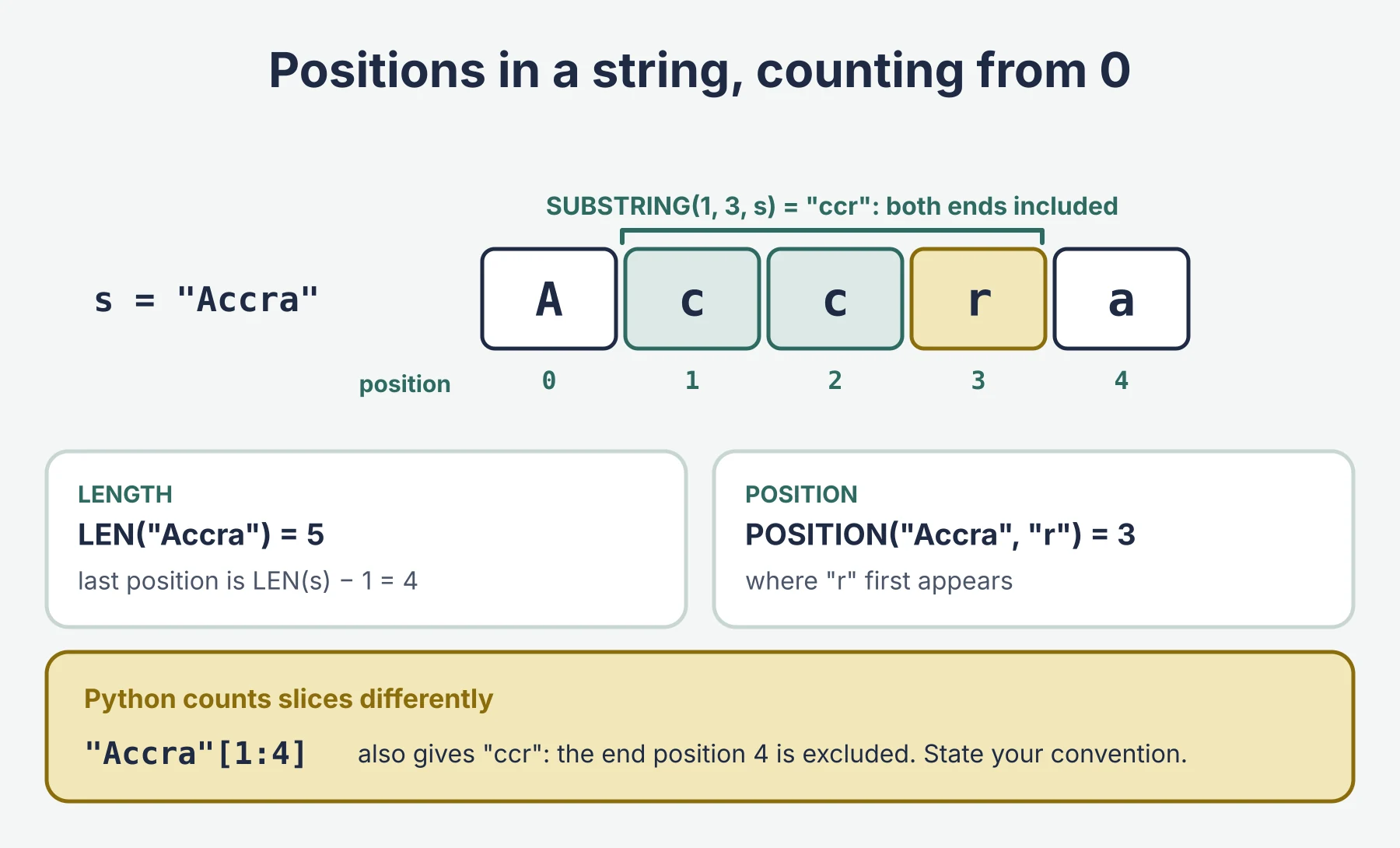
Operations on s ← "Harare" (positions from 0)
H  a  r  a  r  e
0 1 2 3 4 5| Operation | Expression | Result |
|---|---|---|
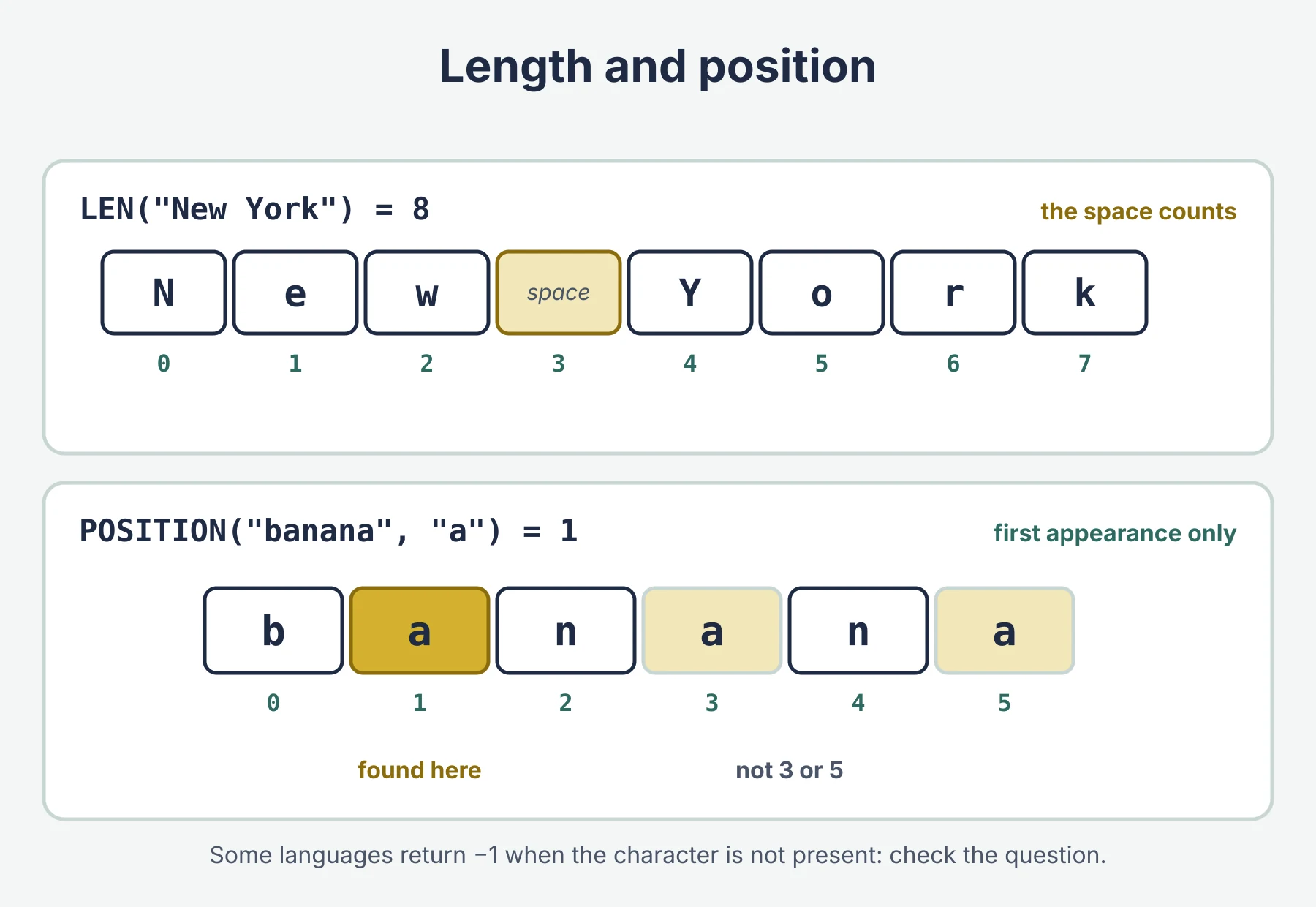
| Length | LEN(s) |
6 |
| Position (first occurrence) | POSITION(s, "r") |
2 |
| Substring (start and end included) | SUBSTRING(2, 4, s) |
"rar" |
| One character | SUBSTRING(0, 0, s) |
"H" |
| Last character | SUBSTRING(LEN(s) - 1, LEN(s) - 1, s) |
"e" |
| Concatenation | s + " city" |
"Harare city" |
Character codes (ASCII)
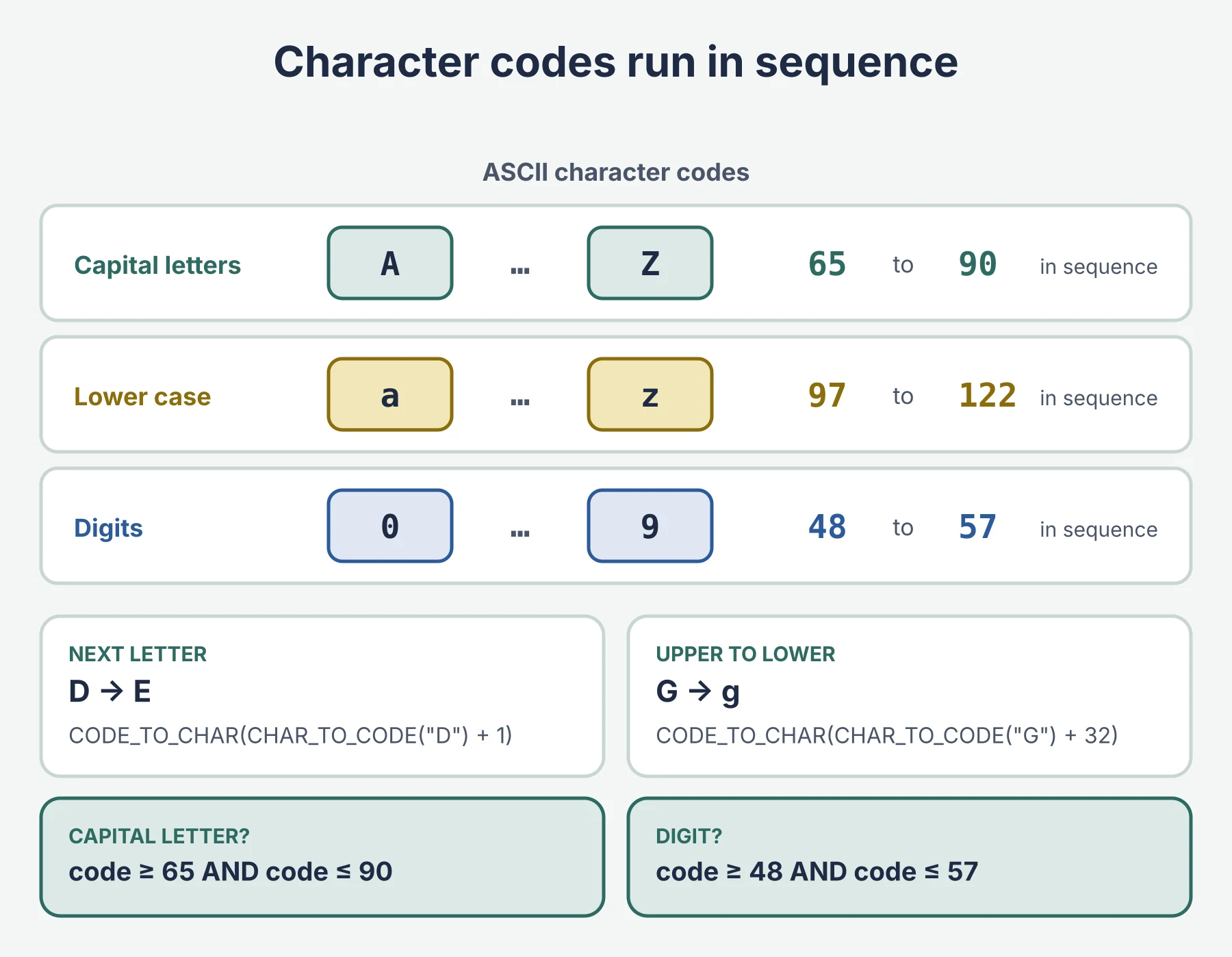
| Characters | Codes |
|---|---|
"0" to "9" |
48 to 57 |
"A" to "Z" |
65 to 90 |
"a" to "z" |
97 to 122 |
| Space | 32 |
- Codes run in sequence, so
CHAR_TO_CODE("C") - CHAR_TO_CODE("A")is2. - Lower case = upper case + 32.
CODE_TO_CHAR(CHAR_TO_CODE(c) + 1)gives the next character.
Conversions
| From → To | Function | Example | Why needed |
|---|---|---|---|
| String → integer | STRING_TO_INT |
"15" → 15 |
Arithmetic on input |
| String → real | STRING_TO_REAL |
"2.75" → 2.75 |
Arithmetic on decimal input |
| Integer → string | INT_TO_STRING |
15 → "15" |
Joining to text; taking digits as characters |
| Real → string | REAL_TO_STRING |
2.75 → "2.75" |
Joining to text in output |
Converting text that is not a number ("twelve") causes an error in most languages.
Template loops
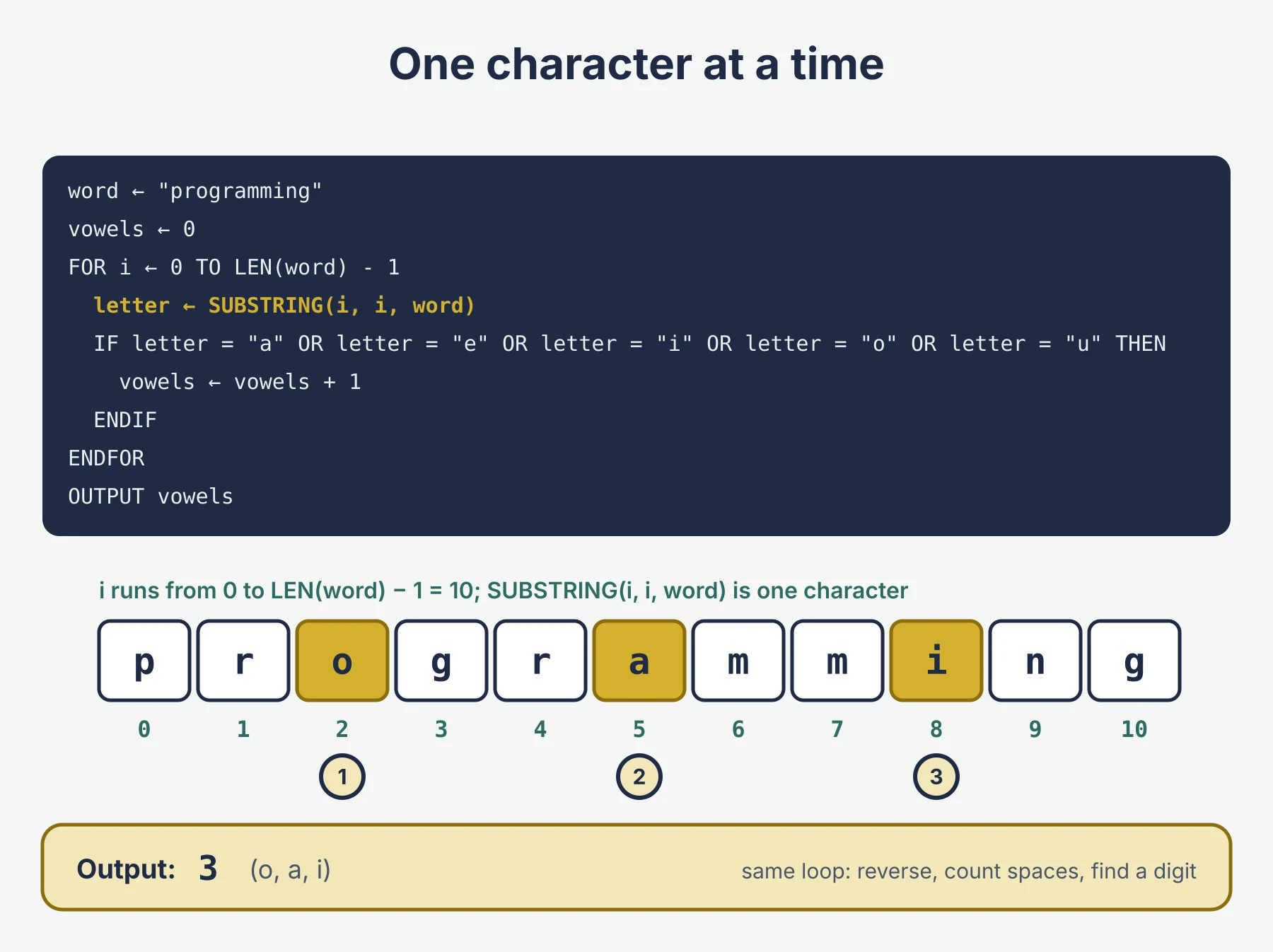
reversed ← ""                         -- reverse a string
FOR i ← LEN(s) - 1 TO 0 STEP -1
  reversed ← reversed + SUBSTRING(i, i, s)
ENDFOR

spaces ← 0                            -- count spaces
FOR i ← 0 TO LEN(s) - 1
  IF SUBSTRING(i, i, s) = " " THEN
    spaces ← spaces + 1
  ENDIF
ENDFOR
(An alternative to the counting-down loop is reversed ← SUBSTRING(i, i, s) + reversed with a normal loop from
0, which adds each character to the front.)
Common patterns
| Task | Method |
|---|---|
Initials from "Lena Park" |
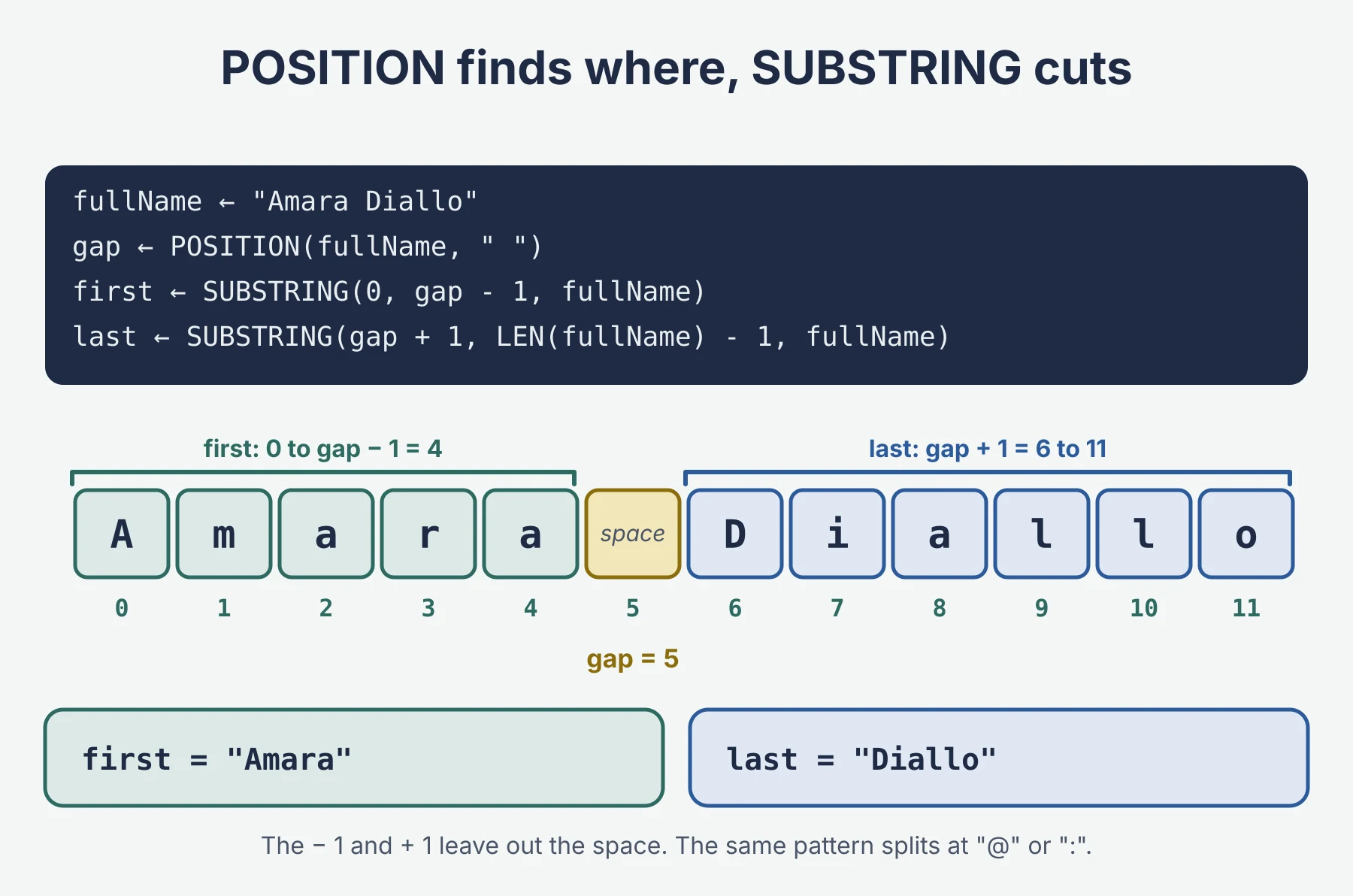
First character, plus the character after the space: SUBSTRING(0, 0, n) + SUBSTRING(POSITION(n, " ") + 1, POSITION(n, " ") + 1, n) → "LP" |
| Split at a separator | p ← POSITION(s, ":"); before: SUBSTRING(0, p - 1, s); after: SUBSTRING(p + 1, LEN(s) - 1, s) |
| Check minimum length | LEN(pwd) ≥ 8 |
| Check a string is empty | LEN(s) = 0 (or s = "") |
| Capital letter test | CHAR_TO_CODE(c) ≥ 65 AND CHAR_TO_CODE(c) ≤ 90 |
| Number of words (single spaces) | Count spaces, then add 1 |
Mini trace: changing case
word ← "cat"
result ← ""
FOR i ← 0 TO LEN(word) - 1
  code ← CHAR_TO_CODE(SUBSTRING(i, i, word))
  result ← result + CODE_TO_CHAR(code - 32)
ENDFOR| i | character | code | code − 32 | result |
|---|---|---|---|---|
| 0 | c | 99 | 67 | "C" |
| 1 | a | 97 | 65 | "CA" |
| 2 | t | 116 | 84 | "CAT" |
The loop only works correctly if every character is a lower-case letter: a space (code 32) would become code 0, which is not a printable character. A complete version would test each code is in the range 97 to 122 first.
Key terms
| Term | Meaning |
|---|---|
| String | A sequence of characters |
| Length | The number of characters in a string, including spaces |
| Position | The index at which a character first appears in a string |
| Substring | Part of a string, taken from a start position to an end position |
| Concatenation | Joining two or more strings end to end |
| Character code | The number used to represent a character, such as its ASCII code |
| String conversion | Changing a value between string and numeric types |
Exam traps
- Positions start at 0 here; Python slices exclude the end position. State your convention.
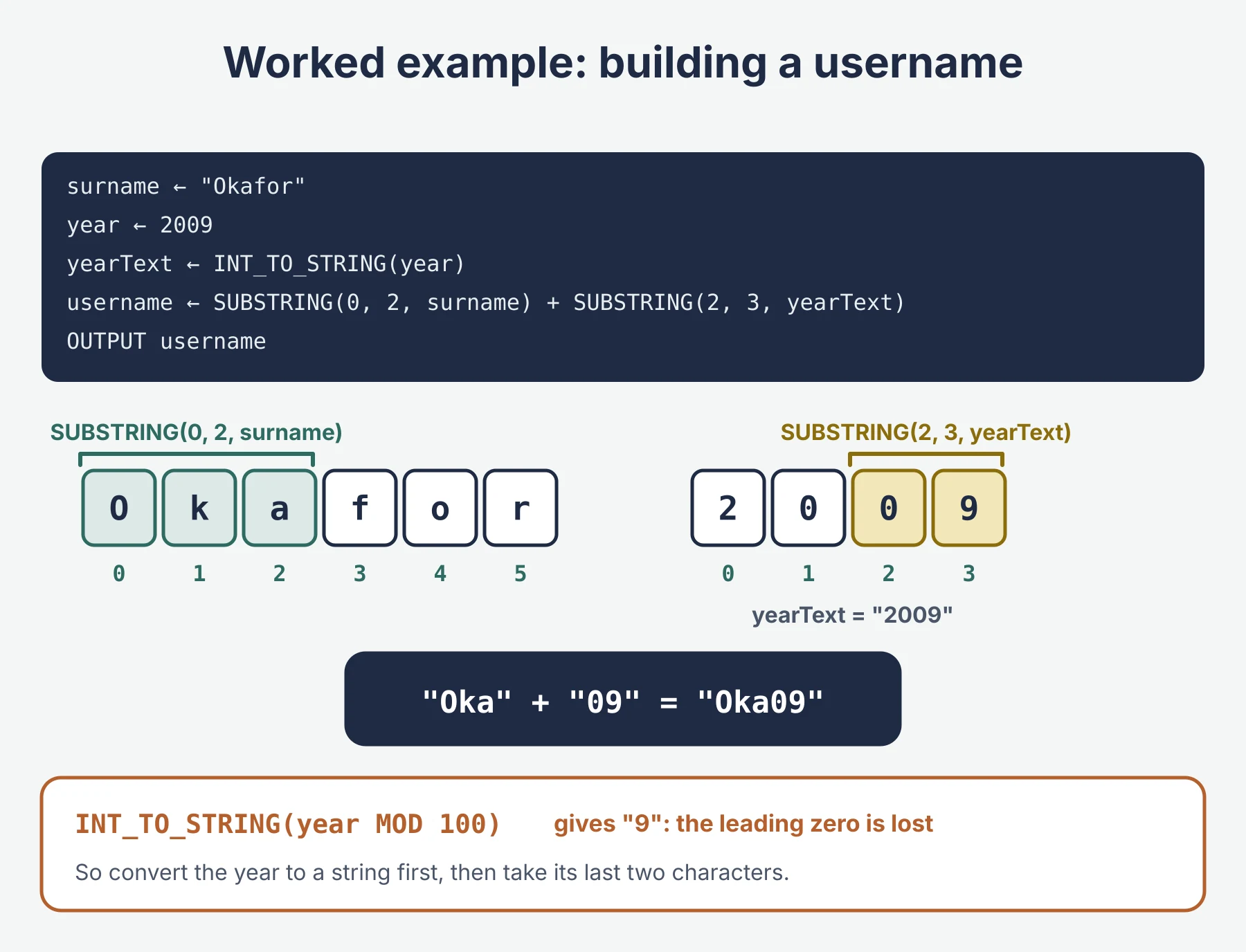
POSITIONgives a number;SUBSTRINGgives a string."3" + "4"is"34"; convert to numbers to get 7.- A number joined to text needs
INT_TO_STRINGorREAL_TO_STRING. INT_TO_STRING(7 MOD 100)gives"7", not"07": leading zeros need string methods.- Capital and lower-case letters have different codes, so
"a" = "A"is False.
Self-test
- State
LEN("Cape Town"). - State
POSITION("Mississippi", "s"), counting from 0. - State
SUBSTRING(0, 3, "Kingston"). - State
SUBSTRING(4, 7, "Kingston"). - State
CHAR_TO_CODE("E"). - State
CODE_TO_CHAR(100). - State
CODE_TO_CHAR(CHAR_TO_CODE("m") - 32). - State the result of
"10" + "5", and ofSTRING_TO_INT("10") + 5. - Write an expression that gives the last character of a string
word. - Write a condition that is true when the single character
chis a digit, using its character code. - Explain why
"Score: " + pointsmay cause an error whenpointsis an integer. - A user types
4.5. Name the conversion needed before it is multiplied by 2.
Answers:
- 9 (the space counts).
-
"King"."ston".-
"d"."M"."105";15.SUBSTRING(LEN(word) - 1, LEN(word) - 1, word).CHAR_TO_CODE(ch) ≥ 48 AND CHAR_TO_CODE(ch) ≤ 57.+cannot join a string and an integer in many languages; convert withINT_TO_STRING(points)first.- String to real (
STRING_TO_REAL).
More resources on this topic
Related resources
-
Study guides
OxfordAQA IGCSE Computer Science (9210): Structured programming
Study guide to OxfordAQA IGCSE Computer Science 9210 section 3.2.11: modular programs, documented interfaces, local variables, parameters and their advantages.
Computer Science · OxfordAQA · IGCSE
Read guide -
Practice questions
OxfordAQA IGCSE Computer Science (9210): Structured programming – Practice Questions
Original OxfordAQA IGCSE Computer Science 9210 practice questions with answers on modular design, interfaces, local variables and structured programming.
Computer Science · OxfordAQA · IGCSE
Try questions -
Revision notes
OxfordAQA IGCSE Computer Science (9210): Structured programming – Revision Notes
Revision notes for OxfordAQA IGCSE Computer Science 9210 section 3.2.11: modules, interfaces, local variables, parameters, return values and a self-test.
Computer Science · OxfordAQA · IGCSE
Revise topic
Get free revision emails (optional)
Occasional emails with practice questions, worked explanations and links to free resources for the qualification and subjects you choose. No spam, and you can unsubscribe from any email. The free tools on this site never need an email.