
Revision Notes
OxfordAQA IGCSE Computer Science (9210): Relational operations in a programming language – Revision Notes
Revision notes for OxfordAQA IGCSE Computer Science 9210 section 3.2.4: relational operators, exam symbols, boundary wording, opposites, traps and a self-test.
- Subject
- Computer Science
- Level
- IGCSE
- Topic
- Topic 2 – Programming
- Author
- Marlbridge Academic Team
- Updated
- Reviewed by
- Harris Khan (what this means)
Aligned to OxfordAQA IGCSE Computer Science (9210), For teaching from September 2017, exams from May/June 2019. Official specification .
Syllabus page (what it covers and how it is assessed): OxfordAQA IGCSE Computer Science.
Syllabus points this page covers
9210
- 3.2.4 Relational operations in a programming language
Found an error? Report a correction.
Need help with this topic? Request a free trial class for IGCSE Computer Science (9210).
Condensed notes for section 3.2.4 Relational operations in a programming language of OxfordAQA International GCSE Computer Science (9210). The traced examples are in the relational operations study guide.
What the specification asks
- Be familiar with and use: equal to, not equal to, less than, greater than, less than or equal to, greater than or equal to.
- Use them in your own programs and interpret them in given algorithms.
- Assessment material uses =, ≠, <, >, ≤, ≥; languages may use other symbols.
Core facts
- A relational operator compares two values and gives a Boolean (True/False).
- The result drives selection (
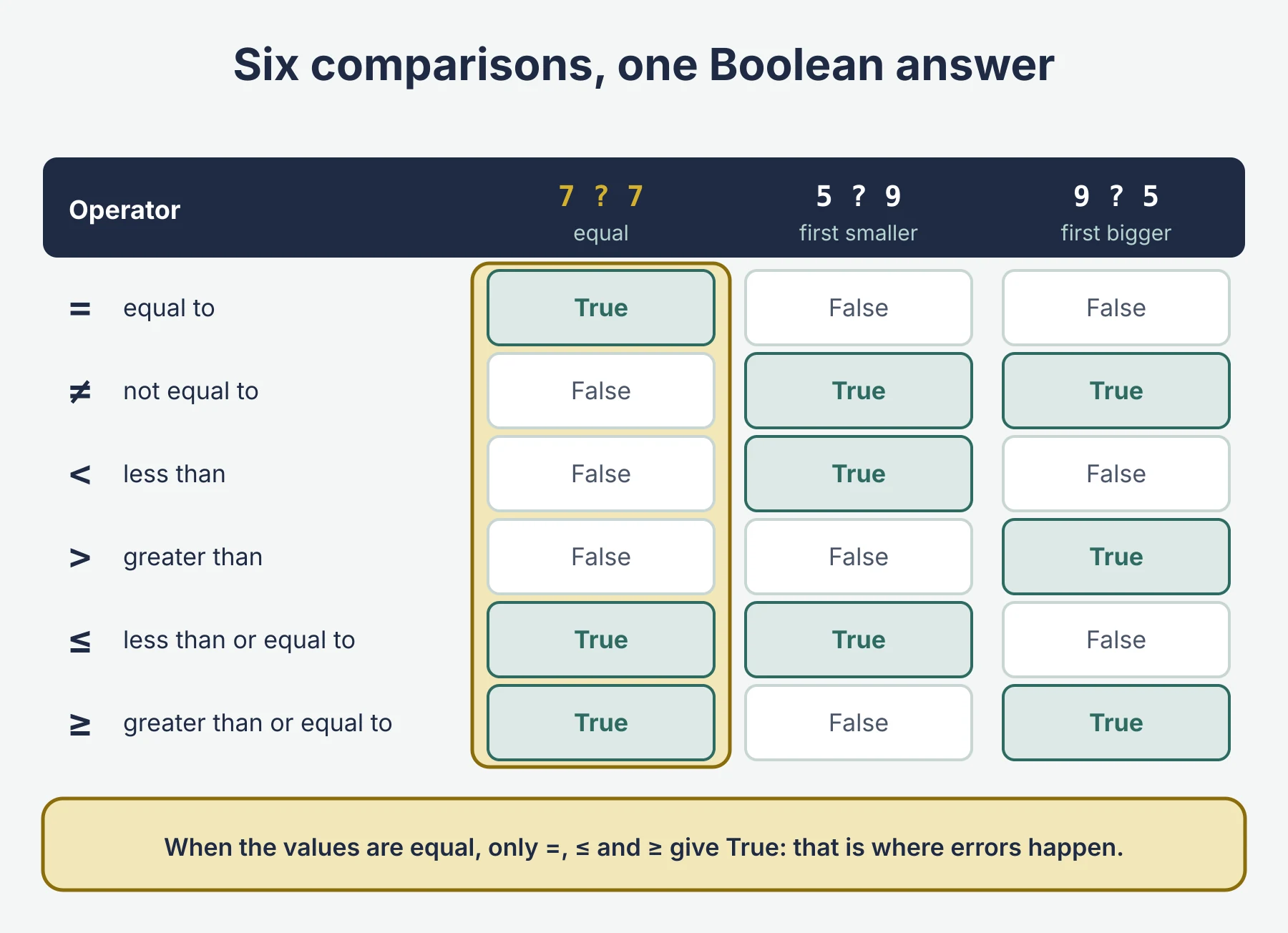
IF) and iteration (WHILE,REPEAT...UNTIL). - When the two values are equal, only
=,≤,≥are True.
Symbol table
| Meaning | Exam | Python / C# | Visual Basic |
|---|---|---|---|
| equal to | = |
== |
= |
| not equal to | ≠ |
!= |
<> |
| less than | < |
< |
< |
| greater than | > |
> |
> |
| less than or equal to | ≤ |
<= |
<= |
| greater than or equal to | ≥ |
>= |
>= |
Pseudocode uses ← for assignment, so = always means comparison.
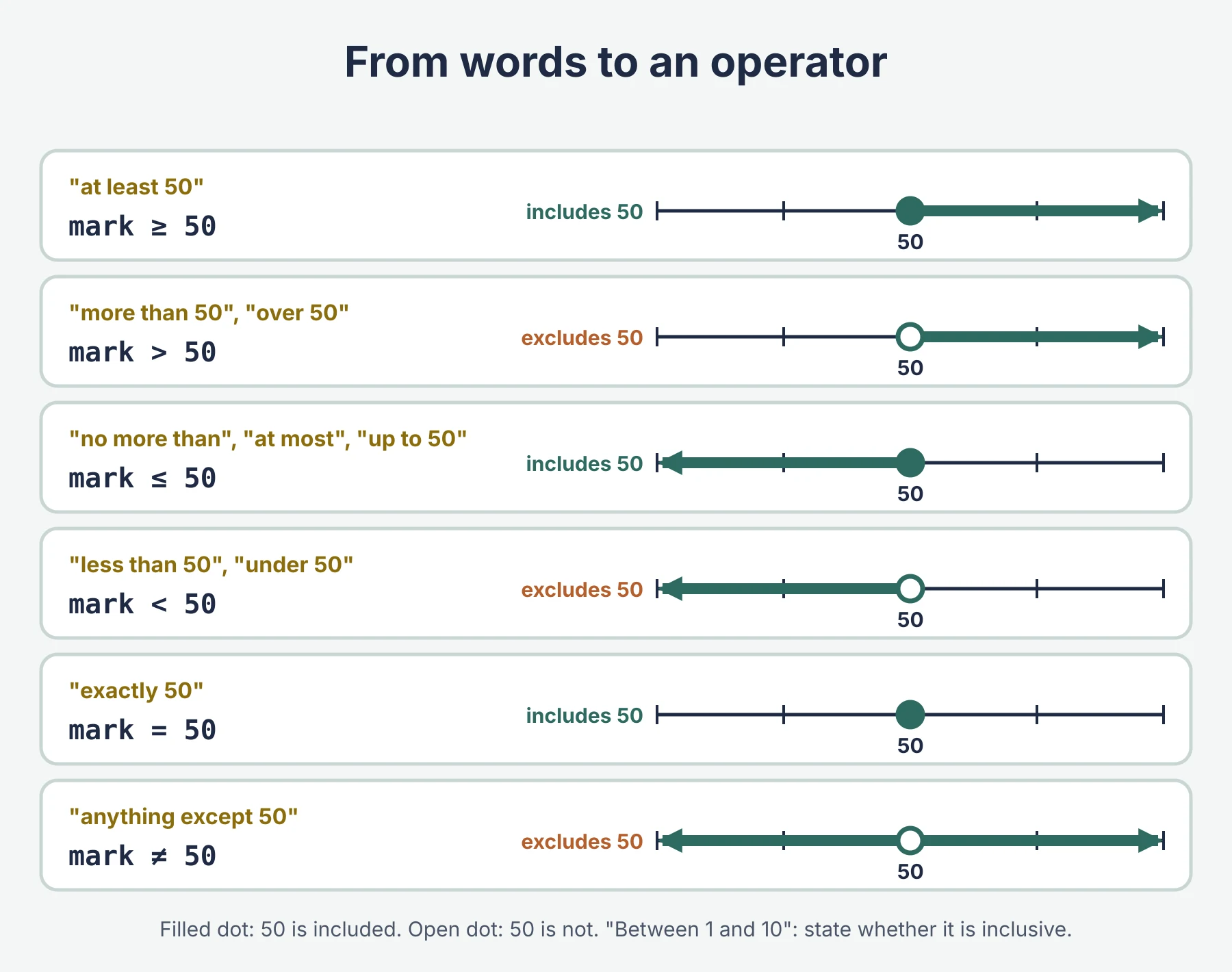
Words to symbols
| Words | Symbol |
|---|---|
| at least, minimum of, no less than | ≥ |
| more than, over, exceeds | > |
| at most, maximum of, no more than, up to | ≤ |
| less than, under, below | < |
| exactly, matches | = |
| different from, except | ≠ |
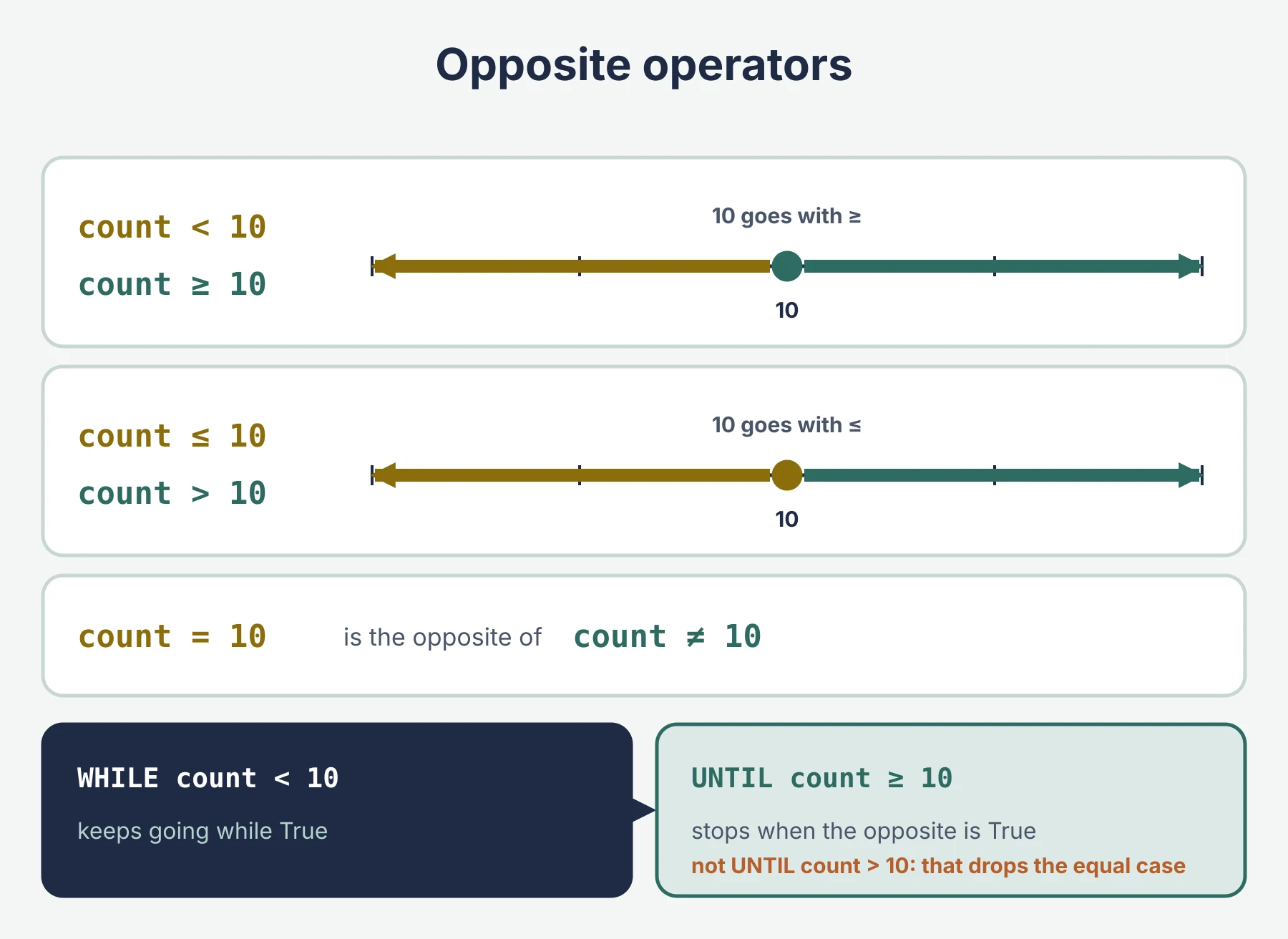
Opposites (for converting loops and negating conditions)
| Condition | Opposite |
|---|---|
a = b |
a ≠ b |
a < b |
a ≥ b |
a > b |
a ≤ b |
WHILE x < 10 stops at the same point as UNTIL x ≥ 10.
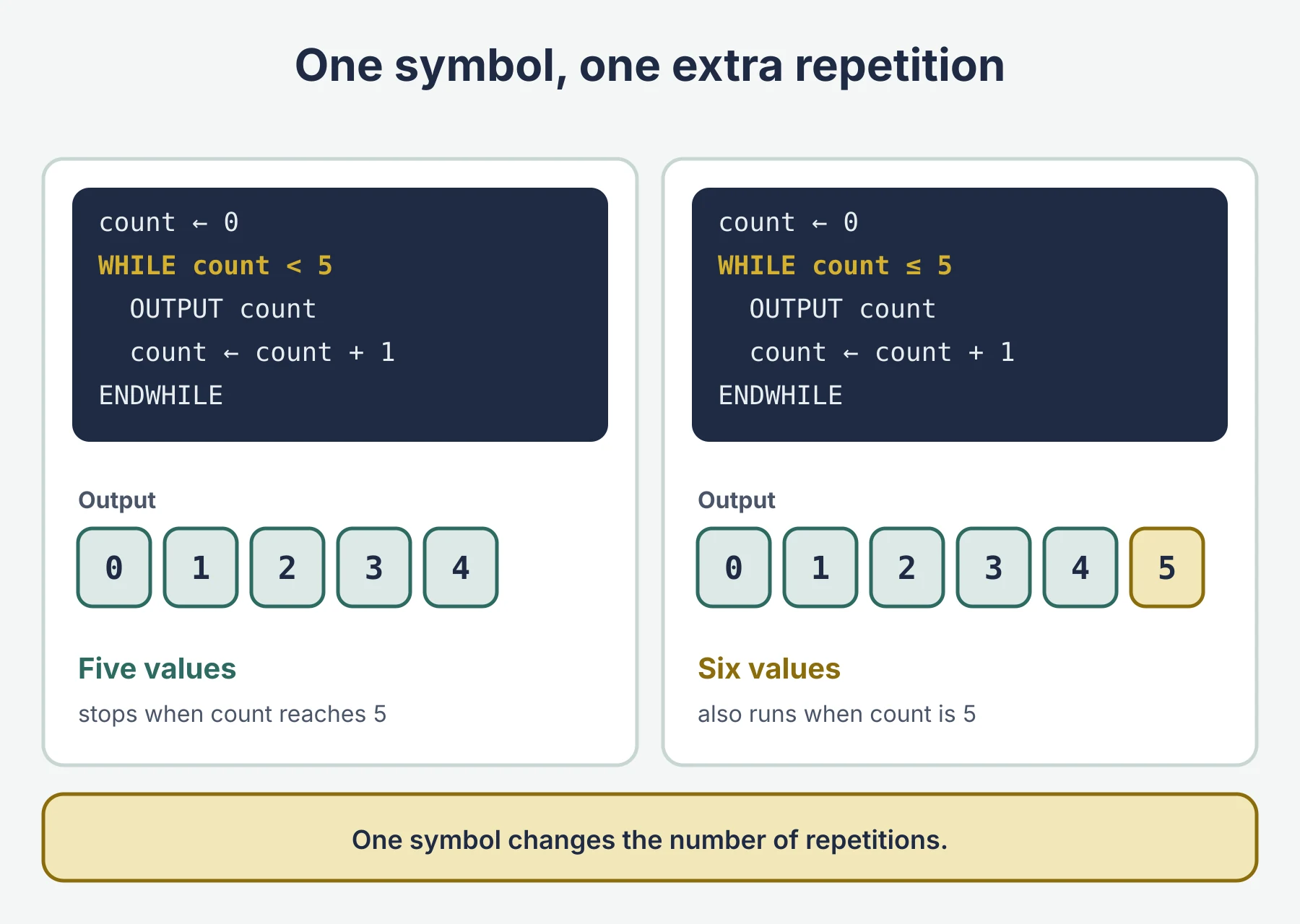
Loop counts depend on the operator
| Loop | Values of i used |
Passes |
|---|---|---|
i ← 0, WHILE i < 5, i ← i + 1 |
0 to 4 | 5 |
i ← 0, WHILE i ≤ 5, i ← i + 1 |
0 to 5 | 6 |
i ← 1, WHILE i < 5, i ← i + 1 |
1 to 4 | 4 |
i ← 10, WHILE i > 0, i ← i - 2 |
10, 8, 6, 4, 2 | 5 |
Selection chains
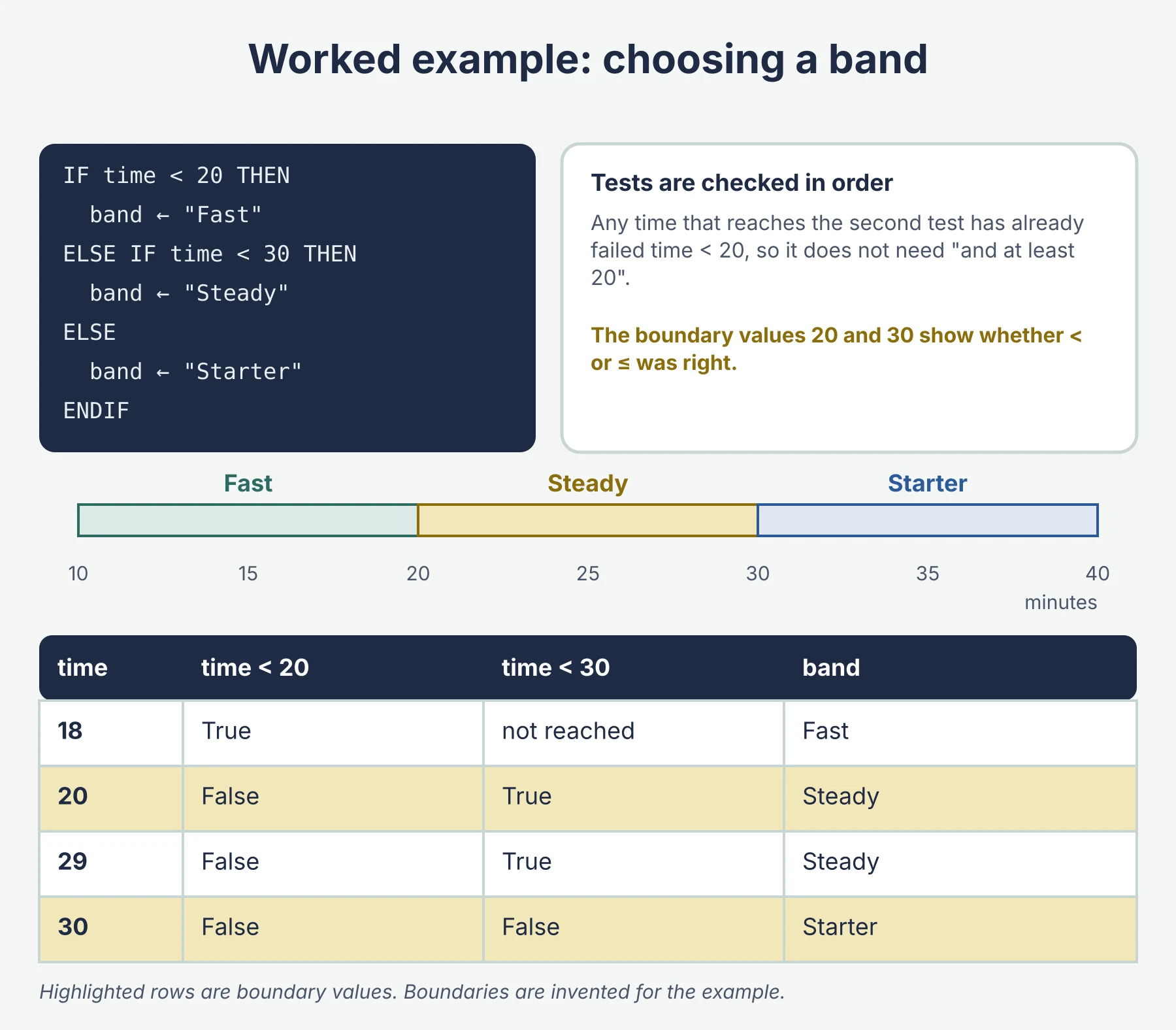
In IF ... ELSE IF ... ELSE chains, tests are checked in order and the first True one wins. Later tests can
assume earlier ones were False, so ELSE IF score ≥ 40 after IF score ≥ 70 means “40 to 69”.
Strings
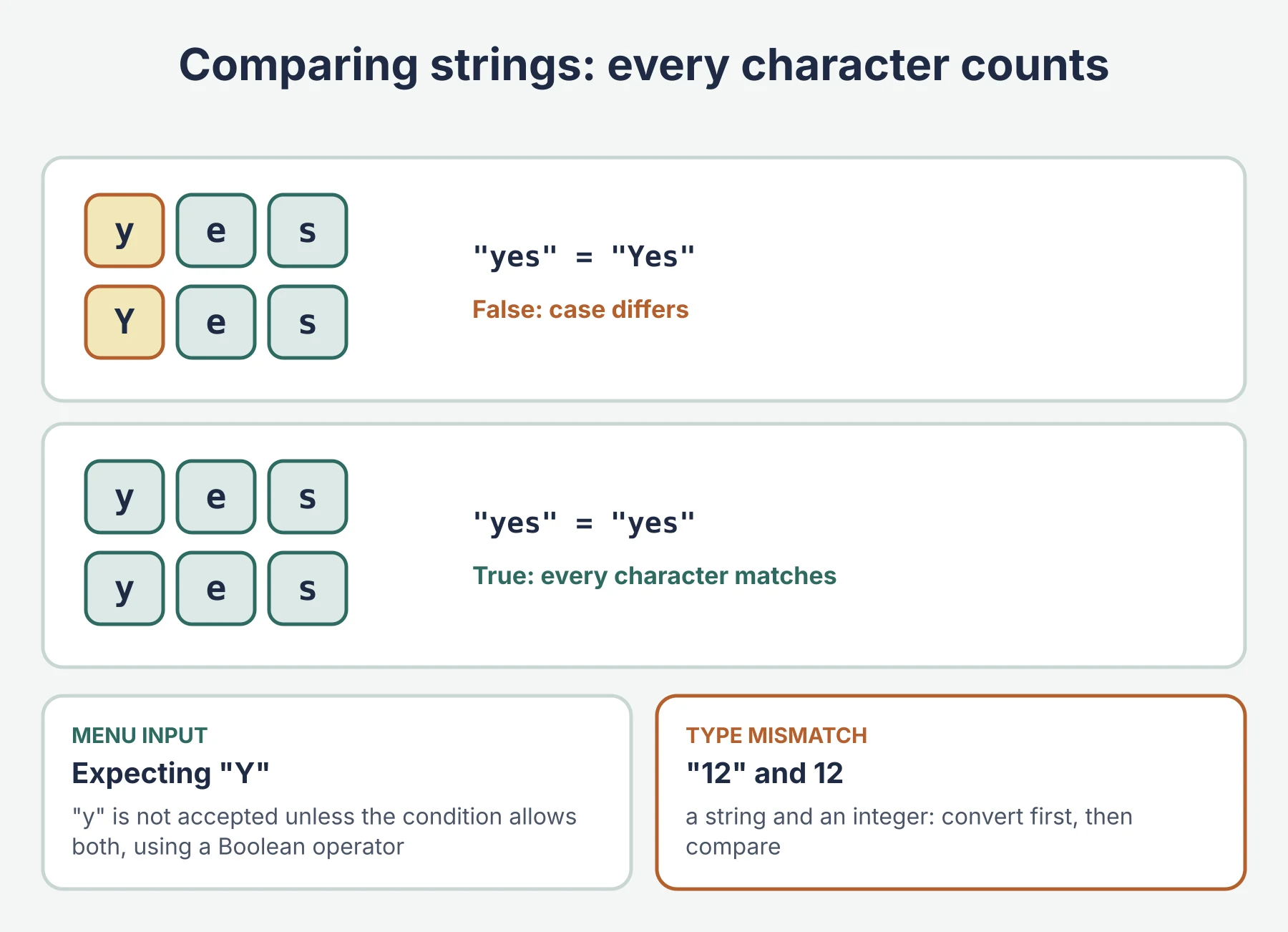
=and≠compare strings character by character; case matters ("Paris" ≠ "paris").- Compare like with like: convert
"25"to an integer before comparing it with25.
Worked mini-trace
lowest ← 100
FOR i ← 1 TO 4
  reading ← USERINPUT
  IF reading < lowest THEN
    lowest ← reading
  ENDIF
ENDFOR
With inputs 60, 75, 60, 42, lowest becomes 60, stays 60, stays 60 (because 60 < 60 is False) and then becomes
42. Using ≤ would give the same final answer here, but it would replace the stored value on a tie, which matters
when the program also records which reading was lowest.
Key terms
| Term | Meaning |
|---|---|
| Relational operator | An operator that compares two values and returns True or False |
| Condition | An expression that evaluates to True or False, used to control selection or iteration |
| Boundary value | A value at the edge of a range, where the choice of < or ≤ matters |
| Inclusive | Including the boundary value (≤, ≥) |
| Exclusive | Excluding the boundary value (<, >) |
Exam traps
- “At least 18” is
≥ 18, not> 18. - Opposite of
>is≤, not<. 1 ≤ x ≤ 10is maths notation; in code usex ≥ 1 AND x ≤ 10.- Off-by-one loops: count the passes, do not guess.
- Writing
=>or=<: use≥/≤(or>=/<=). - Comparing strings without allowing for upper and lower case.
- Assuming a later
ELSE IFis tested when an earlier condition was True.
Self-test
- State the result of
12 ≥ 12. - State the result of
"Cat" = "cat". - Write a condition for “the speed is over 70”.
- Write a condition for “the temperature is no more than 5”.
- Give the opposite of
stock < 20. - Rewrite
WHILE attempts ≠ 3as anUNTILcondition that stops at the same point. - How many times does the body run?
i ← 2,WHILE i ≤ 8,i ← i + 2. - Write the Python and Visual Basic symbols for “not equal to”.
- Explain why
IF mark > 50is wrong for “a pass is 50 or more”. - Write a condition that is true when
ageis from 13 to 19 inclusive. - In
IF t ≥ 30 THEN ... ELSE IF t ≥ 15 THEN ..., which values oftreach the second branch’s code? - Why does the specification’s pseudocode use
←for assignment?
Answers:
- True.
- False (case differs).
speed > 70.temperature ≤ 5.stock ≥ 20.UNTIL attempts = 3.- 4 times (
i= 2, 4, 6, 8). - Python
!=; Visual Basic<>. - A mark of exactly 50 should pass but
50 > 50is False; usemark ≥ 50. age ≥ 13 AND age ≤ 19.- Values from 15 up to but not including 30 (15 ≤ t < 30).
- So that
=always means “equal to” (comparison) and cannot be confused with storing a value.
More resources on this topic
Related resources
-
Study guides
OxfordAQA IGCSE Computer Science (9210): Robust and secure programming
Study guide to OxfordAQA IGCSE Computer Science 9210 section 3.2.12: validation routines, username and password checks, and justified test data.
Computer Science · OxfordAQA · IGCSE
Read guide -
Practice questions
OxfordAQA IGCSE Computer Science (9210): Robust and secure programming – Practice Questions
Original OxfordAQA IGCSE Computer Science 9210 practice questions with answers on validation routines, authentication and normal, boundary and erroneous data.
Computer Science · OxfordAQA · IGCSE
Try questions -
Revision notes
OxfordAQA IGCSE Computer Science (9210): Robust and secure programming – Revision Notes
Revision notes for OxfordAQA IGCSE Computer Science 9210 section 3.2.12: validation checks, authentication routines, test data types, traps and a self-test.
Computer Science · OxfordAQA · IGCSE
Revise topic
Get free revision emails (optional)
Occasional emails with practice questions, worked explanations and links to free resources for the qualification and subjects you choose. No spam, and you can unsubscribe from any email. The free tools on this site never need an email.