
Study Guides
OxfordAQA IGCSE Computer Science (9210): Data types
Study guide to section 3.2.1 of OxfordAQA IGCSE Computer Science 9210: what a data type is and how to choose integer, real, Boolean, character or string.
- Subject
- Computer Science
- Level
- IGCSE
- Topic
- Topic 2 – Programming
- Author
- Marlbridge Academic Team
- Updated
- Reviewed by
- Harris Khan (what this means)
Aligned to OxfordAQA IGCSE Computer Science (9210), For teaching from September 2017, exams from May/June 2019. Official specification .
Syllabus page (what it covers and how it is assessed): OxfordAQA IGCSE Computer Science.
Syllabus points this page covers
9210
- 3.2.1 Data types
Found an error? Report a correction.
Need help with this topic? Request a free trial class for IGCSE Computer Science (9210).
This guide covers section 3.2.1 Data types of OxfordAQA International GCSE Computer Science (9210). The specification asks you to “understand the concept of a data type” and to “understand and use the following appropriately”: integer, real, Boolean, character and string. It also notes that languages may use other names (for example float for real numbers), but exams use the general names. For the wider picture of Topic 2, see the Programming Fundamentals study guide.
What a data type actually is
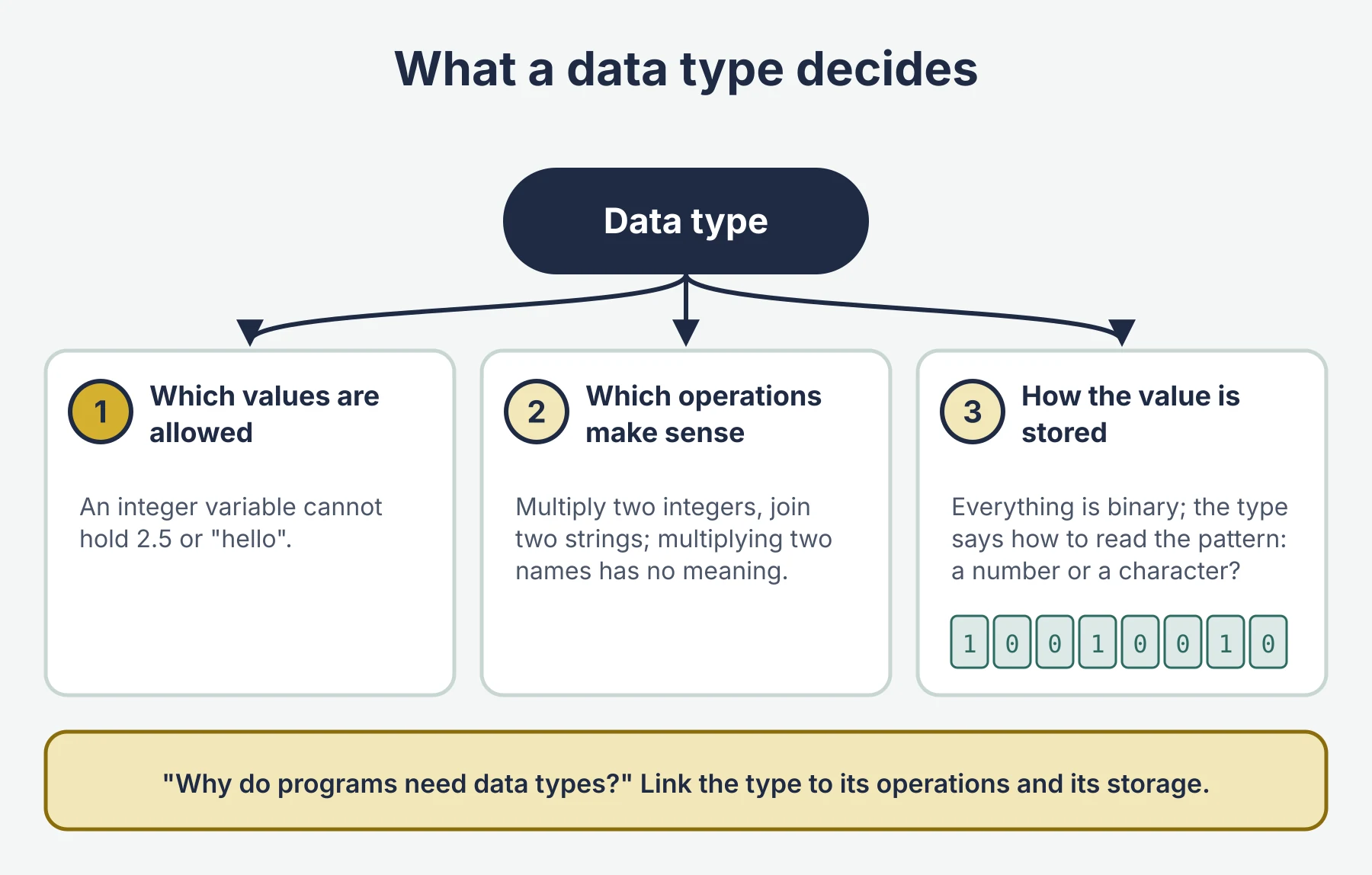
A data type tells the computer what kind of value a variable, constant or field holds. That one decision controls three things:
- Which values are allowed. An integer variable cannot hold 2.5 or “hello”.
- Which operations make sense. You can multiply two integers, but multiplying two names has no meaning. You can join two strings, but joining two Booleans does not.
- How the value is stored. The computer stores every value in binary, and the data type tells it how to interpret that binary pattern. The same bit pattern could mean a number or a character, depending on the type.
So when a question asks “why does a program need data types?”, a complete answer links the type to the operations allowed and to how the value is stored, rather than simply listing the five types.
The five types in detail
Integer
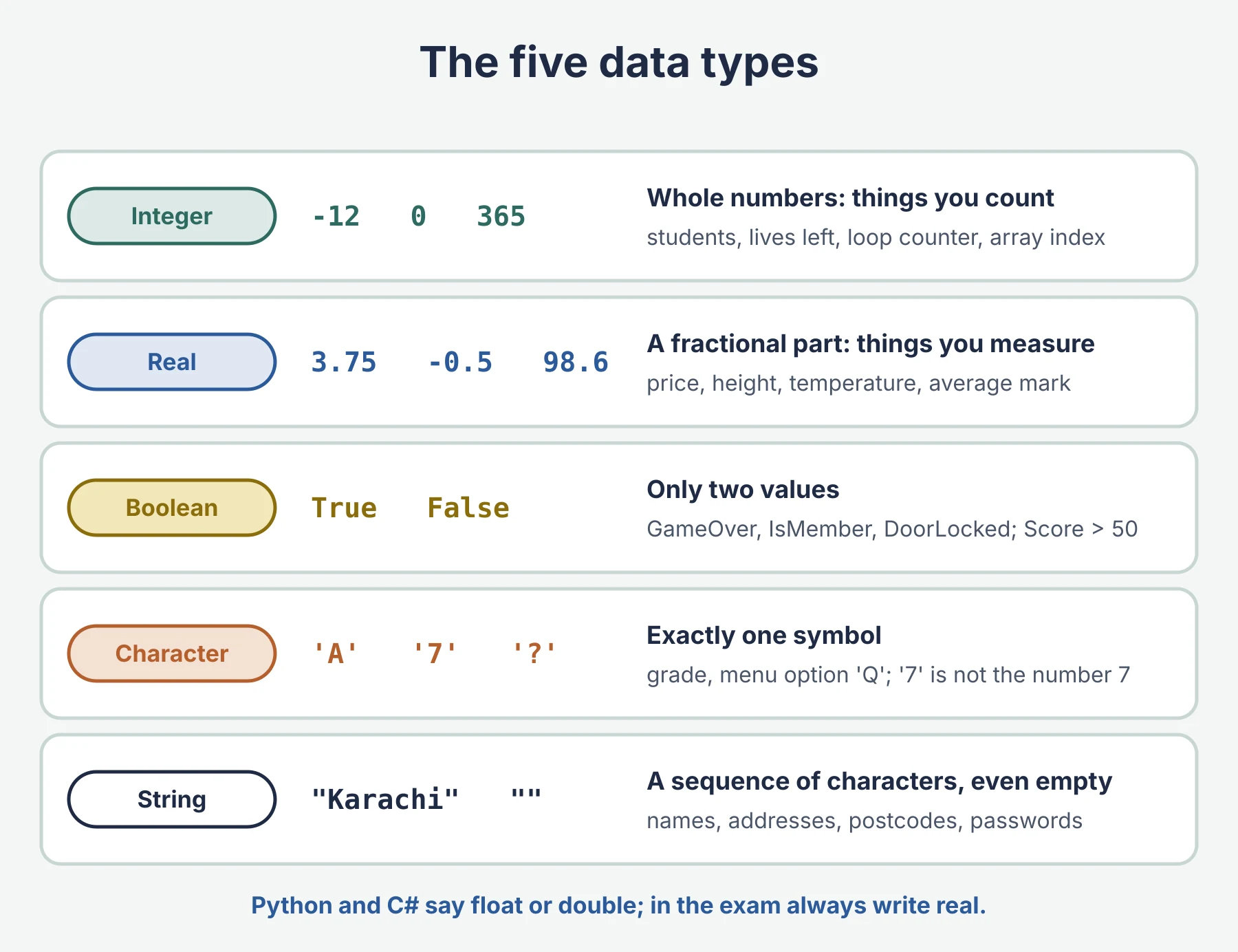
A whole number, positive, negative or zero: -12, 0, 365. Use it for anything you count: number of
students, lives left in a game, goals scored, a loop counter, an array index. If the value can never sensibly
have a fractional part, integer is the right choice.
Real
A number that can have a fractional part: 3.75, -0.5, 98.6. Use it for anything you measure:
price, height, temperature, average mark. Python and C# call it float (or double), and Visual Basic offers
Single and Double, but in the exam you write real. A value such as 4.0 is still a real if the variable
must also be able to hold values like 4.5.
Boolean
Only two possible values: True or False. Use it for a yes/no state: GameOver, IsMember,
DoorLocked. Booleans are what conditions produce, so the result of Score > 50 is itself a Boolean value.
Do not store yes/no data as the strings “Yes” and “No” when a Boolean will do: strings can be misspelt, and a
Boolean can be used directly as a condition, as in WHILE NOT GameOver.
Character
Exactly one symbol: a letter, digit, punctuation mark or space, such as 'A', '7', '?'. Use it for a
single-letter grade, a menu option such as 'Q', or a gender code. A character '7' is not the number 7; it is
the symbol 7, and it has a character code (see the string handling study guide).
String
A sequence of characters, which may be empty or contain many characters: "Karachi", "07700 900123",
"". Use it for names, addresses, postcodes, passwords and any code that contains letters or symbols.
Numbers that should be strings
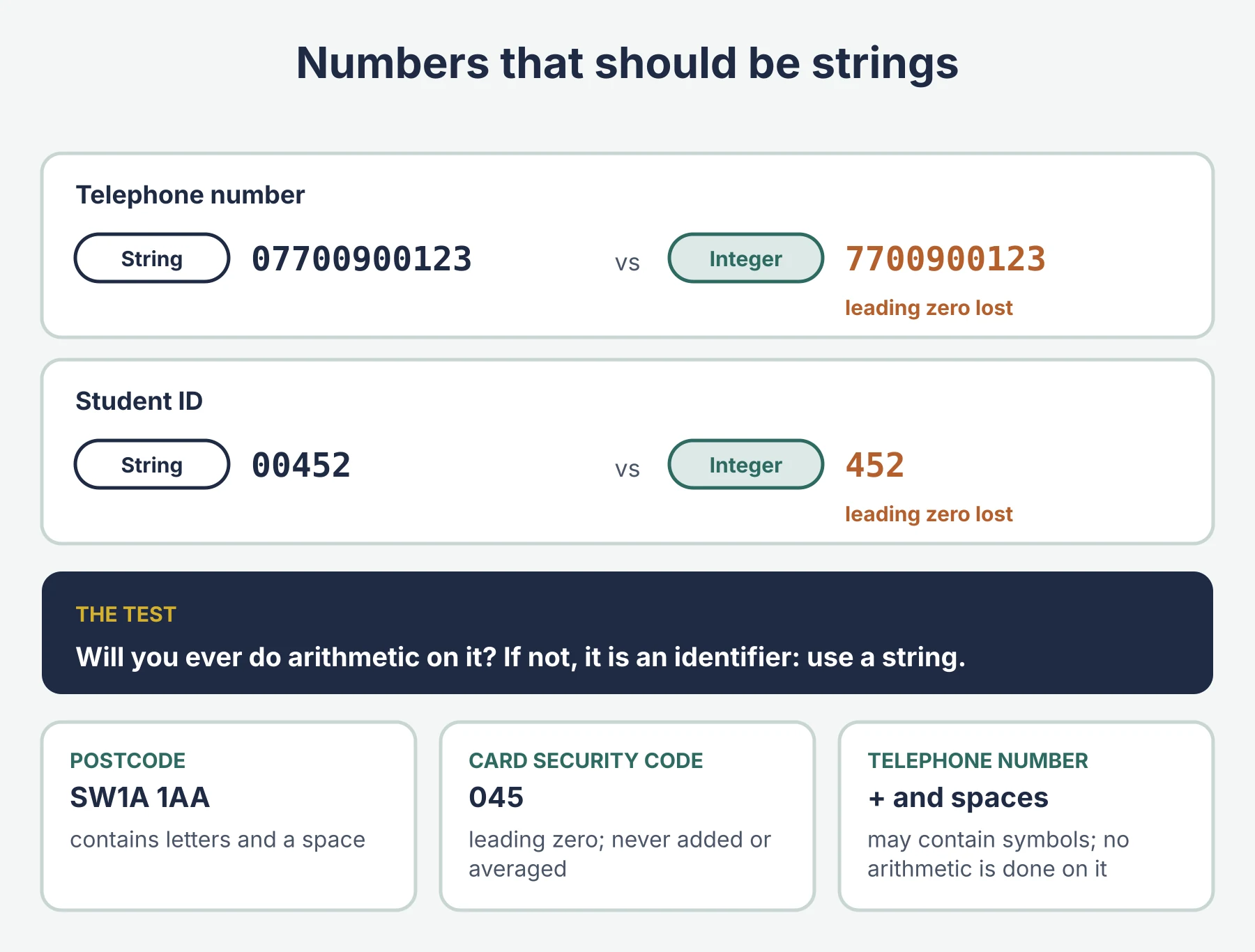
This is the most tested judgement in 3.2.1. Some data looks numeric but must be stored as a string:
| Data | Correct type | Why |
|---|---|---|
Telephone number 07700900123 |
String | Leading zero would be lost as an integer; no arithmetic is done on it; may contain spaces or a + |
Student ID 00452 |
String | Leading zeros matter; it is an identifier, not a quantity |
Postcode SW1A 1AA |
String | Contains letters and a space |
Card security code 045 |
String | Leading zero; never added or averaged |
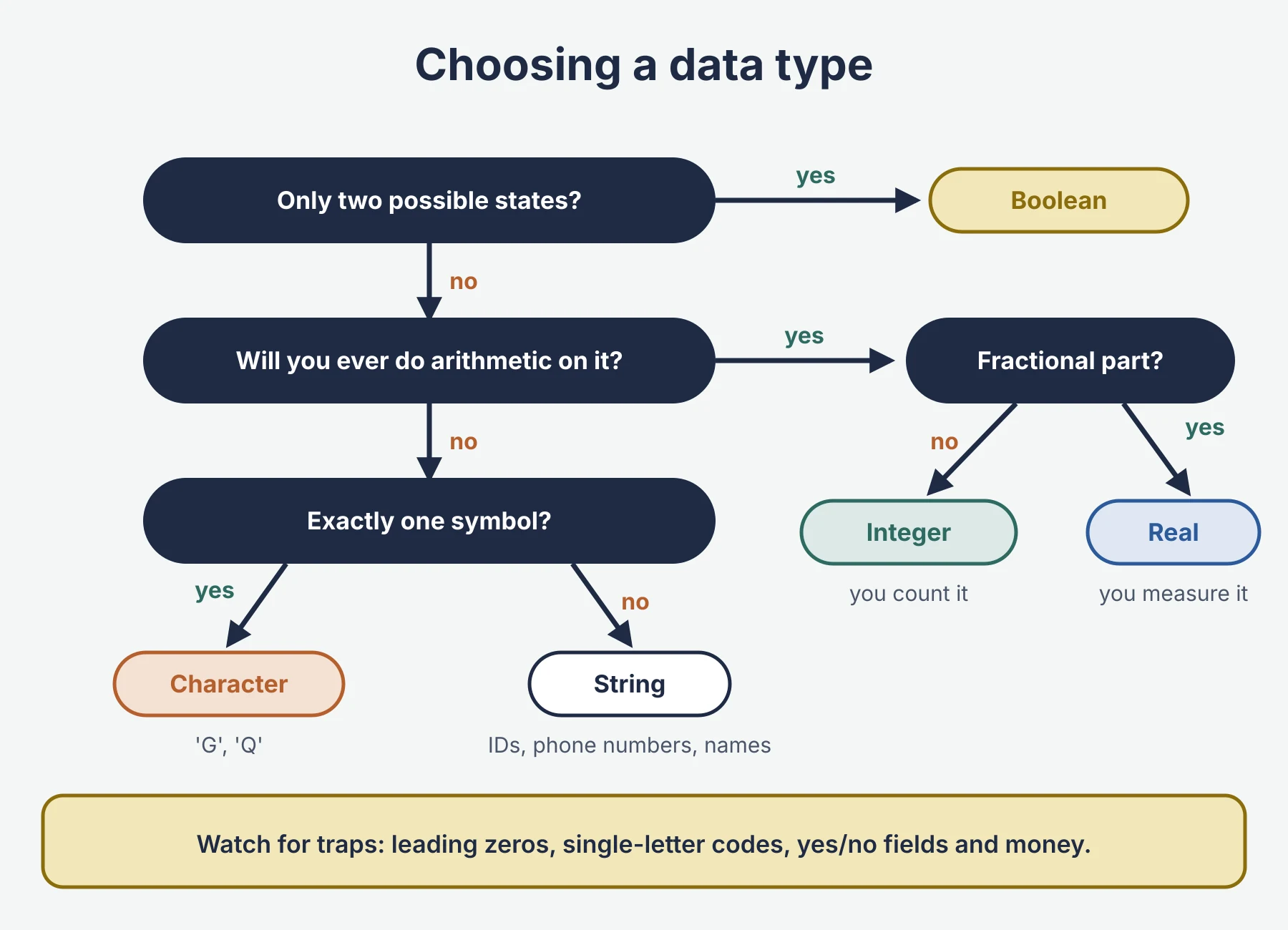
The test is simple: will you ever do arithmetic on it? If adding two of them, or finding their average, is meaningless, it is an identifier and belongs in a string. A good exam answer gives the reason that applies to the specific data, such as “an integer would remove the leading zero”.
Data type and operations together
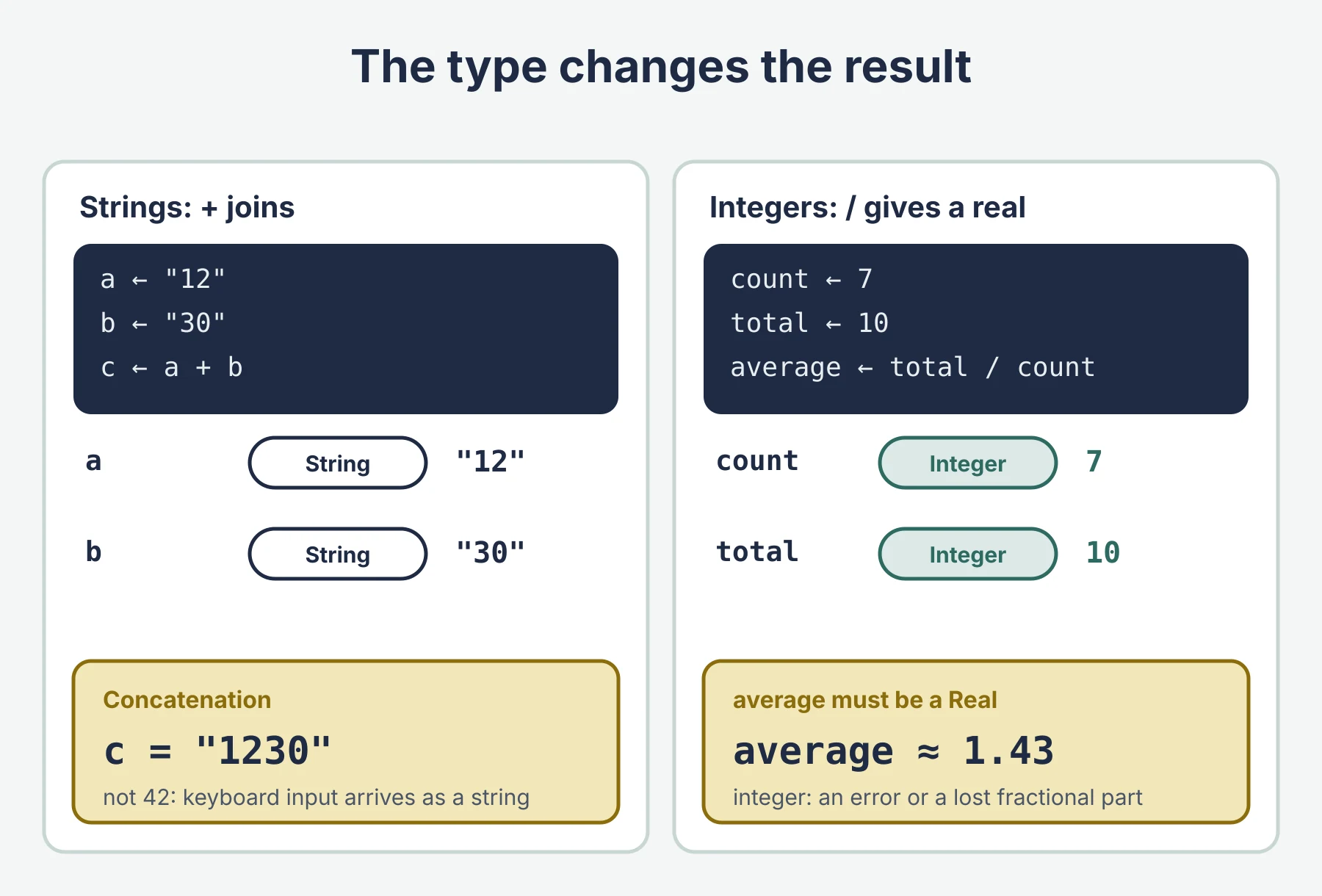
The data type of a value affects what an operation produces. Two short examples show why this matters in the programs you write and trace:
a ← "12"
b ← "30"
c ← a + b
Here a and b are strings, so + means concatenation and c becomes "1230", not 42. Keyboard input
normally arrives as a string, which is why a program converts it before doing arithmetic. Conversion operations
belong to 3.2.8.
count ← 7
total ← 10
average ← total / count
count and total are integers, but average must be a real, because / is real division and the answer
(about 1.43) has a fractional part. Choosing integer for average would either cause an error or lose the
fractional part, depending on the language. The arithmetic operators themselves are covered in the
arithmetic operations study guide.
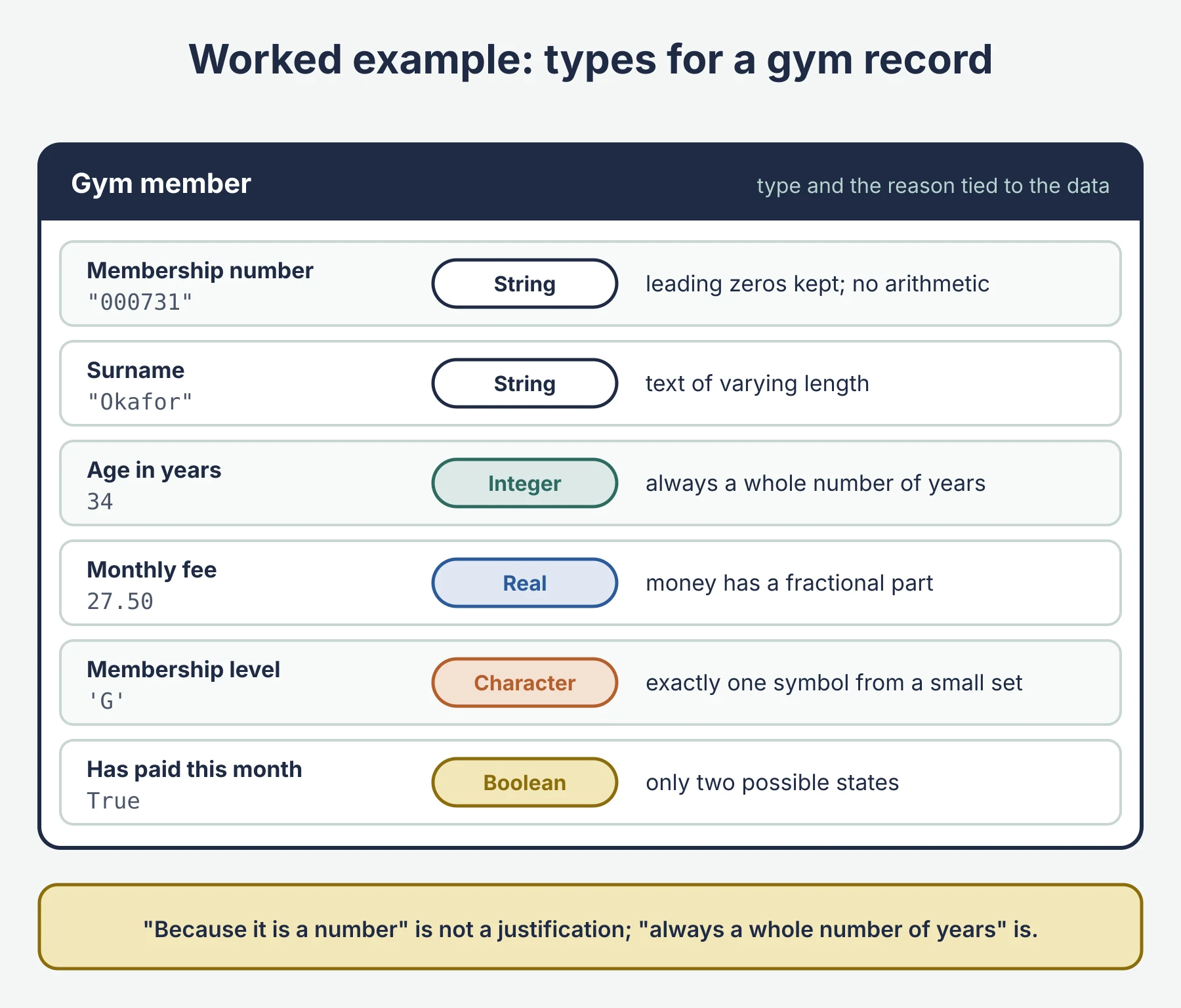
Worked example: choosing types for a record
A gym stores the following about each member. Choose the most appropriate data type for each item and justify it.
| Item | Example | Type | Justification |
|---|---|---|---|
| Membership number | 000731 |
String | Leading zeros must be kept; no arithmetic is done on it |
| Surname | Okafor |
String | Text of varying length |
| Age in years | 34 |
Integer | Whole number of years; may be compared or used in calculations |
| Monthly fee | 27.50 |
Real | Money has a fractional part |
| Membership level | 'G' (gold) |
Character | Exactly one symbol from a small set |
| Has paid this month | True |
Boolean | Only two possible states |
Notice that each justification names a property of that data. “Because it is a number” is not a justification for integer; “because it is always a whole number of years” is.
Annotated model answer
Question: A program stores the number of tickets sold for a concert and the total money taken. Explain why these two values should be stored using different data types. [3]
Model answer: The number of tickets sold should be an integer because tickets are counted and you cannot sell part of a ticket. The money taken should be a real because amounts of money can include a fractional part, such as 1250.75. Using a real for the ticket count would allow impossible values like 3.5 tickets, while using an integer for money would lose the pence or cents.
Why it scores: it names the correct type for each value, gives a reason tied to the data (whole tickets, fractional money), and explains a consequence of choosing wrongly. That final sentence is what separates a full answer from a partial one when the command word is “explain”.
Common mistakes
- Writing “float” or “double” in the exam. The specification says exams use the general name real. Using your language’s name may not be credited.
- Calling a character a string of length one, or vice versa, without care. Some languages have no separate character type, but the specification does: one symbol is a character.
- Storing telephone numbers as integers. This loses leading zeros and allows meaningless arithmetic.
- Choosing real “just in case”. If a value is always whole, such as a number of people, integer is the appropriate type; a real would allow impossible values.
- Forgetting that
"5"and5are different. One is a string (or character), the other an integer, and operations on them behave differently. - Giving a type with no justification when the question says “justify” or “explain”.
Exam technique
- State or identify: give the type name only, using the specification’s names.
- Justify or explain: give the type and a reason tied to the data in the question; for two marks, add the consequence of choosing a different type.
- Describe what a data type is: say it defines the kind of value held, the operations allowed and how the value is stored.
- When a table asks for a type for each field, look for the traps: identifiers with leading zeros, single-letter codes, yes/no fields and money.
Condensed recall and a self-test are in the data types revision notes, and you can try original exam-style questions in the data types practice questions. Data types appear again in records, where each field has its own type: see the data structures study guide.
Related resources
-
Practice questions
OxfordAQA IGCSE Computer Science (9210): Data types – Practice Questions
Original practice questions with mark-scheme answers on OxfordAQA IGCSE Computer Science 9210 data types: choosing and justifying integer, real and string.
Computer Science · OxfordAQA · IGCSE
Try questions -
Revision notes
OxfordAQA IGCSE Computer Science (9210): Data types – Revision Notes
Revision notes on OxfordAQA IGCSE Computer Science 9210 section 3.2.1: the five data types, choosing them for real data, key terms, exam traps and a self-test.
Computer Science · OxfordAQA · IGCSE
Revise topic -
Study guides
OxfordAQA IGCSE Computer Science (9210): Input/output and file handling
Study guide to OxfordAQA IGCSE Computer Science 9210 section 3.2.7: keyboard input, screen output, and reading from and writing to text files step by step.
Computer Science · OxfordAQA · IGCSE
Read guide
Get free revision emails (optional)
Occasional emails with practice questions, worked explanations and links to free resources for the qualification and subjects you choose. No spam, and you can unsubscribe from any email. The free tools on this site never need an email.